

The best processes ready for automation are frequent, repetitive, rules-based, digitally executed, measurable, and costly to perform manually. Start by mapping the current workflow, identifying bottlenecks and exceptions, evaluating business impact and implementation effort, then score candidates based on value, feasibility, risk, and readiness.
TL;DR
- Do not start with the automation tool. Start with the process.
- Look for workflows that are frequent, repetitive, rules-based, measurable, and digitally executed.
- Map the process as it actually operates, including handoffs, systems, approvals, exceptions, and rework.
- Separate automation opportunities from process problems that should be redesigned first.
- Score candidates using business impact, automation feasibility, risk, complexity, and readiness.
- Not every process should be fully automated. Some are better suited to AI assistance or human-in-the-loop automation.
- Start with a small, measurable workflow before scaling automation across departments.
- The best enterprise automation candidates are not necessarily the most repetitive tasks; they are the processes where automation can materially improve an important business outcome.
Introduction
Most enterprises do not have a shortage of potential automation opportunities. They have a prioritization problem.
Teams may already know about repetitive spreadsheet work, manual approvals, email-driven requests, data entry, reconciliation, document processing, and system-to-system handoffs. The difficult question is deciding which processes are actually ready for automation—and which should be redesigned, assisted by AI, or left human-led.
A process can be repetitive and still be a poor automation candidate if its rules are unclear, ownership is fragmented, data is unreliable, exceptions dominate the workflow, or the cost of implementation exceeds its business value.
The goal, therefore, is not to automate everything.
The goal is to identify the right processes to automate first.
Read our blog on How AI Workflow Automation Is Transforming Enterprises in 2026
What Makes a Process Ready for Automation?
A process is generally ready for automation when it has a stable trigger, clearly defined inputs and outputs, repeatable steps, predictable business rules, measurable outcomes, and manageable exceptions. The strongest candidates also generate enough volume, cost, delay, or error to justify the investment in automation.
A useful first-pass test is:
Frequency + Repeatability + Rules + Digital Data + Measurable Impact + Manageable Risk = Automation Readiness
Strong automation signals
Look for processes that:
- Happen frequently
- Follow a repeatable sequence
- Require repetitive manual effort
- Depend on clear business rules
- Involve copying or moving data between systems
- Generate frequent errors or rework
- Create operational delays
- Require multiple handoffs
- Depend heavily on spreadsheets, email, or shared folders
- Have measurable inputs and outputs
- Have clearly defined ownership
- Can be reviewed or reversed when something goes wrong
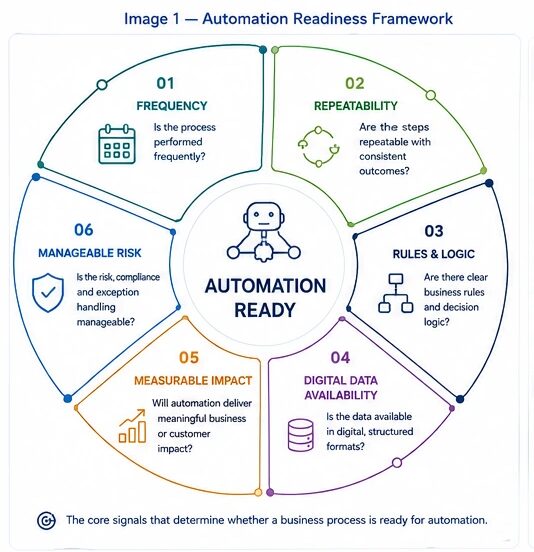
These characteristics closely align with current automation-readiness guidance, which emphasizes repetition, rules, volume, bottlenecks, system handoffs, and measurable business outcomes.
Explore in our webinar on AI Copilots & The Decision Intelligence Gap where experts discuss on how more data often leads to slower decisions.
Step 1: Build an Inventory of Business Processes
Before selecting an automation candidate, create visibility into the processes your teams actually perform.
Before selecting an automation technology, organizations should understand how people, applications, and systems interact across the end-to-end process. IBM’s business process automation guidance similarly emphasizes orchestrating people, applications, and systems while using process insights to identify inefficiencies and improve operational performance.
Do not rely only on formal SOPs. Enterprise processes often evolve through spreadsheets, email instructions, manual workarounds, approvals, and undocumented tribal knowledge.
Start by listing processes across:
| Function | Example Processes |
|---|---|
| Finance | Invoice processing, reconciliation, reporting |
| HR | Employee onboarding, document collection, access requests |
| Sales | Lead routing, CRM updates, follow-ups |
| Customer Service | Ticket classification, routing, escalation |
| Operations | Order processing, dispatch, status updates |
| Procurement | Purchase requests, approvals, vendor onboarding |
| IT | Access provisioning, incident routing, account management |
| Compliance | Evidence collection, validation, reporting |
What to capture
For each process, document:
- Process name
- Trigger
- Owner
- Inputs
- Systems involved
- Main steps
- Decision points
- Approvals
- Exceptions
- Output
- Frequency
- Processing time
- Error/rework rate
- Business impact
This converts a vague automation wish list into an automation opportunity inventory.
Step 2: Map the Process as It Actually Happens
Do not automate the process described in the policy document if that is not how employees execute it.
Map the real workflow.
For each step, identify:
- Who performs the action?
- Which application is used?
- What information is required?
- Where does that information come from?
- What decision is made?
- What happens next?
- What happens when something goes wrong?
- Where does the work wait?
- Where is data manually copied?
- Where does rework occur?
A simple process map might look like:
Trigger → Data Capture → Validation → Decision → Approval → System Update → Notification → Completion
Then add exception paths:
Exception → Human Review → Resolution → Resume / Escalate
Why this matters
Automation amplifies the process it is given.
If the underlying workflow is fragmented, ambiguous, or inefficient, automation can simply make the bad process execute faster.
Current business-process automation guidance similarly recommends mapping the real process, identifying handoffs and bottlenecks, and understanding operational signals before automation.
Step 3: Separate Tasks From the Actual Process
One of the most important distinctions is between task automation and process automation.
| Level | What It Means | Example |
| Task automation | Automates one activity | Send confirmation email |
| Workflow automation | Connects multiple tasks | Lead received → qualify → route → create CRM task |
| Process automation | Automates an end-to-end business process | Order-to-cash |
A five-minute repetitive task may be easy to automate but have little strategic value.
A multi-step process spanning Finance, Sales, Operations, and IT may offer far greater value if automation removes delays and manual handoffs.
Therefore, evaluate the business process, not just the most annoying individual task.
Step 4: Identify the Automation Signals
Once the workflow is mapped, look for specific signals indicating automation potential.
1. High frequency
The more frequently a process occurs, the greater the potential cumulative benefit.
A 10-minute activity performed 500 times per month can represent more automation value than a three-hour task performed twice a year.
2. High repetition
Processes with predictable sequences are generally easier to automate.
Examples:
- Data entry
- Record updates
- Standard notifications
- Report generation
- Routine approvals
- Scheduled reconciliations
3. Clear business rules
Automation works best when decisions can be expressed consistently.
For example:
If invoice amount < approval threshold → route to standard approval.
The more frequently employees ask, “What should I do in this situation?”, the more likely the process needs rule clarification before automation.
4. Multiple system handoffs
Look for:
Email → Spreadsheet → CRM → ERP → Email
Every manual handoff can introduce:
- Delay
- Data duplication
- Errors
- Lost context
- Visibility gaps
These workflows are often strong automation candidates.
5. Rework
Repeated corrections are a valuable automation signal.
Ask:
- How often is the same data entered twice?
- How often are records corrected?
- How often are requests returned because information is missing?
- Where does work loop backward?
6. SLA or processing delays
A process that regularly misses deadlines may be a stronger candidate than one that simply consumes employee time.
7. Measurable outcomes
Automation should improve something measurable:
- Processing time
- Cost per transaction
- Error rate
- SLA compliance
- Throughput
- Customer response time
- Employee capacity
- Revenue leakage
Read our blog on Enterprise AI Strategy in 2026
Step 5: Determine Whether the Process Is Actually Automation-Ready
Not every automation opportunity is ready to automate.
Use this Automation Readiness Scorecard.
| Criterion | 1 Point | 3 Points | 5 Points |
| Frequency | Rare | Weekly | Daily/high volume |
| Repeatability | Highly variable | Mostly repeatable | Highly consistent |
| Rules | Unclear | Partially defined | Clearly defined |
| Data | Fragmented | Partially accessible | Structured/trusted |
| Systems | Complex | Several systems | Well-integrated/accessibile |
| Exceptions | Frequent | Moderate | Manageable |
| Ownership | Unclear | Shared | Clearly owned |
| Business impact | Low | Moderate | High |
| Measurement | Difficult | Some metrics | Clear KPIs |
| Risk | High | Moderate | Low/manageable |
Score interpretation
| Score | Recommendation |
| 40–50 | Strong automation candidate |
| 30–39 | Good candidate; validate feasibility |
| 20–29 | Redesign or clarify before automating |
| <20 | Keep human-led or investigate a different solution |
Important: The score is a prioritization mechanism, not an automatic approval.
A high-scoring process may still require additional controls if it involves sensitive data, financial commitments, employment decisions, regulatory obligations, or customer-impacting decisions.
Step 6: Prioritize Impact Versus Feasibility
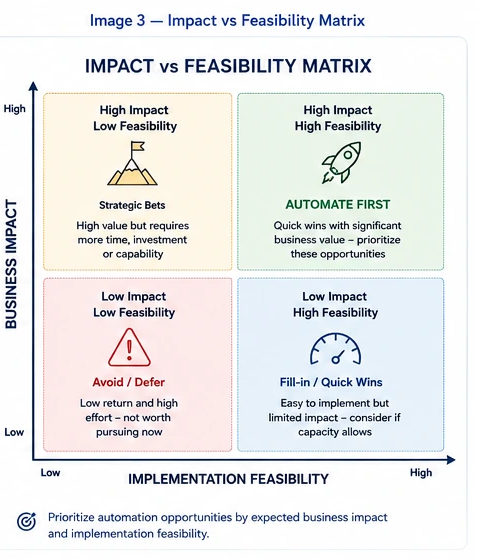
After scoring individual processes, place them on an Impact–Feasibility Matrix.
| High Feasibility | Low Feasibility | |
| High Impact | Automate first | Strategic automation project |
| Low Impact | Quick wins | Deprioritize |
High-impact, high-feasibility
These are your best initial candidates.
Examples:
- Invoice processing
- Data synchronization
- Lead routing
- Standard employee onboarding tasks
- Customer ticket routing
- Automated reporting
High-impact, low-feasibility
These may justify larger transformation programs but require:
- Integration work
- Data modernization
- Process redesign
- Governance
- Change management
Low-impact, high-feasibility
These can provide quick wins but should not consume disproportionate engineering capacity.
Low-impact, low-feasibility
Usually leave them alone.
Step 7: Decide Whether to Automate, Assist, Redesign, or Keep Human-Led
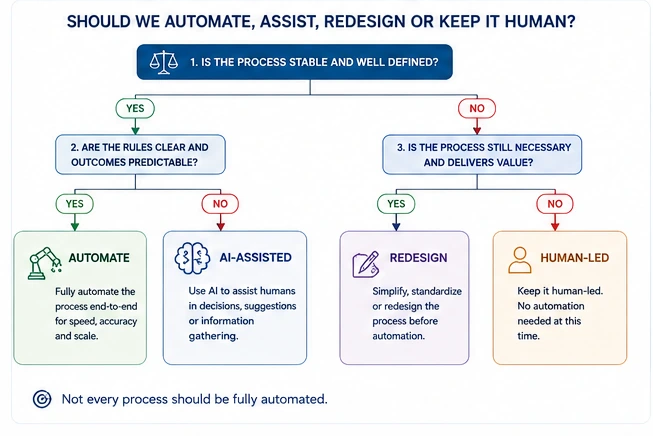
One of the biggest improvements to conventional automation assessment is to avoid a simple automate / don’t automate decision. For workflows involving AI, automation readiness should also account for risk, trustworthiness, and human oversight. NIST’s AI Risk Management Framework provides a lifecycle-oriented approach built around Govern, Map, Measure, and Manage, helping organizations evaluate and manage AI risks throughout design, deployment, and use.
Use four lanes instead.
| Decision | When to Use It | Example |
| Automate | Stable, repeatable, low-risk | CRM updates |
| AI-Assisted | Requires interpretation but needs review | Email classification |
| Redesign First | Process is inefficient or inconsistent | Manual multi-level approvals |
| Human-Led | Judgment, accountability, or empathy dominates | Complex negotiations |
Automate
Use deterministic workflow automation, APIs, RPA, or rules engines when the process is predictable.
AI-Assisted
Use AI where the workflow contains tasks such as:
- Classification
- Summarization
- Document extraction
- Natural-language interpretation
- Draft generation
- Exception identification
Human review can remain at the decision boundary.
Redesign First
If teams cannot agree on:
- The process owner
- The source of truth
- Approval rules
- Exception handling
- Definition of completion
then the process is usually not ready for automation.
Keep Human-Led
Processes involving significant judgment, negotiation, empathy, accountability, or ambiguous decisions may benefit from automation around the edges rather than complete automation.
Step 8: Choose the Right Automation Technology
Once the process is validated, select technology based on the process—not the other way around.
| Process Requirement | Potential Technology |
| Structured, rule-based task | Workflow automation |
| System-to-system integration | APIs |
| Legacy application without APIs | RPA |
| Document extraction | OCR / Document AI |
| Classification | AI / ML |
| Natural-language understanding | LLM / AI |
| Multi-step orchestration | Workflow engine / orchestration |
| Complex autonomous execution | AI agents with controls |
| Human approval required | Human-in-the-loop workflow |
The key principle
AI should not be introduced simply because a process can use AI.
If a deterministic API can reliably perform the task, an AI agent may add unnecessary complexity.
Use AI where interpretation or contextual reasoning is actually part of the work.
Read our blog on Top AI Workflow Orchestration Tools in 2026 for Enterprise Scale
Step 9: Validate the Business Case
Before building the automation, establish a baseline.
Measure:
- Transactions per month
- Average processing time
- Employee hours
- Error rate
- Rework
- SLA breaches
- Cost per transaction
- Customer impact
- Revenue impact
- Current technology costs
Simple automation ROI model
Annual Benefit = Labor Savings + Error Reduction + Delay Reduction + Capacity/Revenue Impact
Then:
ROI = (Annual Benefit − Automation Cost) / Automation Cost × 100
Automation cost should include:
- Development
- Integration
- AI/model usage
- Licensing
- Infrastructure
- Testing
- Security
- Monitoring
- Maintenance
- Change management
A process should not be automated merely because it is technically possible. The expected business value must justify the implementation and operating cost.
Step 10: Start With a Controlled Pilot
The first automation should be narrow enough to test but meaningful enough to measure.
A practical enterprise pilot should define:
Scope
One process, business unit, or workflow segment.
Baseline
Current processing time, errors, cost, and volume.
Success criteria
Specific measurable targets.
Human oversight
Who reviews exceptions or high-risk outcomes?
Failure path
What happens when the automation cannot complete the workflow?
Monitoring
What metrics indicate that the automation is performing correctly?
Rollback
How can the organization safely return to manual processing?
This creates a controlled path from proof of value → production → scale.
Common Business Processes Ready for Automation
The following categories frequently contain strong candidates:
| Function | Automation Opportunities |
| Finance | Invoice processing, reconciliation, reporting |
| HR | Onboarding, document collection, employee updates |
| Sales | Lead routing, CRM updates, follow-ups |
| Customer Service | Ticket classification, routing, notifications |
| Procurement | Purchase requests, approval routing, vendor onboarding |
| Operations | Order processing, status updates, dispatch |
| IT | Access requests, ticket routing, provisioning |
| Compliance | Evidence collection, validation, reporting |
The suitability of each workflow depends on its volume, rules, data quality, risk, exceptions, and integration requirements.
Processes You Should Not Automate First
Avoid making automation a goal in itself.
Processes may be poor candidates when they:
- Occur too infrequently
- Have constantly changing rules
- Depend heavily on subjective judgment
- Have unclear ownership
- Have unreliable data
- Contain too many exceptions
- Are already being redesigned
- Have minimal business impact
- Require complex integrations for little return
- Carry unacceptable risk without effective human oversight
A particularly important rule is:
Do not automate a process simply because it is repetitive. Automate it when repetition creates measurable business value and the process is stable enough to control.
Enterprise Automation Candidate Framework
For enterprise teams, the process-selection sequence can be simplified into seven questions:
1. Does the process matter?
If the business impact is negligible, stop.
2. Does it repeat?
If the workflow rarely occurs, automation economics may not work.
3. Is the normal path stable?
If every case is different, consider AI assistance rather than deterministic automation.
4. Is the required data available?
If information is fragmented or unreliable, fix the data foundation first.
5. Are the rules understood?
If employees cannot explain how decisions are made, document the rules before automating them.
6. Can exceptions be controlled?
Define when automation stops and a human takes over.
7. Can success be measured?
If there is no baseline or KPI, proving automation value becomes difficult.
The Automation Readiness Formula
A practical enterprise prioritization model is:
Automation Priority = Business Impact × Process Readiness × Feasibility ÷ Risk
Where:
- Business Impact = cost, time, revenue, customer, or employee value
- Process Readiness = stability, rules, ownership, data quality
- Feasibility = integration, technology, complexity, resources
- Risk = operational, security, compliance, financial, and customer risk
This produces a better prioritization model than simply asking:
“Can we automate this?”
The more useful question is:
“Should we automate this now, and what is the safest path to measurable value?”
Key Takeaways
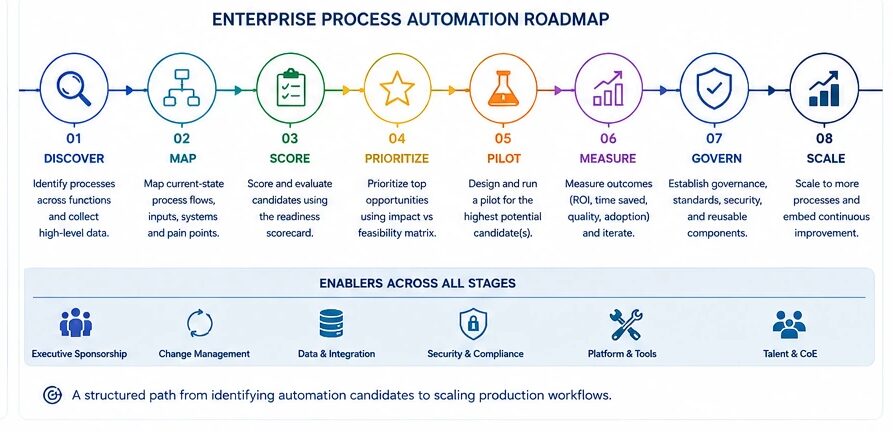
- Start with process discovery, not technology selection.
- Map the process as employees actually execute it.
- Identify repetition, volume, bottlenecks, handoffs, errors, and delays.
- Validate data, ownership, business rules, and exception paths.
- Score processes based on value, readiness, feasibility, and risk.
- Separate automation from AI assistance.
- Redesign broken or unclear workflows before automating them.
- Establish baseline KPIs before implementation.
- Start with controlled pilots and measurable outcomes.
- Scale only after the automation is stable, governed, and repeatable.
How Techment Can Help In Identify Processes Ready for Automation
The strongest automation opportunity is rarely the first process someone names. It is the process where business impact, operational readiness, data, technology feasibility, and risk intersect.
Techment can help enterprises assess automation readiness, identify high-value workflows, modernize the underlying systems and data, and design governed AI-powered automation that scales beyond isolated proofs of concept.
FAQs
1. What makes a process ready for automation?
A process is ready for automation when it is frequent, repeatable, rules-based, digitally executed, measurable, clearly owned, and has manageable exceptions. Strong candidates also have meaningful operational impact and sufficient volume to justify implementation.
2. How do I identify processes for automation?
Start by creating a process inventory, mapping workflows, identifying repetitive activities and bottlenecks, measuring business impact, and scoring each candidate for automation readiness, feasibility, risk, and value.
3. Should every repetitive process be automated?
No. Repetition is only one indicator. A process may still require redesign if its rules, ownership, data, or exception handling are unclear.
4. What processes should be automated first?
Prioritize processes that combine high business impact with high automation feasibility. Common examples include invoice processing, data synchronization, lead routing, reporting, employee onboarding, ticket routing, and repetitive approval workflows.
5. When should AI be used instead of traditional automation?
Use AI when the process requires interpretation, classification, summarization, document understanding, natural-language processing, or contextual reasoning. Use deterministic automation when clear rules and structured inputs are sufficient.
6. What is the difference between RPA and AI workflow automation?
RPA generally automates predefined interactions with applications, while AI workflow automation can add capabilities such as document understanding, classification, natural-language processing, reasoning, or adaptive decision support. Many enterprise workflows combine APIs, RPA, AI, and orchestration.
7. How do you prioritize automation opportunities?
Score candidates based on business impact, frequency, process stability, data availability, rules clarity, integration feasibility, exception rate, risk, and expected ROI.
Related Reads
- Agentic AI Use Cases: 7 Enterprise Examples Driving Autonomous Operations
- How AI copilots for enterprises are transforming executive leadership in 2026.
- Enterprise AI Strategy in 2026: A Practical Guide for CIOs and Data Leaders
- Enterprise AI Governance Framework: Complete 2026 Guide for Responsible AI
- How to Build Enterprise AI Copilots: A Complete Guide for Business Leaders (2026)
- The 30-60-90 Day Enterprise AI Readiness Roadmap For Enterprise AI Success
- Human-in-the-Loop Agentic AI: Why Autonomous Doesn’t Mean Uncontrolled