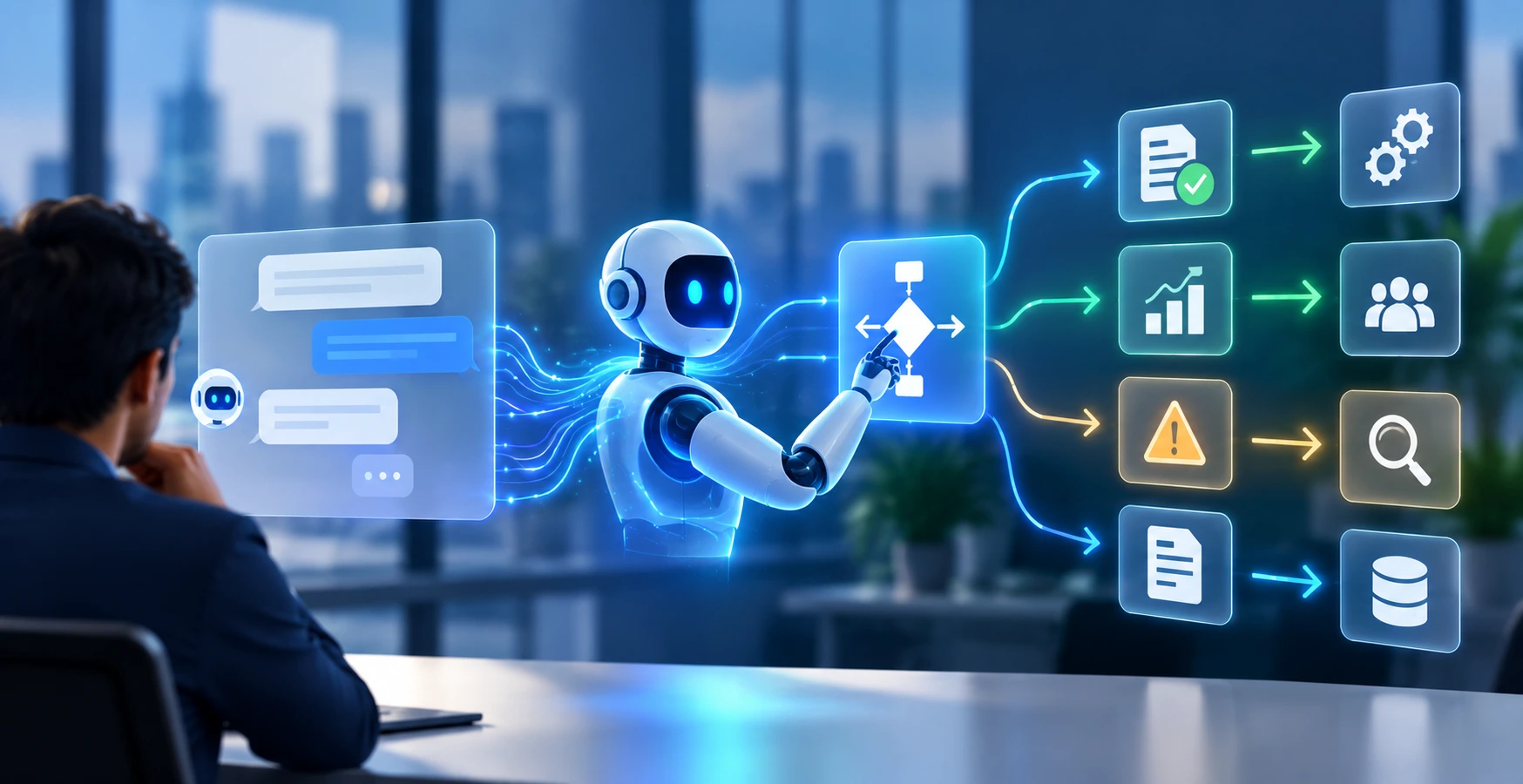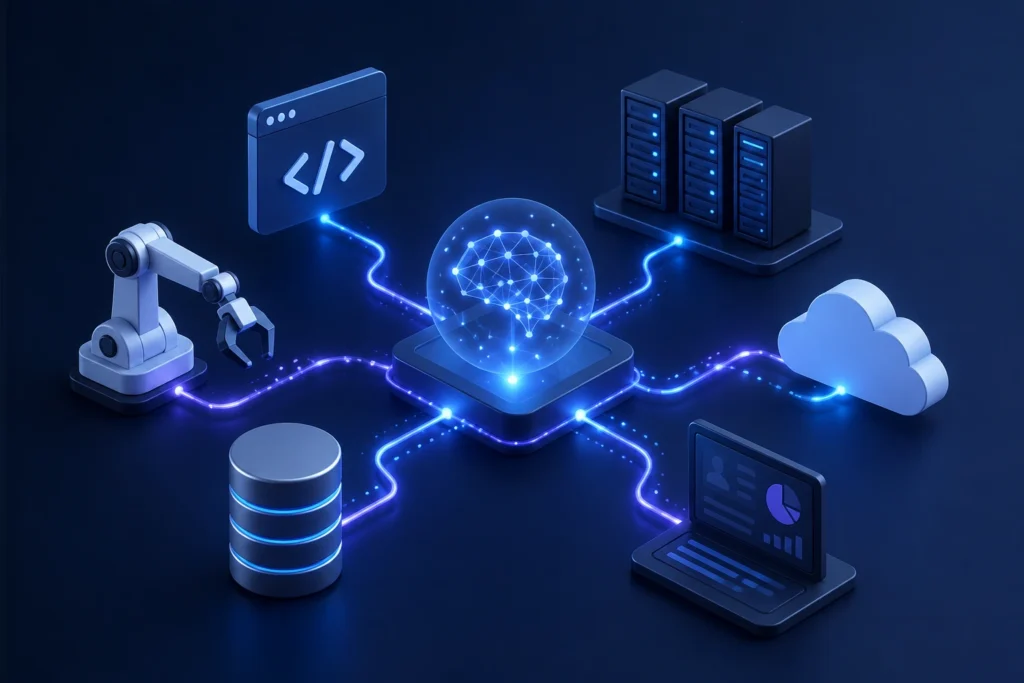
AI Workflow Integration with enterprise systems through APIs, SaaS connectors, databases, RPA, webhooks, events, and increasingly MCP-based tool interfaces. The right architecture separates AI reasoning from system execution, uses APIs where possible, RPA for systems without reliable interfaces, governed database access for data operations, and human approval for high-risk actions.
TL;DR
- AI creates business value when its outputs can retrieve information and trigger controlled actions in enterprise systems.
- Use APIs first when a reliable, supported interface exists.
- Use SaaS connectors for standardized application integrations and faster implementation.
- Use RPA selectively for legacy systems that lack suitable APIs.
- Give AI workflows controlled access to databases through approved services, queries, or tools—not unrestricted database credentials.
- Use webhooks and event-driven patterns when workflows need to react to business events.
- Use MCP where standardized tool/context access improves interoperability between AI systems and enterprise capabilities.
- Separate AI reasoning from deterministic execution.
- Apply identity, least privilege, validation, approval gates, logging, retries, and observability at the workflow level.
- The best enterprise architecture is rarely “AI connected directly to everything.” It is a governed integration layer between AI and systems of record.
What Is AI Workflow Integration?
AI workflow integration is the process of connecting AI models, AI agents, or AI-powered workflow steps to the enterprise applications, APIs, databases, SaaS platforms, and legacy systems required to retrieve data and execute business actions. The objective is to move AI from generating recommendations to completing controlled, measurable business processes.
A typical enterprise AI workflow integration looks like:
Trigger → AI Reasoning → Retrieve Context → Validate → Execute Action → Verify → Log → Escalate
For example:
Customer request → AI classification → CRM lookup → policy validation → ticket update → customer notification → audit log
The AI component handles interpretation where necessary.
The integration layer handles connectivity, permissions, execution, reliability, and control.
That distinction is fundamental to production AI.
Why AI Workflows Need Enterprise System Integration
AI models do not inherently know the current state of a customer’s account, inventory system, ERP, service ticket, employee record, or order database. Enterprise integration gives AI workflows access to the systems where business data lives and enables approved actions to be executed against systems of record.
Without integration, AI can:
- Generate text
- Summarize information
- Recommend actions
- Classify documents
- Answer questions
With integration, it can:
- Retrieve customer information
- Create or update CRM records
- Submit service tickets
- Validate invoices
- Check inventory
- Trigger approvals
- Update ERP transactions
- Send notifications
- Synchronize records
- Execute multi-system workflows
Google Cloud’s current enterprise architecture guidance similarly treats orchestration across disparate enterprise systems as a core pattern for agentic applications, using standardized interfaces between agents and backend systems.
Read our blog on How to Identify Processes Ready for Automation: A Step-by-Step Enterprise Guide
The Enterprise AI Workflow Integration Architecture
A scalable architecture should avoid connecting an AI model directly to every enterprise system.
A stronger pattern is:
Business Event / User Request
↓
AI Workflow / Agent Orchestrator
↓
Context & Decision Layer
↓
Integration / Tool Layer
↓
APIs · SaaS · Databases · RPA · Legacy Systems
↓
Systems of Record
With cross-cutting controls:
Identity · Authorization · Validation · Observability · Audit · Error Handling · Human Approval
Why this separation matters
AI reasoning is probabilistic.
Enterprise transactions should generally be deterministic, permissioned, and auditable.
Therefore:
Let AI decide what needs to happen; let controlled integration services determine how the enterprise system executes it.
This is one of the most important architectural distinctions between an AI demo and a production enterprise workflow.
Google Cloud’s reference architecture for agentic AI shows how an orchestrator can coordinate access to disparate enterprise systems through standardized interfaces, while maintaining identity and access controls. This reinforces the value of separating agent orchestration from backend system implementations.
APIs: The Preferred AI Workflow Integration Pattern
APIs should generally be the first integration option when enterprise applications expose stable, supported interfaces.
APIs are well suited for:
- CRM updates
- ERP transactions
- Customer lookup
- Order management
- Payment status
- Inventory queries
- Employee records
- Service management
- Workflow actions
Example
An AI customer-service workflow could:
- Understand the customer’s request.
- Identify the customer.
- Call the CRM API.
- Retrieve account information.
- Call the order API.
- Determine the order status.
- Draft a response.
- Update the support ticket.
- Escalate if the request exceeds policy.
API integration best practices
Use:
- Strong authentication
- OAuth or managed identity where appropriate
- Short-lived credentials
- Least-privilege permissions
- Input validation
- Schema validation
- Rate limiting
- Idempotency
- Retries with backoff
- Timeouts
- Versioned APIs
- Structured error handling
- Audit logging
An AI agent should not receive unrestricted access simply because an API exists.
The integration should expose only the operations the workflow actually needs.
RPA: When APIs Are Not Available
RPA remains useful when AI workflows need to interact with systems that do not provide suitable APIs.
Typical examples include:
- Legacy desktop applications
- Older ERP interfaces
- Virtual desktop environments
- Mainframe applications
- Applications with inaccessible backends
- Third-party systems with limited integration capabilities
API vs RPA
| Requirement | API | RPA |
|---|---|---|
| Structured system access | Excellent | Good |
| Legacy UI | Limited | Strong |
| Reliability | Generally high | More UI-dependent |
| Maintenance | Usually lower | Can be higher |
| Performance | High | Moderate |
| System changes | API versioning | UI changes can break bots |
| Best use | System-to-system integration | UI-based legacy integration |
The enterprise rule
Use APIs where reliable APIs exist. Use RPA as a controlled bridge where they do not.
Do not introduce RPA simply because it is familiar.
And do not force an API-first architecture when the underlying legacy system genuinely has no viable interface.
Database AI Workflow Integration: Give AI Access Without Giving It the Database
Databases often contain the most valuable enterprise information—but they also represent a significant security and reliability boundary.
AI workflows may need to retrieve:
- Customer records
- Product information
- Inventory
- Financial data
- Operational metrics
- Transaction history
- Knowledge metadata
The safer pattern is to expose approved data access services or tools rather than allowing unrestricted model-generated SQL against production systems.
Recommended pattern
AI Workflow → Data Access Layer → Validated Query / Tool → Database
rather than:
AI Workflow → Direct unrestricted database access
Database integration controls
Use:
- Read/write separation
- Least privilege
- Query validation
- Row/column-level controls where required
- Parameterized queries
- Connection isolation
- Rate limits
- Data masking
- Audit logs
- Transaction boundaries
- Read replicas where appropriate
For high-impact write operations, use a controlled service layer rather than allowing the model to directly manipulate production tables.
SaaS AI Workflow Integration: Connect the Applications Where Work Happens
Enterprise AI workflows frequently span SaaS platforms such as:
- Salesforce
- ServiceNow
- Microsoft 365
- SAP
- Workday
- HubSpot
- Jira
- Slack
- Microsoft Teams
- Zendesk
- NetSuite
The integration layer may use:
- Native connectors
- REST APIs
- Graph APIs
- Webhooks
- Events
- Integration platforms
- Custom services
Example: Lead-to-Opportunity Workflow
Website Lead
↓
AI Lead Classification
↓
CRM API
↓
Lead Enrichment
↓
Sales Routing
↓
Teams/Slack Notification
↓
CRM Task Creation
The important point is that AI is only one step.
The workflow orchestration layer connects the entire business process.
Webhooks and Event-Driven AI Workflows
Not every AI workflow should begin with a user prompt.
Many enterprise workflows should start with an event.
Examples:
- New invoice received
- Customer submits a ticket
- New lead created
- Order status changes
- Contract uploaded
- Employee joins the organization
- Payment fails
- Inventory falls below threshold
An event-driven pattern looks like:
Business Event → Event Bus/Webhook → Workflow → AI Step → Validation → Enterprise Action
This architecture reduces polling, improves responsiveness, and allows AI workflows to operate continuously as part of business operations.
Example
Invoice Uploaded
→ Document AI extracts fields
→ AI classifies invoice
→ ERP API retrieves purchase order
→ Database validates vendor
→ Rules engine performs three-way match
→ Exception routed to Finance
→ Approved invoice posted to ERP
This is more robust than asking an AI assistant to “process invoices.”
Read our blog on How to Calculate AI Workflow Automation ROI: Enterprise Guide.
Where MCP Fits Into Enterprise AI Workflow Integration
Model Context Protocol (MCP) provides a standardized way for AI applications to interact with tools and external context.
In enterprise architectures, MCP can act as a tool-access interface between AI agents and approved capabilities such as:
- Databases
- Internal applications
- APIs
- Search systems
- Business tools
- Enterprise services
Google Cloud’s current architecture guidance describes MCP servers as an abstraction layer that exposes backend capabilities to agents while isolating the agent from the underlying systems.
MCP does not replace APIs
A useful distinction is:
| Technology | Primary Role |
| API | Application-to-application contract |
| RPA | UI-based automation |
| Database | Persistent data storage |
| SaaS connector | Standardized application connectivity |
| Webhook/Event | Event notification |
| MCP | AI-facing tool/context interface |
| Workflow engine | Process orchestration |
MCP can sit above existing APIs and services rather than requiring enterprises to replace them.
APIs vs RPA vs Databases vs SaaS vs MCP
| Integration Method | Best For | Main Strength | Main Risk |
| APIs | Modern applications | Reliable system integration | API changes |
| RPA | Legacy/UI systems | Works without APIs | UI fragility |
| Databases | Structured enterprise data | Fast data access | Security/data integrity |
| SaaS connectors | Standard applications | Faster implementation | Connector limitations |
| Webhooks/events | Event-driven workflows | Real-time triggers | Event reliability |
| MCP | AI tool access | Standardized AI interaction | Tool governance |
| Workflow engine | Multi-step processes | Orchestration/control | Complexity at scale |
The right enterprise architecture often combines several of these rather than selecting one.
Step-by-Step AI Workflow Integration With Enterprise Systems
Step 1: Map the Business Workflow
Identify:
- Trigger
- Inputs
- AI tasks
- Business rules
- Systems touched
- Data sources
- Outputs
- Approvals
- Exceptions
- Audit requirements
Do this before selecting an integration technology.
Step 2: Classify Every System Interaction
For every step, ask:
Does the workflow need to read data, write data, trigger an action, or receive an event?
Then map the appropriate interface.
| Need | Preferred Pattern |
| Read structured data | API / governed data service |
| Write business transaction | API / service |
| Trigger workflow | API / event |
| Receive event | Webhook / event bus |
| Access legacy UI | RPA |
| AI tool access | MCP / tool interface |
| Complex orchestration | Workflow engine |
Step 3: Establish the System of Record
Every critical data element should have a defined source of truth.
For example:
Customer → CRM
Order → ERP
Employee → HRIS
Ticket → Service Management Platform
Financial Transaction → ERP/Finance System
AI should not become an accidental system of record.
It should retrieve, interpret, and act against governed sources of truth.
Step 4: Design the Tool and Permission Boundary
Do not expose entire applications to AI.
Instead, expose narrowly scoped capabilities.
For example, instead of:
salesforce_full_access
provide tools such as:
get_customerget_open_orderscreate_caseupdate_case_status
This improves:
- Security
- Auditability
- Reliability
- Testing
- Governance
Step 5: Add Deterministic Validation
AI output should not automatically become an enterprise transaction.
Use validation between reasoning and execution.
AI Decision → Validation → Authorization → Execution
Validation can check:
- Required fields
- Data types
- Business rules
- Policy constraints
- Amount thresholds
- User permissions
- Duplicate transactions
- Allowed destinations
Step 6: Add Human Approval Where Risk Requires It
Use human-in-the-loop controls for actions such as:
- Financial transfers
- High-value purchases
- Employee-impacting decisions
- Sensitive customer changes
- Regulatory submissions
- Contractual commitments
- Irreversible transactions
A mature AI workflow does not maximize autonomy.
It maximizes safe automation.
Step 7: Build Error Handling Before Production
Every integration should define:
- Timeout behavior
- Retry logic
- Duplicate prevention
- Partial failure handling
- API failures
- Authentication failures
- Invalid AI output
- Missing data
- Human escalation
- Rollback or compensating actions
Example
If an AI workflow successfully creates an ERP transaction but the CRM update fails, the workflow should not simply return “failed.”
It needs a defined recovery path.
This is why workflow state management becomes increasingly important as AI workflows span multiple systems.
Enterprise Integration Security Model
Security should be designed around the action, not simply around the AI model.
A practical model is:
Identity
Who initiated the workflow?
Authorization
What is the AI workflow allowed to do?
Data Access
Which records can it access?
Action Controls
Which operations can it execute?
Approval
Which actions require human authorization?
Audit
Can every action be traced?
Monitoring
Can anomalous behavior be detected?
Containment
Can the workflow be stopped quickly?
Enterprise AI integration guidance increasingly emphasizes identity, least privilege, permission-aware retrieval, and auditable actions rather than treating an API token as sufficient security.
The Most Important Design Principle: Separate Reasoning From Execution
This is where many AI workflow implementations become fragile.
Oracle’s enterprise AI architecture guidance highlights the gap between AI reasoning and executing approved actions across business systems. This supports a layered architecture in which trusted data, business processes, and controlled application actions work together rather than allowing an AI model to directly manipulate enterprise systems.
Do not design:
LLM → Direct System Action
Prefer:
LLM → Structured Intent → Validation → Policy Check → Authorized Tool → System of Record → Verification
Example
Instead of allowing an AI agent to directly issue:
“Refund customer $5,000.”
The workflow should produce:
Intent:
Action = refund
Customer = 12345
Amount = 5000
Reason = duplicate charge
Then:
Validate → Check refund policy → Check user authority → Request approval → Execute → Verify → Audit
This creates a clear separation between probabilistic reasoning and deterministic execution.
Read our blog on How AI Workflow Automation Is Transforming Enterprises in 2026
Common Integration Mistakes
| Mistake | Why It Fails | Better Approach |
| Direct AI-to-database access | Security and integrity risk | Governed data-access layer |
| AI directly controls every API | Excessive permissions | Narrow tool contracts |
| RPA everywhere | Fragile and expensive | API-first integration |
| Replacing systems to add AI | Unnecessary transformation | Integrate with existing systems |
| No system of record | Conflicting data | Define authoritative sources |
| No validation | AI output becomes unsafe action | Deterministic validation |
| No workflow state | Difficult recovery | Durable orchestration |
| No audit trail | Poor accountability | End-to-end logging |
| No human escalation | High-risk failures | Risk-based approval gates |
| Point-to-point integrations everywhere | Integration sprawl | Reusable integration layer |
A Reference Architecture for Enterprise AI Workflows
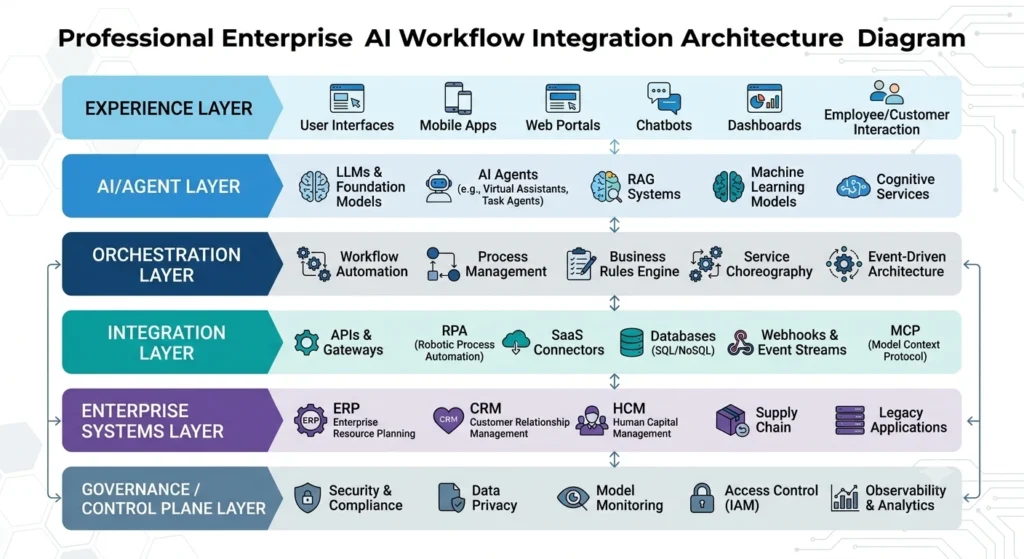
A practical production architecture can be organized into six layers:
1. Experience Layer
- Chat
- Copilot
- Web application
- Employee portal
- API client
2. AI Layer
- LLM
- AI agent
- Classification
- Extraction
- Reasoning
3. Orchestration Layer
- Workflow engine
- State management
- Routing
- Retry logic
- Human approval
4. Integration Layer
- APIs
- MCP servers/tools
- SaaS connectors
- Webhooks
- Event bus
- RPA
5. Enterprise Systems Layer
- CRM
- ERP
- HRIS
- Service management
- Databases
- Data platforms
- Legacy applications
6. Control Plane
- Identity
- Authorization
- Policy
- Secrets
- Observability
- Audit
- Security
- Governance
This layered model allows enterprises to evolve individual components without redesigning the entire AI workflow.
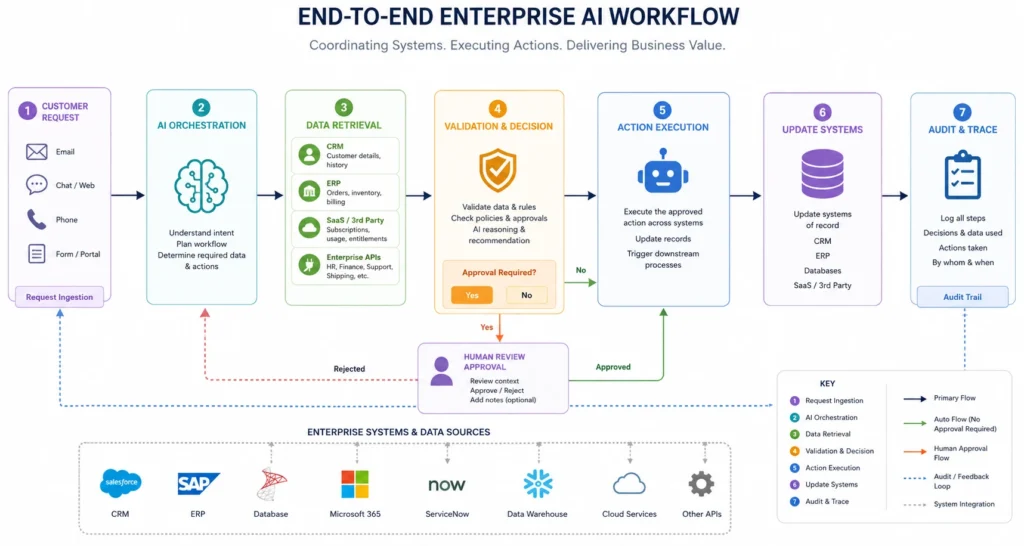
Example: End-to-End Customer Service AI Workflow
Consider a customer asking:
“Why hasn’t my order arrived?”
The workflow could execute:
Customer Message
↓
AI Intent Classification
↓
Customer Identity Verification
↓
CRM API → Customer Record
↓
Order API → Order Status
↓
Warehouse Database → Inventory/Shipment Data
↓
AI Reasoning → Explanation
↓
Business Rules → Determine Resolution
↓
CRM → Update Case
↓
Customer → Response
If the order requires a refund above a defined threshold:
Human Approval → Refund API
This example demonstrates the real value of AI workflow integration: one intelligent workflow coordinating multiple enterprise systems while preserving control boundaries.
How to Choose the Right Integration Pattern
Use this decision framework:
Does the system have a reliable API?
Yes → Use the API.
No API, but the workflow must interact with the UI?
Use RPA selectively.
Does the workflow require structured data?
Use a governed database/data service.
Is the system SaaS?
Use native connectors, APIs, or events.
Does the workflow need real-time reactions?
Use webhooks or event-driven architecture.
Does an AI agent need standardized access to tools?
Consider MCP or another governed tool interface.
Does the workflow span multiple systems?
Use an orchestration layer rather than embedding logic inside the AI model.
How to Make AI Workflow Integration Scalable
Start by avoiding one-off integrations.
Build reusable capabilities:
- Authentication services
- API adapters
- Tool definitions
- Data-access services
- Event handlers
- Workflow components
- Validation services
- Approval mechanisms
- Observability patterns
Then new AI workflows can reuse the same integration foundation.
This changes the economics from:
One workflow = one custom integration
to:
Many workflows = reusable enterprise capabilities
That is the difference between an AI pilot and an enterprise AI integration platform.
Key Takeaways
- AI workflows become valuable when they can safely interact with enterprise systems.
- APIs should generally be the first choice for modern application integration.
- RPA remains valuable for legacy applications without suitable interfaces.
- Databases should be accessed through governed data services or narrowly scoped tools.
- SaaS applications should be integrated using supported APIs, connectors, events, or webhooks.
- MCP can provide a standardized AI-facing tool interface without replacing underlying APIs.
- Use an orchestration layer to manage multi-step workflows and state.
- Separate AI reasoning from deterministic system execution.
- Use least privilege, validation, human approval, auditability, and observability.
- Treat systems of record as authoritative; AI should not become an uncontrolled source of truth.
- Design reusable integration capabilities so new AI workflows do not create integration sprawl.
FAQs
1. How do AI workflows integrate with enterprise systems?
AI workflows integrate with enterprise systems through APIs, SaaS connectors, databases, webhooks, event buses, RPA, and tool interfaces such as MCP. An orchestration layer coordinates AI reasoning, data retrieval, validation, approvals, and actions across systems.
2. Should AI workflows use APIs or RPA?
Use APIs whenever reliable, supported interfaces are available. Use RPA when a legacy or desktop system lacks a suitable API and UI automation is the practical integration option.
3. Can AI agents directly access enterprise databases?
They technically can in some architectures, but unrestricted direct database access is generally inappropriate for production enterprise systems. A governed data-access layer with scoped permissions, validation, auditing, and controlled operations is safer.
4. What role does MCP play in AI workflow integration?
MCP provides a standardized interface through which AI applications can discover and use approved tools and context. It can sit above APIs and enterprise services, allowing agents to interact with capabilities without requiring every agent to understand each backend implementation.
5. Is MCP a replacement for APIs?
No. APIs remain application-to-application contracts. MCP is primarily an AI-facing protocol for exposing tools and context. An MCP server may itself call APIs, databases, or other enterprise services.
6. How do you securely connect AI agents to enterprise systems?
Use identity-aware access, least privilege, scoped tools, input and output validation, policy enforcement, human approval for high-risk actions, audit logging, monitoring, and controlled credentials. AI agents should receive only the capabilities required for their specific workflow.
7.What is the difference between AI workflow automation and AI workflow integration?
AI workflow automation focuses on what business work should be automated. AI workflow integration focuses on how the AI workflow connects to the enterprise applications, data, APIs, and systems required to execute that work. Integration is therefore a foundational component of scalable AI automation.
Related Reads
- How AI Workflow Automation Is Transforming Enterprises in 2026
- Top AI Workflow Orchestration Tools in 2026 for Enterprise Scale
- How to Identify Processes Ready for Automation: A Step-by-Step Enterprise Guide
- How to Calculate AI Workflow Automation ROI: Enterprise Guide
- How to Validate AI Testing Agents for Enterprise Quality Engineering
- How to Manage AI Agents Across Your Organization: Governance, Security