
AI workflow automation ROI is calculated by comparing the measurable value generated by an automated workflow with its total cost of ownership. Start with a baseline, quantify labor, error, speed, capacity, and revenue benefits, include implementation and operating costs, then calculate ROI, payback period, and realized value using conservative assumptions.
TL;DR
- Start with the workflow baseline, not the AI vendor’s projected savings.
- Calculate what the process costs today in labor, errors, delays, rework, technology, and management overhead.
- Measure benefits across time savings, error reduction, faster cycle times, capacity, and revenue enablement.
- Include the full cost of automation: implementation, integrations, AI usage, licenses, human review, monitoring, maintenance, security, and change management.
- Do not assume every hour saved becomes a direct cash saving. Apply a benefit-capture factor based on how the organization will actually use the freed capacity.
- Calculate ROI and payback period together.
- Use conservative, expected, and upside scenarios rather than one optimistic number.
- Measure actual performance after launch and compare it against the original baseline.
- The strongest AI automation business case connects technology metrics to financial outcomes.
What Is AI Workflow Automation ROI?
AI workflow automation ROI measures the financial return generated by using AI to automate or augment a repeatable business workflow relative to the full cost of implementing and operating that automation. Unlike a simple labor-savings calculation, enterprise ROI should account for errors, cycle time, capacity, revenue impact, human review, integration, governance, and ongoing operating costs.
The core concept is:
AI automation creates ROI only when measurable business value exceeds the total cost of creating and operating the workflow.
That means a workflow processing 100,000 AI tasks per month is not automatically successful.
If the automation increases review effort, creates integration costs, requires significant exception handling, or produces little business value, a high automation rate can coexist with poor ROI.
Why AI Workflow Automation ROI Is Harder Than It Looks
AI workflow automation ROI is difficult to measure because benefits are distributed across departments while costs span technology, people, integration, governance, and operations. Time savings may become additional capacity rather than headcount reduction, while quality and risk improvements can be valuable without appearing directly in a P&L line.
The biggest measurement problems are:
- No reliable pre-automation baseline
- Counting only direct labor savings
- Treating all freed employee time as cash savings
- Ignoring human review
- Excluding integration and implementation costs
- Underestimating ongoing AI usage and maintenance
- Measuring too soon after launch
- Double-counting benefits
- Using vendor benchmarks instead of internal data
- Confusing automation activity with business value
The attached reference makes a similar point: ROI needs a baseline, complete cost inputs, quantified gains, and a defined review cadence rather than a one-time calculation.
Read our blog on How to Identify Processes Ready for Automation: A Step-by-Step Enterprise Guide
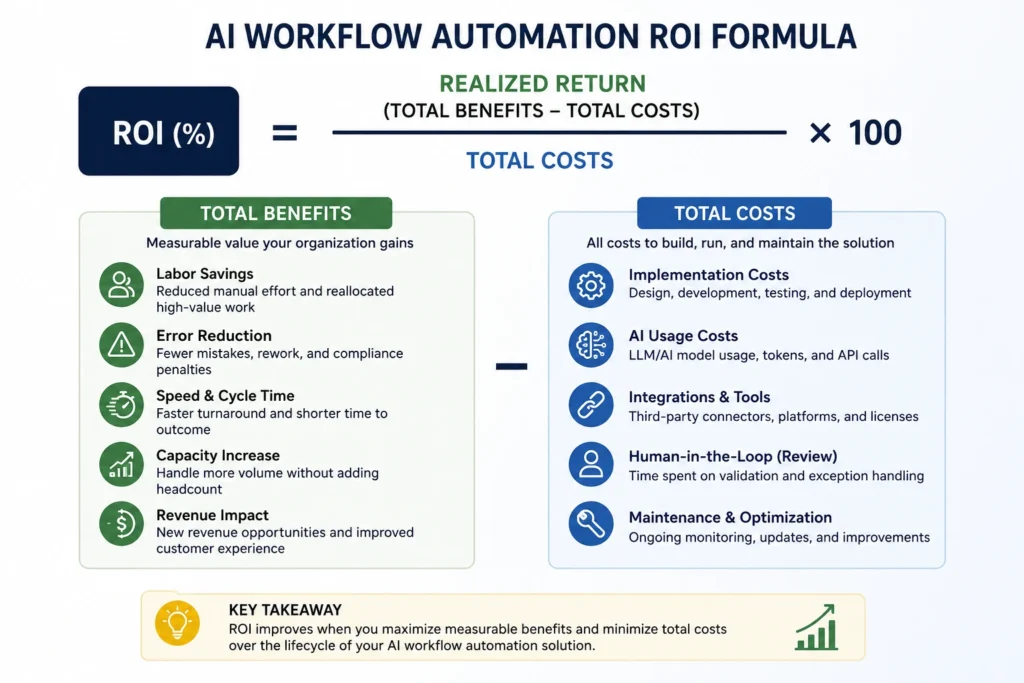
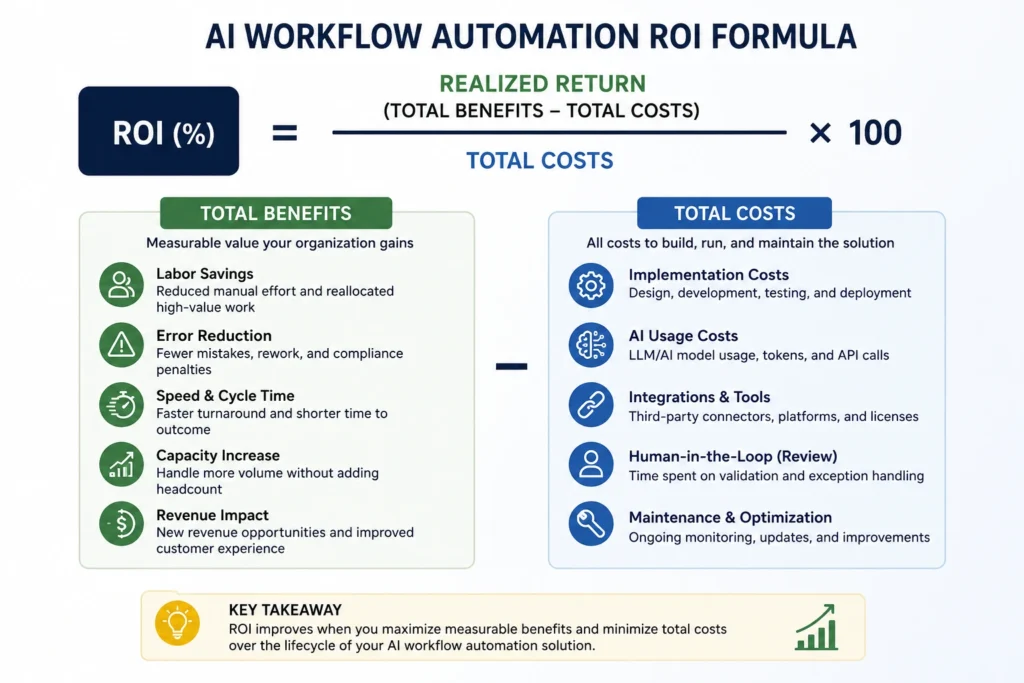
The AI Workflow Automation ROI Formula
The basic enterprise formula is:
ROI = (Total Realized Benefits − Total Automation Costs) ÷ Total Automation Costs × 100
Where:
Total Realized Benefits
Can include:
- Labor capacity value
- Error reduction
- Rework reduction
- Faster processing
- Avoided hiring
- Increased throughput
- Revenue enablement
- Reduced operational losses
- Risk or compliance value where it can be defensibly quantified
Total Automation Costs
Should include:
- Discovery and process redesign
- Development
- AI/model usage
- Software licenses
- API costs
- Data preparation
- Integration
- Testing
- Human review
- Security
- Governance
- Monitoring
- Maintenance
- Training
- Change management
This broader model is consistent with current enterprise ROI guidance, which recommends comparing workflow-level benefits against implementation, integration, review, monitoring, and ongoing support costs rather than looking only at AI licensing.
Read our blog on How AI Workflow Automation Is Transforming Enterprises in 2026
Step 1: Establish the Baseline Before Automating
The most important input in an AI workflow automation ROI calculation is the current-state baseline.
Measure the workflow before implementation.
| Baseline Metric | What to Measure |
|---|---|
| Volume | Transactions per day/month |
| Processing time | Minutes or hours per transaction |
| Cycle time | End-to-end completion time |
| Labor | People and percentage of time involved |
| Loaded labor rate | Salary + benefits + overhead |
| Error rate | Percentage requiring correction |
| Rework | Time/cost to resolve errors |
| SLA performance | Delays or missed targets |
| Technology cost | Existing systems and tooling |
| Exceptions | Percentage requiring special handling |
Baseline labor cost
A simple model is:
Annual Labor Cost = Annual Volume × Average Manual Time × Loaded Hourly Cost
For example:
- 12,000 transactions/year
- 15 minutes per transaction
- $45 fully loaded hourly cost
Annual labor cost:
12,000 × 0.25 × $45 = $135,000
This is your starting point—not your guaranteed savings.
Step 2: Calculate the Full Cost of Automation
A credible AI automation business case must include the total cost of ownership, not just the AI platform subscription.
The attached source specifically identifies licensing, implementation, training/change management, ongoing operations, and internal opportunity cost as important cost inputs.
One-Time Costs
- Process discovery
- Architecture
- Development
- Integration
- Data preparation
- Testing
- Security assessment
- Initial training
- Change management
Recurring Costs
- AI/model usage
- Platform licenses
- API consumption
- Cloud infrastructure
- Monitoring
- Human review
- Maintenance
- Prompt/model updates
- Support
- Governance
- Periodic testing
Enterprise TCO formula
Total Year-1 Cost = Implementation Cost + Year-1 Operating Cost + Change Cost
For multi-year planning:
TCO = Initial Investment + Σ Annual Operating Costs
This prevents a common mistake: calculating an attractive ROI using only the first implementation invoice while ignoring the costs required to keep the automation reliable.
Enterprise AI automation should be evaluated beyond initial implementation cost. Microsoft’s Well-Architected guidance provides a useful framework for considering operational excellence, reliability, security, performance, and cost optimization when designing and running cloud workloads.
Step 3: Quantify the Five Major Sources of Value
AI workflow automation can generate value in several different ways. Labor savings are only one component.
1. Labor and Capacity Value
Calculate:
Time Saved = (Old Time − New Time) × Volume
Then:
Labor Value = Time Saved × Loaded Labor Rate
But there is an important enterprise distinction:
Time saved ≠ cash saved
If an employee saves 10 hours per week, the organization does not necessarily reduce payroll by 10 hours.
The time may instead be redirected to:
- Higher-value customer work
- Revenue-generating activities
- Analysis
- Product development
- Strategic projects
- Additional transaction volume
Therefore, use a benefit-capture factor.
Example
If calculated labor capacity value is $100,000 but Finance estimates only 60% can realistically be captured:
Realized Labor Value = $100,000 × 60% = $60,000
This produces a much more defensible ROI model.
2. Error Reduction
Automation can reduce:
- Data-entry errors
- Duplicate records
- Incorrect routing
- Missing information
- Manual calculation errors
- Compliance evidence gaps
- Rework
Calculate:
Error Savings = (Old Error Rate − New Error Rate) × Volume × Cost per Error
Cost per error may include:
- Rework time
- Escalation
- Customer credits
- Operational delays
- Penalties
- Lost revenue
Error reduction is often underrepresented in ROI models even though it can create significant downstream value. The attached reference similarly identifies error reduction as a distinct ROI driver rather than simply treating it as part of labor savings.
3. Faster Cycle Times
Automation can reduce the time required to move work through the organization.
Examples:
- Faster invoice processing
- Faster customer response
- Faster approvals
- Faster employee onboarding
- Faster lead qualification
- Faster reporting
The financial value depends on what the organization does with that speed.
For example:
Faster customer response → higher conversion
or:
Faster invoice processing → earlier discounts / fewer late-payment costs
or:
Faster approval → shorter project delivery cycle
Do not assign a financial value to speed unless there is a credible business mechanism connecting the improvement to the outcome.
4. Capacity and Avoided Hiring
This is particularly important for growing enterprises.
Suppose automation enables a team of 20 employees to process 30% more transactions without increasing headcount.
The value is not necessarily “30% labor savings.”
It may be:
Avoided Hiring Cost = Additional Capacity × Cost of Additional Workforce
This can be more economically meaningful than direct labor reduction when transaction volume is growing.
5. Revenue Enablement
Some workflows influence revenue indirectly.
Examples:
- Faster lead response
- Faster proposal generation
- Better lead qualification
- Reduced customer churn
- Faster onboarding
- Higher sales capacity
Revenue benefits should be modeled conservatively.
Instead of:
“AI will increase revenue by 20%.”
Use:
“The workflow reduces lead response time from 30 minutes to 3 minutes. Based on historical conversion data, we estimate an incremental 2% conversion improvement.”
This creates a traceable assumption that Finance can challenge and validate.
Step 4: Apply a Benefit-Capture Factor
This is one of the most important improvements to a conventional AI ROI model.
Not every theoretical benefit becomes realized financial value.
Use:
Realized Benefit = Theoretical Benefit × Benefit-Capture Factor
Example:
| Benefit | Theoretical Value | Capture Factor | Realized Value |
| Labor capacity | $100,000 | 60% | $60,000 |
| Error reduction | $30,000 | 90% | $27,000 |
| Faster processing | $40,000 | 50% | $20,000 |
| Revenue enablement | $50,000 | 40% | $20,000 |
| Total | $220,000 | — | $127,000 |
This prevents inflated ROI projections based on theoretical productivity.
Step 5: Calculate ROI and Payback Period
Once benefits and costs are established:
ROI
ROI = (Realized Benefits − Total Costs) ÷ Total Costs × 100
Payback Period
Payback Period = Initial Investment ÷ Monthly Net Benefit
Both should be presented to leadership.
ROI answers:
How attractive is the investment?
Payback answers:
How long until we recover the investment?
Enterprise decision-makers generally need both.
Current ROI-focused automation guidance similarly recommends evaluating payback alongside ROI because a strong percentage return can still involve an unattractive recovery period.
Worked Example: AI Invoice Processing Automation
Consider an enterprise processing 10,000 invoices annually.
Current State
- 10,000 invoices/year
- 12 minutes manual processing per invoice
- $45 loaded labor cost/hour
- 8% error/rework rate
- 20 minutes average rework per error
Baseline Labor Cost
10,000 × 12/60 × $45 = $90,000
Baseline Error Cost
10,000 × 8% × 20/60 × $45 = $12,000
Total Baseline Cost
$102,000/year
After Automation
Assume:
- Processing time falls to 4 minutes
- Error rate falls to 2%
- AI/platform cost = $12,000/year
- Human review and monitoring = $8,000/year
- Implementation = $25,000 one-time
New Processing Labor Cost
10,000 × 4/60 × $45 = $30,000
New Error Cost
10,000 × 2% × 20/60 × $45 = $3,000
Annual Operating Cost
$30,000 + $3,000 + $12,000 + $8,000 = $53,000
Annual Benefit
$102,000 − $53,000 = $49,000
Year-1 Cost
$25,000 implementation + $20,000 operating costs = $45,000
Year-1 ROI
($49,000 − $25,000) ÷ $45,000 × 100 ≈ 53%
The exact accounting treatment should be aligned with Finance, but the important principle is that the model includes labor, errors, AI operating costs, human review, and implementation, rather than simply multiplying “hours saved” by salary.
Step 6: Model Conservative, Expected, and Upside Scenarios
Do not present a single ROI estimate.
Build three scenarios:
| Scenario | Benefit Assumption | Cost Assumption | Purpose |
| Conservative | Lower benefit capture | Higher operating cost | Downside protection |
| Expected | Realistic measured assumptions | Expected TCO | Investment case |
| Upside | Strong adoption and benefit realization | Stable TCO | Expansion potential |
For example:
| Scenario | Annual Benefit | Year-1 Cost | ROI |
| Conservative | $90K | $60K | 50% |
| Expected | $125K | $55K | 127% |
| Upside | $160K | $55K | 191% |
The purpose is not to make the upside scenario attractive.
It is to show leadership how sensitive the business case is to the assumptions.
Step 7: Measure ROI After Launch
ROI should become an operating metric rather than a one-time business-case calculation.
A practical measurement cadence is:
30 Days
Focus on:
- Adoption
- Exceptions
- Errors
- Workflow stability
Do not make major ROI conclusions yet.
60 Days
Start comparing:
- Processing time
- Error rate
- Cost per task
- Human review effort
90 Days
Use this as a stronger steady-state measurement point, assuming adoption and workflow behavior have stabilized.
Quarterly
Track:
- Realized ROI
- Cost per task
- Automation rate
- Error reduction
- Processing time
- Exception rate
- AI operating cost
The attached source recommends a similar 30/60/90-day and quarterly measurement cadence.
The Five KPIs That Matter Most
Avoid building an executive dashboard with dozens of AI metrics.
Track the metrics that connect automation to business outcomes.
| KPI | Formula / Definition | Why It Matters |
| Realized ROI | Benefits − costs ÷ costs | Overall financial return |
| Cost per Automated Task | Total operating cost ÷ tasks | Unit economics |
| Payback Period | Investment ÷ monthly net benefit | Capital recovery |
| Automation Rate | Fully automated eligible tasks ÷ total eligible tasks | Workflow effectiveness |
| Error Reduction | Baseline error rate − current error rate | Quality improvement |
Add operational metrics such as cycle time and exception rate where they explain why ROI is moving.
The source material similarly identifies ROI, cost per AI-assisted task, time-to-value, automation rate, and error reduction as high-value KPIs.
Common Mistakes That Distort AI Automation ROI
1. Counting Every Hour Saved as Cash
Freed capacity only becomes direct cost savings when the organization can actually reduce expenditure.
Otherwise, classify it as capacity value.
2. Ignoring Human Review
If employees still validate 20% of AI outputs, that review time is part of the operating cost.
3. Excluding Integration
Connecting an AI workflow to ERP, CRM, data platforms, legacy applications, or internal systems can be a significant part of the investment.
4. Using Vendor Benchmarks as Internal ROI
Industry benchmarks can establish hypotheses.
They should not replace your own baseline.
5. Measuring Only Automation Rate
A workflow can achieve 95% automation and still have poor ROI if the automated work has little financial value.
Automation activity is not business value.
6. Measuring Too Early
Early performance may be distorted by:
- Training
- Adoption
- Exception discovery
- Workflow changes
- Prompt/model tuning
7. Double-Counting Benefits
For example, do not count the same labor reduction as both:
- Labor savings
- Avoided hiring
- Capacity improvement
unless each represents a distinct financial outcome.
8. Ignoring Ongoing Costs
AI workflows require monitoring, maintenance, evaluation, integration support, and periodic updates.
The ROI model should reflect the system’s operating life, not only its launch.
Reads our blog on Human-in-the-Loop Agentic AI: Why Autonomous Doesn’t Mean Uncontrolled
A CFO-Ready AI Workflow Automation Business Case
Before requesting investment approval, answer these eight questions:
- What workflow are we automating?
- What does the workflow cost today?
- What measurable problem are we solving?
- What benefits will automation create?
- What percentage of those benefits can actually be captured?
- What is the full implementation and operating cost?
- What are the conservative, expected, and upside ROI scenarios?
- How will actual ROI be measured after deployment?
If these questions cannot be answered, the automation is probably not ready for an enterprise investment decision.
When AI Workflow Automation Is Not Worth the Investment
AI automation may not be economically justified when:
- Workflow volume is too low
- The process changes constantly
- Exceptions dominate the workflow
- Data quality is poor
- Integration costs are excessive
- Human review offsets most of the savings
- Business value cannot be measured
- The process is likely to be retired or redesigned soon
- The expected payback is too long for the organization’s investment horizon
The right conclusion is sometimes do not automate yet.
That is a better outcome than approving an automation project because the technology is available.
Enterprise AI Automation ROI Decision Framework
Use this simple sequence:
1. Baseline → 2. Cost → 3. Benefits → 4. Capture → 5. ROI → 6. Payback → 7. Pilot → 8. Validate → 9. Scale
The critical decision gate
After the pilot, compare:
Actual Realized Benefit vs. Forecast Benefit
Then calculate:
ROI Variance = Actual ROI − Forecast ROI
This creates an additional enterprise metric:
How accurately can your organization predict AI automation value?
Over time, this becomes a strategic capability.
Organizations can use historical automation projects to improve future estimates for implementation effort, benefit capture, exception rates, operating costs, and payback.
Key Takeaways
- AI workflow automation ROI starts with a baseline.
- Measure the current process before calculating potential savings.
- Include labor, errors, delays, capacity, and revenue-related value.
- Include the full cost of implementation and operation.
- Separate theoretical productivity from realized financial value.
- Apply a benefit-capture factor to avoid overstating savings.
- Calculate ROI and payback period together.
- Use scenario analysis instead of a single optimistic forecast.
- Measure actual ROI after 30, 60, and 90 days and continue quarterly.
- Track business outcomes—not just AI activity.
- Use pilot results to replace assumptions with evidence before scaling.
For enterprises, the objective is not simply to automate more tasks. It is to identify workflows where automation can create measurable value, build the right technical foundation, and prove that value with evidence.
Techment helps enterprises identify high-value automation opportunities, build AI-powered workflows, modernize the systems and data behind them, and establish the architecture and measurement framework needed to scale AI automation with confidence.
FAQs
1. How do you calculate ROI for AI workflow automation?
Calculate AI workflow automation ROI by subtracting total automation costs from realized benefits, then dividing the result by total automation costs and multiplying by 100. Include labor capacity, error reduction, speed, throughput, revenue impact, implementation, AI usage, human review, integration, maintenance, and governance costs.
2. What costs should be included in AI automation ROI?
Include implementation, software and AI licensing, model/API usage, integrations, data preparation, testing, human review, monitoring, maintenance, security, training, change management, and ongoing support.
3. Is AI automation ROI the same as labor savings?
No. Labor savings are only one potential benefit. AI automation can also create value through error reduction, faster cycle times, additional capacity, avoided hiring, improved customer experience, and revenue enablement.
4. How do you calculate the payback period for AI automation?
Divide the initial automation investment by the expected monthly net benefit.
Payback Period = Initial Investment ÷ Monthly Net Benefit
5.What is a good ROI for AI workflow automation?
There is no universal “good” ROI. The acceptable return depends on implementation risk, capital cost, strategic importance, payback expectations, and alternative investments. A defensible ROI model is more valuable than an arbitrary benchmark.
6. How long does it take to see ROI from AI workflow automation?
Some workflows can show measurable operational improvements shortly after deployment, but reliable ROI measurement generally requires enough production volume for adoption, exceptions, and human-review patterns to stabilize. A 30/60/90-day measurement framework is useful for many enterprise pilots.
7. Should human review be included in AI automation ROI?
Yes. If employees review AI outputs, their time is part of the automation’s operating cost. Ignoring review effort can significantly overstate ROI.
8. How can enterprises avoid overstating AI ROI?
Use measured baselines, conservative assumptions, benefit-capture factors, scenario analysis, full lifecycle costs, and post-launch validation. Avoid treating theoretical time savings as guaranteed financial savings.
Related Reads
- Agentic AI Use Cases: 7 Enterprise Examples Driving Autonomous Operations
- How AI copilots for enterprises are transforming executive leadership in 2026.
- Enterprise AI Strategy in 2026: A Practical Guide for CIOs and Data Leaders
- Enterprise AI Governance Framework: Complete 2026 Guide for Responsible AI
- How to Build Enterprise AI Copilots: A Complete Guide for Business Leaders (2026)
- The 30-60-90 Day Enterprise AI Readiness Roadmap For Enterprise AI Success
- Human-in-the-Loop Agentic AI: Why Autonomous Doesn’t Mean Uncontrolled