Microsoft Fabric pricing starts with the F2 capacity for smaller workloads and scales up to F2048 for enterprise deployments. Organizations can choose between pay-as-you-go and reserved capacity pricing, with reserved capacity offering savings of up to 41% for predictable workloads. Choosing the right capacity depends on data volumes, concurrency, refresh frequency, and AI workloads.
TL;DR
Microsoft Fabric uses a capacity-based pricing model rather than per-user licensing.
Pricing starts with the F2 SKU and scales to F2048 for enterprise workloads.
Organizations can choose between Pay-as-You-Go and Reserved Capacity pricing.
Reserved Capacity can reduce compute costs by up to 41% for long-running workloads.
Microsoft Fabric includes Data Engineering, Data Factory, Data Science, Real-Time Intelligence, Data Warehouse, Power BI, and OneLake under a single capacity.
Selecting the right capacity depends on workload size, concurrency, refresh frequency, and business growth.
Microsoft Fabric Pricing at a Glance
Microsoft Fabric simplifies analytics licensing by consolidating multiple Azure analytics services into a single capacity-based platform. Instead of purchasing separate services for data engineering, warehousing, business intelligence, and real-time analytics, organizations purchase Fabric Capacity (F SKU) and share compute resources across workloads.
Unlike traditional licensing models, capacity can be scaled up or down based on demand, making Microsoft Fabric suitable for both departmental analytics and enterprise-wide deployments. For enterprise leaders, Total Cost of Ownership is not just about budgeting—it is about long-term sustainability of analytics investments. Gartner highlights hidden operational and integration costs as major contributors to underestimated analytics TCO
Actual Microsoft Fabric pricing is region-specific and available through Azure Pricing and Microsoft Fabric Capacity pricing pages. Costs differ by geography and by Pay-As-You-Go versus Reserved Capacity.
Microsoft Fabric pricing depends on three primary factors:
Selected F SKU (compute capacity)
Pricing model (Pay-as-You-Go or Reserved Capacity)
Azure region
Smaller organizations can begin with an entry-level capacity for development, testing, or lightweight analytics, while larger enterprises typically deploy higher-capacity SKUs to support concurrent users, real-time analytics, and AI workloads.
In addition to compute capacity, organizations should consider related Azure costs such as storage, networking, and data movement where applicable.
Key takeaway: The monthly cost of Microsoft Fabric is driven primarily by the capacity you provision, not by the number of individual analytics services you use within that capacity.
Fabric capacities are measured in Capacity Units (CUs). Each SKU allocates a defined level of compute that is shared across Fabric workloads, including Data Engineering, Data Factory, Data Warehouse, Real-Time Intelligence, Data Science, and Power BI.
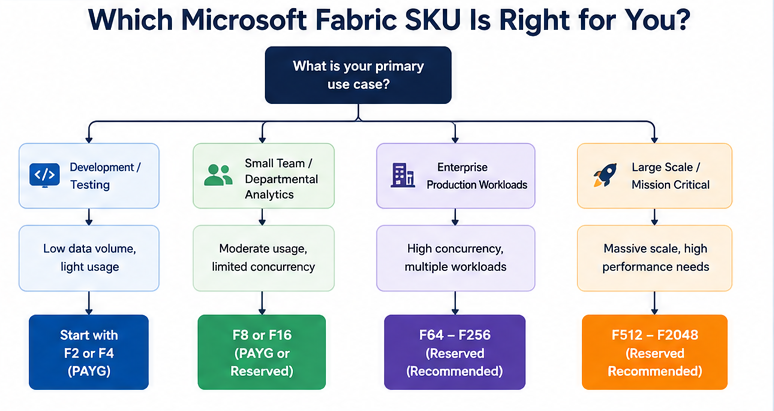
Choosing the right SKU depends on workload characteristics rather than company size alone.
F2–F8
Ideal for:
Proof of concepts
Development environments
Small BI teams
Low concurrency
F16–F32
Best suited for:
Departmental analytics
Data engineering pipelines
Moderate Power BI usage
Daily scheduled refreshes
F64
A common starting point for enterprise deployments.
Suitable for:
Enterprise BI
Lakehouse workloads
Large semantic models
AI-assisted analytics
High user concurrency
F128 and Above
Designed for organizations managing:
Enterprise-scale analytics
Multiple business units
Large data engineering pipelines
AI and machine learning workloads
Global reporting environments
Instead of sizing for today’s workload, plan for expected growth over the next 12–24 months to avoid frequent capacity changes.
Microsoft Fabric Pricing Calculator: How to Estimate Your Costs
The right capacity depends on workload demand rather than user count alone. A simple estimation framework can help organizations shortlist the appropriate SKU before validating it with Microsoft Capacity Metrics.
Step 1: Estimate Your Users
Users
Recommended Starting Capacity
Up to 50
F2–F4
50–250
F8–F16
250–1,000
F32–F64
1,000+
F128 and above
Step 2: Evaluate Your Workloads
Consider:
Number of Power BI reports
Semantic model size
Data refresh frequency
Data engineering pipelines
Real-time analytics
AI and machine learning workloads
Organizations running multiple Fabric experiences simultaneously typically require higher capacity than those focused solely on reporting.
Step 3: Measure Concurrency
Peak demand has a significant impact on sizing.
Evaluate:
Concurrent report users
Scheduled refresh windows
Data ingestion frequency
Spark jobs
Data warehouse queries
AI model execution
Capacity should be sized for peak business activity rather than average usage.
Factors That Influence Microsoft Fabric Pricing
Your monthly Fabric costs are influenced by more than the selected F SKU. Key considerations include:
Workload mix: Interactive BI, data engineering, AI, and real-time analytics consume capacity differently.
Concurrency: More simultaneous users and jobs require higher compute capacity.
Data refresh schedules: Frequent refreshes increase capacity consumption.
Storage growth: Although OneLake reduces duplication, storage requirements continue to expand as data volumes increase.
Regional pricing: Azure pricing varies across regions.
Understanding these variables helps organizations avoid overprovisioning while ensuring consistent performance.
Key Takeaways
Microsoft Fabric uses a capacity-based pricing model centered on F SKUs.
Costs are primarily determined by compute capacity, workload type, and Azure region.
F2 is suitable for development and lightweight analytics, while F64 and above are common for enterprise deployments.
Capacity planning should account for concurrency, workload mix, and future growth—not just the number of users.
A structured sizing exercise before implementation helps optimize both performance and cost.
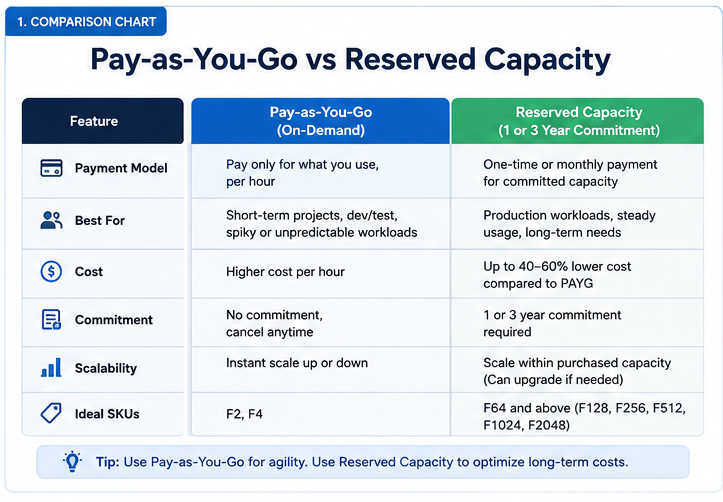
Microsoft Fabric Pay-as-You-Go vs Reserved Capacity Pricing
Microsoft Fabric offers two pricing models:
Pay-as-You-Go (PAYG): Pay only for the capacity you provision, making it ideal for variable or short-term workloads.
Reserved Capacity: Commit to a one-year or three-year reservation in exchange for significantly lower compute costs.
Choosing the right model depends on workload predictability, budget planning, and long-term usage.
Feature
Pay-as-You-Go
Reserved Capacity
Billing
Hourly consumption
1 or 3-year commitment
Upfront commitment
None
Yes
Flexibility
High
Medium
Best for
Development, pilots, seasonal workloads
Production and enterprise workloads
Cost savings
None
Up to ~41% compared to PAYG*
Capacity changes
Easy
Planned in advance
When Should You Choose Pay-as-You-Go?
Pay-as-you-go works well when:
You’re evaluating Microsoft Fabric.
Workloads are seasonal or unpredictable.
Capacity requirements change frequently.
Development and testing environments are temporary.
It minimizes commitment while allowing organizations to scale compute up or down as business needs evolve.
When Does Reserved Capacity Make Sense?
Reserved Capacity is a better option when:
Analytics workloads run continuously.
Capacity usage is predictable.
Budgets require stable monthly costs.
Enterprise reporting operates 24×7.
For organizations with consistent demand, reservations can significantly reduce long-term operating costs while simplifying financial planning.
Microsoft Fabric vs Power BI Premium Pricing
Many organizations evaluating Microsoft Fabric are existing Power BI Premium customers. Understanding the pricing differences helps determine whether migrating to Fabric provides additional value.
Capability
Power BI Premium
Microsoft Fabric
Business Intelligence
✔
✔
Data Engineering
✖
✔
Data Warehouse
✖
✔
Data Factory
✖
✔
Real-Time Analytics
✖
✔
OneLake
✖
✔
AI Workloads
Limited
Native
Unified Capacity
BI only
All Fabric workloads
Power BI Premium primarily provides dedicated capacity for business intelligence. Microsoft Fabric extends the same capacity model across data integration, engineering, warehousing, real-time analytics, and AI.
For many enterprises, this consolidation reduces the need for multiple analytics platforms and simplifies licensing.
Migration Tip: Organizations already using Power BI Premium should evaluate Fabric based on their broader data platform strategy—not just BI requirements. If your roadmap includes data engineering, AI, or unified analytics, Fabric typically delivers greater long-term value.
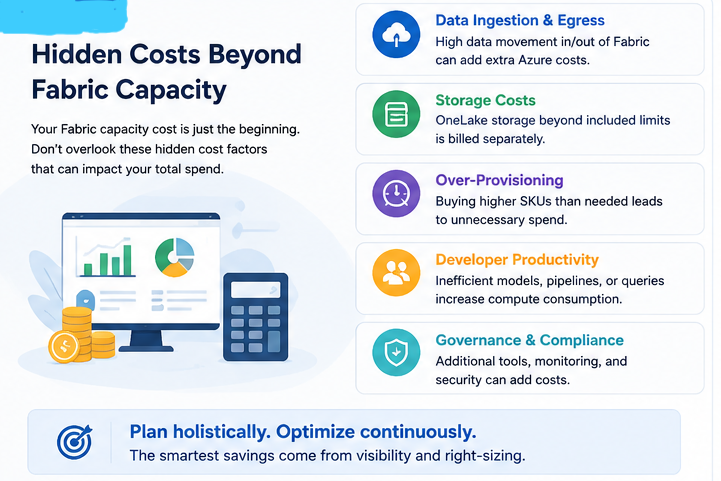
Hidden Microsoft Fabric Costs to Consider
The advertised capacity price is only one component of your total investment. Enterprise deployments should account for additional Azure services and operational expenses that may influence the overall cost.
1. OneLake Storage
Although OneLake eliminates unnecessary data duplication, storage consumption continues to grow as data volumes increase. Monitor storage usage and apply lifecycle management to reduce long-term costs.
2. Networking and Data Transfer
Moving data between Azure regions, external cloud providers, or on-premises environments can generate networking charges. Minimize unnecessary data movement by keeping workloads close to the data source.
3. Data Ingestion
Large-scale ingestion pipelines and frequent data refreshes consume compute resources. Optimize ingestion schedules and consolidate pipelines where possible.
4. AI and Machine Learning Workload
Training machine learning models, running generative AI applications, or integrating Azure AI services may introduce additional Azure consumption charges beyond Fabric capacity.
5. Third-Party Integrations
Organizations connecting Fabric to external databases, SaaS applications, or partner tools should also consider API usage, licensing, and integration costs.
Budget Planning Tip: Estimate your total cost of ownership (TCO) by including compute, storage, networking, AI services, integrations, and operational support—not just the Fabric capacity price.
How to Choose the Right Microsoft Fabric Capacity
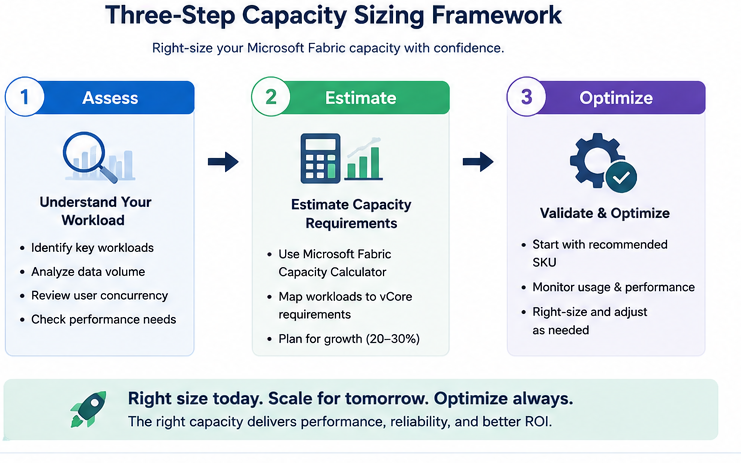
Selecting the appropriate capacity is one of the most important decisions during implementation. Overprovisioning increases costs, while underprovisioning can lead to slower performance and poor user experience.
A structured sizing approach helps balance cost and performance.
Step 1: Assess Business Workloads
Document the workloads you plan to run, including:
Power BI reports and dashboards
Data engineering pipelines
Data warehouse queries
Real-Time Intelligence
AI and machine learning workloads
Data Factory pipelines
The broader your workload mix, the more capacity you’ll require.
Step 2: Estimate Concurrent Usage
Capacity should be sized for peak demand rather than average usage.
Consider:
Concurrent report users
Scheduled refresh windows
Interactive dashboards
Background Spark jobs
Data warehouse queries
Organizations with multiple business units often require larger capacities to maintain consistent performance.
Step 3: Plan for Growth
Most enterprises experience increasing analytics adoption over time.
When sizing capacity, account for:
New users
Additional business units
AI initiatives
Higher data volumes
Increased reporting frequency
Choosing a capacity that supports expected growth helps avoid frequent upgrades.
Quick Capacity Recommendation
Business Scenario
Recommended Starting SKU
Development & Proof of Concept
F2–F4
Small Analytics Team
F8–F16
Departmental BI
F32
Enterprise Reporting
F64
Enterprise Data Platform
F128–F256
Large Global Enterprise
F512+
This provides a practical starting point. Final sizing should always be validated using Microsoft’s Capacity Metrics and real workload testing.
7 Ways to Reduce Microsoft Fabric Costs
Cost optimization should be part of every Fabric implementation. The following practices help improve resource utilization without compromising performance.
1. Choose the Right Capacity
Avoid provisioning larger capacities than necessary. Start with a realistic baseline and scale based on usage patterns.
2. Use Reserved Capacity for Stable Workloads
If your analytics environment runs continuously, reserved capacity can significantly reduce long-term compute costs.
3. Monitor Capacity Utilization
Regularly review Capacity Metrics to identify underused resources, workload bottlenecks, and optimization opportunities.
4. Optimize Data Refresh Schedules
Avoid refreshing datasets more frequently than required. Align refresh frequency with business needs to reduce unnecessary compute consumption.
5. Consolidate Analytics Workloads
One of Microsoft Fabric’s biggest advantages is running multiple analytics workloads on a shared capacity. Consolidating services reduces licensing complexity and improves overall utilization.
6. Manage Storage Growth
Archive inactive data, implement lifecycle policies, and eliminate redundant datasets to control long-term storage costs.
7. Continuously Review Usage
Business requirements change over time. Regularly reassess capacity requirements and adjust SKUs to ensure you’re paying only for the resources you need.
Key Takeaways
Pay-as-You-Go provides flexibility for pilots and variable workloads, while Reserved Capacity can deliver meaningful savings for predictable enterprise usage.
Microsoft Fabric extends beyond Power BI Premium by unifying data engineering, warehousing, AI, and business intelligence under a single capacity model.
Your total cost includes more than the F SKU price—consider storage, networking, AI services, and integrations when budgeting.
Capacity sizing should reflect workload complexity, concurrency, and future growth, not just user count.
Ongoing monitoring and optimization help maximize ROI and keep analytics costs under control.
Why Enterprises Choose Microsoft Fabric
Microsoft Fabric simplifies modern analytics by bringing data engineering, integration, warehousing, real-time analytics, AI, and business intelligence together on a single platform. Instead of managing multiple products with separate licensing and infrastructure, organizations operate on a unified capacity model that reduces complexity and improves resource utilization.
For enterprise leaders, the value extends beyond pricing. A unified platform enables:
Lower licensing complexity
Centralized data management with OneLake
Faster deployment of analytics projects
Improved collaboration across data teams
Native AI capabilities for advanced analytics
Simplified governance and security
As organizations expand their data and AI initiatives, Microsoft Fabric provides a scalable foundation that supports both operational efficiency and long-term innovation.
Read more on how Microsoft Fabric AI solutions fundamentally transform how enterprises unify data, automate intelligence, and deploy AI at scale in our blog.
Why Capacity Planning Matters More Than Pricing
One of the biggest mistakes organizations make is selecting a Fabric SKU based solely on monthly cost. Capacity should instead be aligned with business demand.
A lower-capacity SKU may reduce upfront costs but can lead to slower report performance, delayed data refreshes, and reduced user productivity. Conversely, overprovisioning increases operational expenses without delivering proportional business value.
The goal is to identify the smallest capacity that consistently meets workload requirements, then scale as usage grows.
Best Practice: Begin with a structured capacity assessment, monitor real-world utilization using Microsoft Capacity Metrics, and adjust your SKU based on actual consumption rather than assumptions.
How Techment Helps Optimize Microsoft Fabric Costs
Selecting the right Microsoft Fabric capacity is only the first step. Achieving long-term value requires careful planning, implementation, governance, and ongoing optimization.
Techment helps organizations maximize their Microsoft Fabric investment through:
Microsoft Fabric Capacity Assessment
Evaluate current analytics workloads, estimate compute requirements, and recommend the optimal F SKU based on performance, scalability, and budget.
Migration & Modernization
Modernize legacy data platforms, consolidate analytics workloads, and migrate from Power BI Premium or traditional architectures with minimal disruption.
Cost Optimization
Reduce analytics spend through workload optimization, capacity right-sizing, reserved capacity planning, and continuous monitoring.
Data Platform Architecture
Design scalable Microsoft Fabric architectures aligned with enterprise data, AI, governance, and security requirements.
Managed Optimization Services
Continuously monitor capacity utilization, identify optimization opportunities, and adapt environments as business needs evolve.
Whether you’re evaluating Microsoft Fabric for the first time or planning a migration from Power BI Premium, choosing the right capacity is critical to balancing performance and cost.
Techment’s Microsoft Fabric experts can help you:
Assess your current analytics environment
Estimate the right F SKU for your workloads
Compare Pay-as-You-Go and Reserved Capacity options
Microsoft Fabric introduces a simpler, capacity-based pricing model that unifies data engineering, data integration, business intelligence, real-time analytics, and AI on a single platform. Rather than managing multiple products with separate licenses, organizations purchase the compute capacity they need and scale as workloads evolve.
The right capacity isn’t determined by company size alone. It depends on workload complexity, concurrency, data volumes, and growth expectations. By combining accurate capacity planning with ongoing monitoring, organizations can control costs while ensuring consistent performance.
For enterprises adopting Microsoft Fabric, pricing should be viewed as part of a broader data strategy. Selecting the right F SKU, leveraging reserved capacity where appropriate, and continuously optimizing workloads will help maximize both return on investment and long-term scalability.
Frequently Asked Questions About Microsoft Fabric Pricing
1. How much does Microsoft Fabric cost per month?
Microsoft Fabric pricing depends on the F SKU capacity, Azure region, and pricing model. Organizations can start with an entry-level F2 capacity for smaller workloads and scale up to F2048 for enterprise deployments. Monthly costs increase with higher compute capacity and workload requirements.
2. What are Microsoft Fabric F SKUs?
Microsoft Fabric uses F SKUs (Fabric Capacities) to allocate dedicated compute resources for analytics workloads. Each SKU provides a specific number of Capacity Units (CUs), which are shared across all Fabric experiences, including Data Engineering, Data Warehouse, Data Factory, Real-Time Intelligence, Power BI, and Data Science.
3. What is the difference between F2 and F64?
The F2 SKU is designed for development, testing, and lightweight analytics with limited concurrency. F64 is the recommended starting point for enterprise deployments, supporting larger semantic models, concurrent users, data engineering pipelines, and AI workloads.
4. Is Microsoft Fabric cheaper than Power BI Premium?
It depends on your analytics requirements. If your organization only needs business intelligence, Power BI Premium may meet your needs. However, if you require data engineering, data integration, AI, lakehouse, real-time analytics, and business intelligence, Microsoft Fabric consolidates these workloads into a single capacity, often reducing overall platform costs and simplifying licensing.
5.How much can I save with Reserved Capacity?
Organizations with predictable workloads can reduce compute costs by up to approximately 41% by committing to Reserved Capacity instead of Pay-as-You-Go pricing. The exact savings depend on the Azure region, reservation term, and Microsoft’s current pricing.
6. How do I estimate the right Microsoft Fabric capacity?
Start by evaluating: Number of concurrent users Data volumes Refresh frequency Data engineering workloads AI and machine learning requirements Future business growth Microsoft Capacity Metrics can then validate whether your selected SKU provides sufficient compute resources.
7. Does Microsoft Fabric include Power BI?
Yes. Microsoft Fabric includes Power BI as one of its integrated experiences. Organizations can create reports, dashboards, semantic models, and self-service analytics while sharing the same compute capacity used for data engineering and warehousing.
8. Can I upgrade or downgrade my Fabric capacity?
Yes. Microsoft Fabric supports capacity scaling, allowing organizations to increase or decrease their F SKU as business requirements evolve. This flexibility helps optimize performance while controlling costs.
Sucheta Rathi is a content and digital communications specialist with over seven years of experience creating technology thought leadership for global organizations. She specializes in data, AI, cloud, and product engineering translating complex technical concepts into clear, actionable business insights. At Techment, her work is grounded in deep research and technical depth, crafting narratives that bridge the gap between innovation and industry impact.