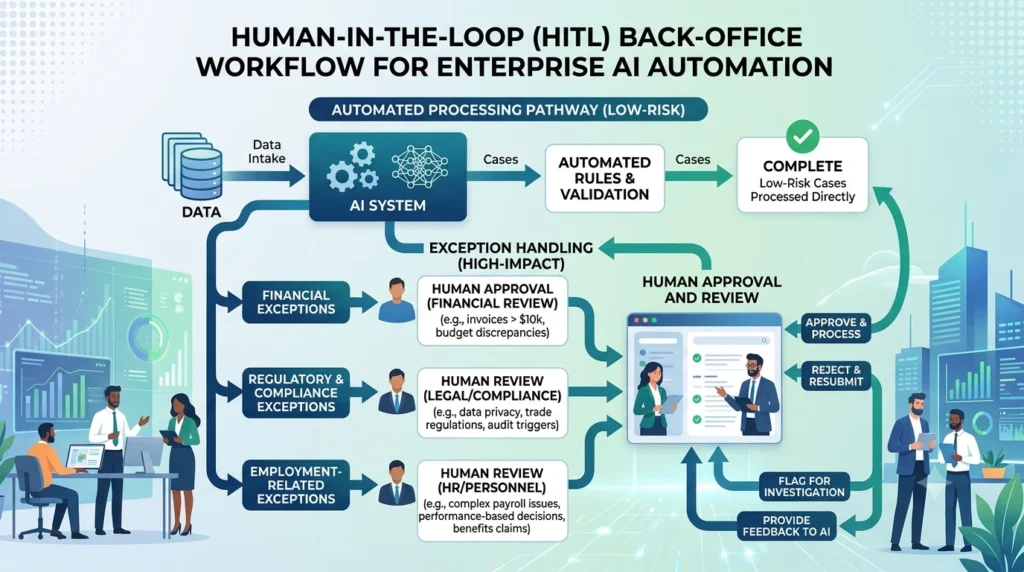
AI workflow automation for back-office operations uses AI, workflow orchestration, APIs, RPA, and enterprise data to automate repetitive administrative processes across finance, HR, procurement, IT, compliance, and operations. High-value use cases include invoice processing, reconciliation, employee onboarding, vendor management, document processing, approvals, reporting, and exception handling.
TL;DR
Back-office operations are strong candidates for AI workflow automation because they contain high-volume, repetitive, document-heavy, and rules-driven work.
The highest-value opportunities often sit in handoffs, exceptions, reconciliation, approvals, and document processing, not just data entry.
AI adds value where workflows require classification, extraction, summarization, interpretation, or contextual decisions.
APIs and workflow engines should handle deterministic system actions; AI should handle tasks that require interpretation.
RPA remains useful when legacy applications lack reliable APIs.
Human approval should remain in workflows involving financial, regulatory, employment, or other high-impact decisions.
The 10 priority use cases span finance, procurement, HR, IT, compliance, and shared services.
Measure automation using business KPIs such as cycle time, cost per transaction, error rate, exception rate, SLA adherence, and capacity released.
The objective is not maximum automation. It is maximum controlled business value.
What Is AI Workflow Automation for Back-Office Operations?
AI workflow automation for back-office operations combines artificial intelligence with workflow orchestration and enterprise integrations to automate administrative and operational processes behind the customer-facing business. It can interpret documents and requests, make bounded decisions, retrieve enterprise data, trigger system actions, route exceptions, and keep humans involved where judgment or approval is required.
Traditional back-office automation typically handled predictable steps.
AI workflow automation expands that capability to work involving:
Unstructured documents
Emails
Natural-language requests
Classification
Data extraction
Contextual interpretation
Exception handling
Decision support
This distinction is increasingly important as enterprises move beyond basic RPA toward AI-enabled workflows and agents that can coordinate multiple systems. Current enterprise automation guidance emphasizes that the highest-value workflows combine AI with existing systems, rather than treating AI as a standalone application.
Why Back-Office Operations Are a Strong AI Automation Opportunity
Back-office operations contain many characteristics that make them suitable for automation: recurring transactions, structured workflows, document-heavy inputs, repetitive decisions, system handoffs, measurable outcomes, and large volumes of exception-management work.
Typical back-office friction includes:
Manual data entry
Email-driven processes
Spreadsheet dependencies
Duplicate data entry
Reconciliation
Approval bottlenecks
Document processing
Status checking
Exception routing
Repetitive reporting
Cross-system updates
The biggest opportunity is often not replacing an entire department.
It is removing the administrative friction surrounding human judgment.
Watch our webinar with industry expert on Accelerating Quality with AI-Driven Test Automation
For example:
Invoice received → AI extracts information → ERP validates purchase order → rules check → exception routed → approved invoice posted
The finance professional remains responsible for exceptions and policy decisions while automation handles the repetitive workflow.
AI workflow automation can streamline invoice intake, data extraction, validation, matching, coding, approval routing, and ERP updates. It is particularly valuable where finance teams process large invoice volumes across email, PDFs, portals, procurement systems, and ERP platforms.
Typical workflow
Invoice received ↓ Document AI extracts fields ↓ Vendor validation ↓ Purchase order matching ↓ Three-way match ↓ Policy validation ↓ Approval or exception ↓ ERP posting
Where AI helps
Extract invoice fields
Classify invoice types
Identify missing information
Match documents
Detect anomalies
Summarize exceptions
Route invoices to appropriate approvers
Business value
Lower processing cost
Faster invoice cycle time
Fewer manual errors
Reduced duplicate payments
Better visibility into exceptions
Finance automation research consistently identifies invoice processing and exception handling as high-value use cases because transaction volumes and processing economics are relatively measurable.
2. Financial Reconciliation and Exception Management
AI workflow automation can accelerate reconciliations by comparing records across financial systems, identifying mismatches, explaining likely causes, and routing unresolved exceptions to the appropriate finance team. The greatest value comes from reducing manual investigation rather than blindly automating accounting decisions.
Example
Bank transaction ↓ ERP record ↓ AI-assisted matching ↓ Variance detected ↓ AI investigates supporting records ↓ Explanation generated ↓ Finance approval ↓ Reconciliation completed
AI can help with
Transaction matching
Variance classification
Exception investigation
Supporting-document retrieval
Reconciliation summaries
Suggested resolution
Key control
AI should recommend or explain accounting treatment where judgment is required; deterministic rules and authorized finance systems should control final postings.
3. Procurement and Purchase Approval Automation
AI can automate procurement workflows by interpreting purchase requests, checking policies, validating supplier information, evaluating approval thresholds, and routing requests to the right decision-maker. Routine purchases can move automatically while exceptions receive human review.
The enterprise opportunity is particularly strong when procurement teams manage large volumes of requests with different approval rules and thresholds. Recent enterprise finance automation guidance highlights procurement approvals as a practical AI workflow because routine transactions can proceed automatically while policy exceptions are escalated.
4. Employee Onboarding and Offboarding
AI workflow automation can coordinate employee onboarding across HR, IT, security, facilities, payroll, and collaboration systems. Instead of relying on email and manual checklists, a single workflow can trigger tasks, collect documents, provision access, track completion, and escalate exceptions.
Onboarding workflow
New employee created in HRIS ↓ AI identifies onboarding requirements ↓ Document collection ↓ IT access request ↓ Application provisioning ↓ Payroll/benefits tasks ↓ Manager notification ↓ Completion tracking
Offboarding can automate
Access removal
Equipment return
Payroll notifications
Account deactivation
Data ownership transfer
Exit documentation
Compliance evidence
Why it matters
Employee lifecycle processes are ideal for orchestration because multiple departments and systems must complete coordinated tasks around a common business event.
5. HR Document and Employee Request Processing
AI workflow automation can process employee documents and routine HR requests by extracting information, classifying requests, retrieving policy context, updating HR systems, and routing cases that require human judgment.
Examples include:
Employment documents
Leave requests
Benefits questions
Policy inquiries
Address changes
Certification documents
HR case classification
Employee record updates
Example
Employee request → AI classification → policy retrieval → eligibility check → HRIS update or human escalation
The key distinction is between policy execution and employment judgment.
Routine, policy-defined requests can be automated.
Sensitive employment decisions should retain appropriate human oversight.
6. IT Service Desk and Internal Request Automation
AI workflow automation can handle internal IT requests by classifying tickets, gathering missing information, checking knowledge sources, triggering approved actions, and escalating incidents that require human intervention.
Common workflows
Password/access requests
Software provisioning
Account changes
Ticket classification
Incident routing
Knowledge retrieval
Device requests
Application access
Example
Employee request → AI identifies intent → Identity verification → IAM tool/API → Policy validation → Access provisioned → Confirmation sent → Audit log created
AI workflow automation can extract, classify, compare, summarize, and route information from contracts and compliance documents. It is particularly valuable when teams manage large document volumes but still require human approval for legal or regulatory decisions.
Use cases
Contract metadata extraction
Clause identification
Renewal tracking
Policy comparison
Compliance evidence collection
Regulatory document classification
Obligation tracking
Example
Contract uploaded → AI extracts key terms → Identifies renewal date → Compares against policy → Flags unusual clause → Routes to Legal → Stores approved metadata
AI handles document interpretation.
The legal or compliance team retains decision authority.
8. Customer and Vendor Master Data Management
AI workflow automation can improve master-data operations by identifying duplicate records, validating incoming information, enriching records, and routing uncertain matches for review. This reduces the downstream problems caused by inconsistent customer, supplier, product, or employee data.
Workflow
New record submitted ↓ AI extracts and normalizes data ↓ Duplicate detection ↓ Master-data validation ↓ Confidence check ↓ Auto-approve or human review ↓ System-of-record update
Benefits
Fewer duplicate records
Better data quality
Faster record creation
Reduced manual validation
More reliable downstream analytics
This is especially valuable when AI workflows depend on clean enterprise context.
9. Management Reporting and Operational Reporting
AI workflow automation can reduce the manual effort required to collect data, reconcile metrics, generate recurring reports, explain variances, and distribute management updates. The highest-value implementations connect directly to governed data sources rather than relying on manually maintained spreadsheets.
Data sources → validation → KPI calculation → AI variance analysis → report generation → approval → distribution
AI can support
Narrative generation
Variance explanations
KPI summaries
Report drafting
Anomaly identification
Executive briefing preparation
Important control
AI-generated explanations should be grounded in verified enterprise data.
The workflow should not allow a language model to invent metrics or business conclusions.
10. Back-Office Exception Management
Exception management is one of the highest-value opportunities for AI workflow automation because traditional rules-based automation handles the normal path well but often leaves humans to investigate the difficult cases. AI can gather context, classify exceptions, explain likely causes, recommend next actions, and route unresolved cases.
Examples include:
Invoice mismatches
Payment exceptions
Procurement policy violations
HR data discrepancies
Customer-record conflicts
SLA breaches
Operational anomalies
Compliance exceptions
Exception workflow
Exception detected ↓ AI gathers context ↓ Related records retrieved ↓ Cause classified ↓ Resolution recommended ↓ Human approval if required ↓ System updated ↓ Outcome recorded
This is a critical shift:
AI does not need to eliminate every exception to create value. It can reduce the time humans spend understanding and resolving exceptions.
AI Automation vs Traditional RPA for Back-Office Operations
RPA remains effective for predictable, rules-based interactions, while AI extends automation into workflows involving unstructured information, interpretation, classification, and contextual decision support. Most mature enterprises will use both rather than treating AI and RPA as competing technologies.
Capability
Traditional RPA
AI Workflow Automation
Structured data
Strong
Strong
Fixed rules
Strong
Strong
UI automation
Strong
Possible
Document understanding
Limited
Strong
Natural language
Limited
Strong
Classification
Rule-based
AI-assisted
Exception investigation
Limited
Stronger
Contextual reasoning
Limited
Strong
Predictability
High
Requires controls
Best use
Deterministic tasks
Mixed cognitive + operational workflows
Microsoft’s architecture guidance is useful when deciding where deterministic automation, APIs, AI services, and human oversight belong in an enterprise workflow. Use it to reinforce the principle that technology selection should follow the process requirement rather than forcing every workflow into an AI-first pattern.
The practical architecture
API → preferred
RPA → when legacy UI access is required
AI → when interpretation is required
Workflow engine → when multiple steps must be orchestrated
This avoids the common mistake of trying to solve every back-office problem with one technology.
How Enterprise AI Back-Office Workflows Should Be Governed
Production back-office automation needs stronger controls than a standalone AI assistant because it can read sensitive data and trigger consequential business actions. Governance should cover identity, permissions, validation, human approvals, audit trails, monitoring, exception handling, and the ability to stop or roll back workflows.
A production workflow should define:
Identity
Who initiated the process?
Permissions
What can the AI workflow access?
Tool boundaries
Which systems and operations are available?
Validation
What must be verified before an action executes?
Approval
Which decisions require a human?
Audit
Can every important action be reconstructed?
Monitoring
Can failures, anomalies, and drift be detected?
Recovery
What happens when an API, model, or downstream system fails?
The core principle is:
Automate execution where risk is low; increase human control as consequence and uncertainty increase. As AI workflows move from recommendations to actions in finance, HR, procurement, and IT systems, governance becomes part of the automation architecture. NIST’s AI Risk Management Framework provides a structured approach for managing AI risks across the system lifecycle.
How to Measure Back-Office AI Automation ROI
Back-office AI automation should be measured against operational outcomes rather than AI activity. Establish a baseline before automation, then compare processing cost, cycle time, error rate, exception volume, SLA performance, human review effort, and capacity after deployment.
Core KPIs
KPI
Measurement
Processing Cost
Cost per transaction
Cycle Time
Start-to-completion duration
Automation Rate
Eligible work completed without manual intervention
Exception Rate
Transactions requiring human intervention
Error Rate
Incorrect transactions or outputs
Rework
Time spent correcting work
SLA Performance
Percentage completed within target
Human Review Time
Time spent validating AI output
Throughput
Transactions completed per period
ROI
Realized benefits versus total cost
The most important metric
Cost per successfully completed business transaction
This is often more useful than:
“Percentage of tasks automated.”
A workflow with 90% automation can still be economically poor if the remaining 10% requires extensive human investigation.
A Practical Enterprise Back-Office Automation Roadmap
Phase 1 — Discover
Inventory finance, HR, procurement, IT, compliance, and shared-service workflows.
Phase 2 — Baseline
Measure:
Volume
Time
Cost
Errors
Exceptions
SLA performance
Phase 3 — Prioritize
Score workflows on:
Impact × Readiness × Feasibility ÷ Risk
Phase 4 — Design
Define:
AI tasks
Deterministic tasks
APIs
RPA
Data sources
Approval points
Exception paths
Phase 5 — Pilot
Start with one measurable workflow.
Phase 6 — Validate
Compare actual performance against the baseline.
Phase 7 — Scale
Convert successful integrations and workflow components into reusable enterprise capabilities.
The Enterprise Back-Office Automation Architecture
Identity · Security · Governance · Observability · Human Oversight
This architecture is more scalable than embedding system-specific logic directly into individual AI agents.
Key Takeaways
Back-office operations are among the strongest areas for enterprise AI workflow automation.
The highest-value opportunities often involve documents, exceptions, approvals, reconciliation, and cross-system handoffs.
Finance, procurement, HR, IT, compliance, and shared services all contain strong automation candidates.
AI should handle interpretation; deterministic systems should handle controlled execution.
APIs should generally be preferred for modern system integration, with RPA used selectively for legacy applications.
Human-in-the-loop controls are essential for high-impact decisions.
Systems of record should remain authoritative.
Measure business outcomes, not just automation rates.
Start with high-value, measurable workflows and scale reusable integration components.
The goal is not a fully autonomous back office. It is a faster, more accurate, more scalable, and better-governed operating model.
FAQs
1. What is AI workflow automation for back-office operations?
AI workflow automation uses AI, workflow orchestration, and enterprise integrations to automate repetitive back-office processes such as invoice processing, reconciliation, procurement, HR onboarding, IT requests, document processing, reporting, and exception management.
2. What are the best AI workflow automation use cases for back-office operations?
High-value use cases include accounts payable, financial reconciliation, procurement approvals, employee onboarding, HR requests, IT service desk automation, contract processing, master-data management, reporting, and exception management.
3. How is AI back-office automation different from RPA?
RPA is strongest at predictable, rules-based interactions, particularly UI automation. AI workflow automation adds capabilities such as document understanding, natural-language processing, classification, contextual reasoning, and exception investigation. Enterprises can combine both technologies.
4.Can AI completely automate back-office operations?
Not usually, and complete automation should not be the objective. Many back-office processes contain exceptions, judgment, approvals, or regulatory requirements. A better model combines automation for routine work with human oversight for high-impact decisions.
5. Which back-office processes should be automated first?
Start with high-volume, repetitive, measurable processes that have clear rules, digital data, manageable risk, and meaningful operational impact. Invoice processing, reconciliation, procurement routing, onboarding, and IT request handling are common starting points.
6.How do you measure the ROI of back-office AI automation?
Measure the baseline cost and performance of the existing workflow, then compare it with the automated process. Key measures include processing cost, cycle time, errors, rework, exception rates, human review effort, throughput, SLA performance, and realized financial benefits.
7. How do enterprises secure AI back-office workflows?
Use least-privilege access, identity-aware authentication, scoped tools, data controls, validation, approval gates, audit logging, monitoring, exception handling, and rollback or containment mechanisms where appropriate.
8. What is the role of AI agents in back-office automation?
AI agents can coordinate multi-step workflows, retrieve information from enterprise systems, interpret unstructured inputs, select approved tools, and handle bounded tasks. In production environments, agent actions should remain constrained by permissions, business rules, validation, and human oversight.
The Techment Editorial Team collaborates with subject matter experts, architects, consultants, and technology leaders to create practical insights on AI, data engineering, cloud modernization, Microsoft Fabric, analytics, and enterprise transformation.