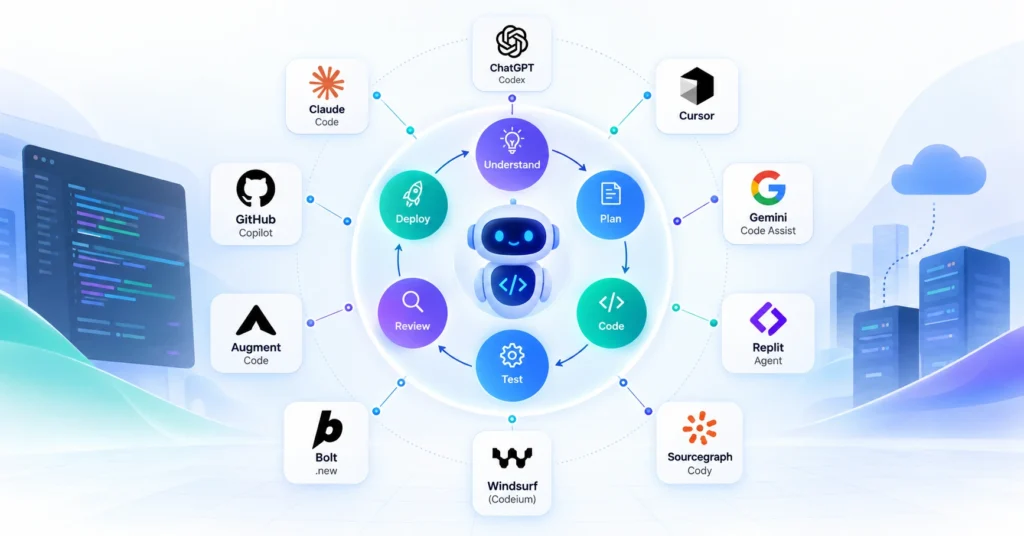
The best AI coding agents in 2026 include Claude Code, OpenAI Codex, Cursor, GitHub Copilot, Windsurf, Gemini Code Assist, Cline, Devin, Kiro, and Augment. They differ in autonomy, IDE integration, codebase context, enterprise controls, and workflow support. The right choice depends on whether your priority is coding speed, autonomous execution, enterprise governance, or large-scale software engineering.
TL;DR
- Claude Code is a strong choice for complex, terminal-driven, multi-file engineering work.
- OpenAI Codex is suited to long-running, autonomous coding tasks and parallel agent workflows.
- Cursor stands out for developers who want an AI-native IDE and multi-file agent experience.
- GitHub Copilot is a strong enterprise option for organizations already standardized on GitHub and common IDEs.
- Windsurf focuses on an AI-first development environment and agent-assisted workflows.
- Gemini Code Assist fits teams invested in the Google Cloud ecosystem.
- Cline is attractive to developers seeking an extensible, open-source-style agent experience with model/provider flexibility.
- Devin is designed around autonomous software-engineering tasks, including backlog work, debugging, testing, and migrations.
- Kiro emphasizes structured, spec-driven agentic development rather than prompt-only coding.
- Augment differentiates around deep codebase context and enterprise-scale software engineering.
- There is no single best AI coding agent. The best tool is the one that fits your repository, engineering workflow, security requirements, and level of desired autonomy.
What Are AI Coding Agents?
AI coding agents are software-development systems that can understand a coding task, inspect a codebase, plan changes, modify multiple files, run tools or tests, and iterate toward a working result. Unlike traditional AI coding assistants, they can execute multi-step development workflows rather than simply suggest individual lines of code.
The shift from AI coding assistants to AI coding agents is important.
Traditional assistants primarily help developers:
- Generate code
- Complete functions
- Explain code
- Suggest fixes
- Write documentation
AI coding agents can go further by:
Understand → Plan → Edit → Execute → Test → Debug → Iterate
For example, instead of asking an AI assistant:
“Write a function to validate an order.”
An agent can receive:
“Add order validation to the checkout service, update the API contract, add unit and integration tests, run the existing test suite, and prepare the changes for review.”
The distinction matters because enterprise software development increasingly involves multi-file changes, legacy codebases, testing, debugging, migrations, documentation, and repetitive engineering workflows.
Current AI coding agent comparisons increasingly evaluate tools by workflow rather than autocomplete quality alone.
Read our blog on AI-Native Engineering Explained: The Enterprise Guide to AI-Driven Software Development
10 Best AI Coding Agents in 2026
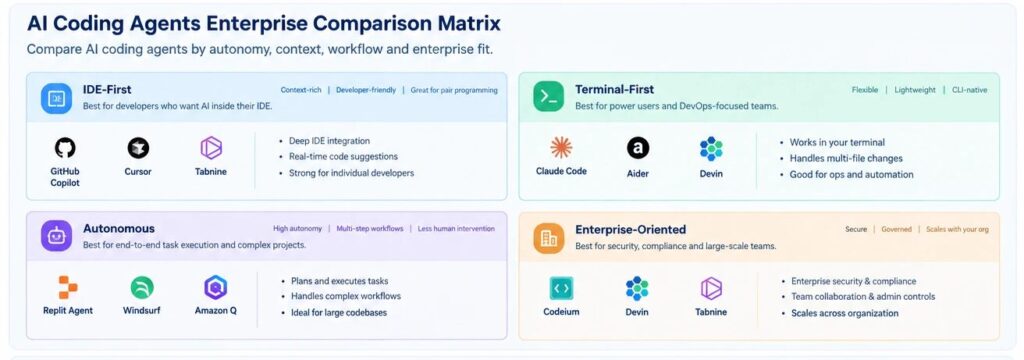
The leading AI coding agents in 2026 are Claude Code, OpenAI Codex, Cursor, GitHub Copilot, Windsurf, Gemini Code Assist, Cline, Devin, Kiro, and Augment. They are not interchangeable: some are IDE-centric, some are terminal-first, some emphasize autonomous execution, and others focus on enterprise governance or deep codebase context.
Quick Comparison
| AI Coding Agent | Best For | Primary Experience | Autonomy | Enterprise Fit |
|---|---|---|---|---|
| Claude Code | Complex engineering tasks | Terminal / CLI | High | High |
| OpenAI Codex | Long-running development tasks | Cloud / IDE / CLI | High | High |
| Cursor | AI-native development | IDE | High | High |
| GitHub Copilot | Enterprise developer workflows | GitHub + IDE + CLI | High | Very High |
| Windsurf | AI-first IDE workflows | IDE | High | High |
| Gemini Code Assist | Google Cloud development | IDE | High | High |
| Cline | Flexible, extensible development | IDE | High | Medium–High |
| Devin | Autonomous engineering work | Cloud workspace | Very High | High |
| Kiro | Spec-driven development | IDE / CLI / Web | High | High |
| Augment | Large and complex codebases | IDE / CLI | High | Very High |
Capabilities and commercial plans evolve quickly; verify current vendor documentation before making a purchasing decision.
1. Claude Code
Claude Code is a terminal-first AI coding agent designed for complex software-engineering work. It can inspect repositories, reason across files, execute commands, make changes, and iterate through development tasks, making it particularly useful for engineers working on large or technically complex codebases.
Claude Code is particularly compelling for:
- Complex debugging
- Multi-file refactoring
- Architecture changes
- Test generation and repair
- Repository exploration
- Terminal-heavy workflows
- Long-running engineering tasks
Its strongest differentiator is the depth of agent-driven engineering workflow, rather than traditional autocomplete.
Anthropic has continued to position Claude’s latest models around coding and long-running agentic work.
Best suited for: Senior developers, platform engineers, architects, and teams comfortable with CLI-based workflows.
2. OpenAI Codex
OpenAI Codex is an AI coding agent built to handle software-engineering tasks end to end, including feature development, refactoring, migrations, testing, and repository work. Its workflow is increasingly oriented toward delegating longer-running tasks and coordinating multiple coding agents.
Codex is a strong fit for:
- Feature implementation
- Large refactoring tasks
- Code migrations
- Test generation
- Repository maintenance
- Parallel agent workflows
- Background engineering tasks
OpenAI describes Codex as supporting long-running engineering work and parallel agents through isolated work environments.
Best suited for: Teams looking to delegate substantial engineering tasks rather than use AI solely for inline code completion.
3. Cursor
Cursor is an AI-native code editor with an agent that can search a codebase, edit multiple files, execute terminal commands, and iterate on complex tasks. Its advantage is combining an AI-first IDE experience with agentic software development and support for multiple frontier models.
Cursor works particularly well for:
- Daily development
- Multi-file editing
- Feature development
- Debugging
- Refactoring
- UI development
- Codebase exploration
Its Agent can use file editing, codebase search, terminal execution, web access, and other tools while working through a task.
Best suited for: Developers who want the convenience of an IDE combined with autonomous coding capabilities.
4. GitHub Copilot
GitHub Copilot is one of the strongest enterprise choices for AI-assisted and agentic software development because it combines coding assistance with GitHub’s repository, pull request, security, and developer workflow ecosystem. Its agent capabilities can research tasks, plan changes, modify code, run tests, and prepare pull requests for review.
Copilot is particularly valuable when your engineering organization already uses:
- GitHub
- GitHub Actions
- VS Code
- Visual Studio
- JetBrains IDEs
- GitHub Issues
- Pull requests
- GitHub Advanced Security
GitHub’s current agent capabilities extend beyond code completion into background task execution, code review, issue handling, and third-party agent integration.
Best suited for: Enterprise teams wanting strong integration with an existing GitHub-centered SDLC.
For enterprises evaluating agentic development, GitHub — Integrating agentic AI into your enterprise SDL guidance outlines how AI agents can participate across planning, coding, testing, review, optimization, and security within the software development lifecycle.
5. Windsurf
Windsurf is an AI-first development environment designed around agent-assisted coding. Its value is less about individual code suggestions and more about maintaining developer flow while AI helps execute larger coding tasks, navigate the project, and make coordinated changes.
Consider Windsurf when your team prioritizes:
- AI-native IDE workflows
- Fast iteration
- Agent-assisted development
- Context-aware coding
- Multi-file changes
- Developer productivity
Best suited for: Product engineering teams that want an AI-first coding environment rather than a traditional IDE plugin.
6. Gemini Code Assist
Gemini Code Assist provides AI-powered coding assistance and agent mode within supported development environments. Its agent mode can handle multi-step tasks, use available tools, modify code, and allow developers to review or approve actions, making it relevant for teams building within the Google Cloud ecosystem.
Useful scenarios include:
- Application development
- Cloud-native development
- Debugging
- Test generation
- Code modernization
- Google Cloud workloads
- MCP-enabled workflows
Google’s documentation describes agent mode as supporting complex multi-step tasks and configurable tool use, while also warning that some capabilities remain in preview.
Best suited for: Teams heavily invested in Google Cloud and Google’s developer ecosystem.
7. Cline
Cline is an extensible coding agent that gives developers significant control over models, tools, and execution. It is well suited to developers who want a flexible agent architecture rather than a tightly coupled proprietary development environment.
Cline can be attractive for:
- Experimental agentic development
- Custom workflows
- BYO-model approaches
- Tool integration
- MCP-based workflows
- Developers who want greater control
Best suited for: Technical teams comfortable configuring AI development environments and managing their own model/provider choices.
8. Devin
Devin positions itself as an autonomous AI software engineer capable of planning and executing engineering tasks, running tests, debugging, creating pull requests, and handling migrations or refactoring work. Its cloud-oriented workflow makes it particularly relevant for delegating engineering tasks rather than simply assisting inside an IDE.
Potential enterprise use cases include:
- Backlog reduction
- Bug fixing
- CI failure investigation
- Test coverage improvements
- Code migrations
- Refactoring
- Documentation
- PR review
Devin’s documentation recommends starting with well-scoped work and progressively moving toward more complex tasks.
Best suited for: Engineering organizations looking to delegate discrete software-development tasks to autonomous agents.
9. Kiro
Kiro takes a structured approach to agentic software development by turning prompts into requirements, architecture designs, and implementation tasks before agents write code. This makes it especially relevant when teams need more structure and traceability than prompt-driven coding alone provides.
Kiro is differentiated by:
- Spec-driven development
- Structured requirements
- Architecture planning
- Agent hooks
- Custom agents
- MCP support
- Permissions
- Parallel agent workflows
- Cloud development sessions
Kiro’s current platform combines IDE, CLI, and web-based agent workflows and emphasizes structured specifications before implementation.
Best suited for: Enterprise teams concerned with requirements clarity, architectural consistency, and controlled agent autonomy.
10. Augment
Augment is an AI coding platform focused heavily on codebase context and enterprise-scale software engineering. Its Context Engine is designed to help agents understand relationships across files, repositories, dependencies, documentation, and development history instead of relying only on basic keyword search.
This makes Augment particularly interesting for:
- Large repositories
- Enterprise monorepos
- Legacy modernization
- Cross-repository development
- Complex refactoring
- Code migration
- AI-powered code review
Augment’s documentation emphasizes semantic codebase search and context across repositories and other engineering artifacts.
Best suited for: Enterprises where repository scale and codebase context are major constraints on AI coding quality.
AI Coding Agents: Which One Should You Choose?
Choosing an AI coding agent should start with the engineering workflow you want to improve—not the benchmark score alone. Evaluate each tool against repository complexity, required autonomy, IDE preferences, security controls, model flexibility, integration requirements, and the amount of human review your organization needs.
| If Your Priority Is… | Consider |
|---|---|
| Complex terminal-based engineering | Claude Code |
| Long-running autonomous tasks | Codex / Devin |
| AI-native IDE experience | Cursor / Windsurf |
| GitHub-centered enterprise development | GitHub Copilot |
| Google Cloud development | Gemini Code Assist |
| Flexible/custom agent workflows | Cline |
| Structured requirements and architecture | Kiro |
| Large codebase understanding | Augment |
A Better Enterprise Selection Framework
Instead of asking:
“Which AI coding agent is best?”
Ask:
“Which agent is best for this class of engineering work?”
Evaluate candidates across six dimensions:
| Evaluation Area | Key Question |
|---|---|
| Code Quality | Does it produce maintainable, production-ready code? |
| Context | Can it understand the relevant architecture and dependencies? |
| Autonomy | How much work can it complete without intervention? |
| Verification | Can it run tests and validate its own changes? |
| Governance | Can the organization control permissions, data, models, and actions? |
| Integration | Does it fit the existing SDLC and enterprise toolchain? |
This is more useful than treating benchmark scores as a universal ranking. Current comparison articles similarly emphasize that different agents excel in different workflows, with context, autonomy, IDE/CLI experience, and enterprise fit becoming major differentiators.
AI Coding Agents vs. AI Coding Assistants
AI coding assistants primarily suggest code or answer developer questions, while AI coding agents can execute multi-step tasks using tools, modify multiple files, run commands, test changes, and iterate toward a defined outcome. The distinction is increasingly important as software engineering moves from AI-assisted coding toward agentic development.
| Capability | AI Coding Assistant | AI Coding Agent |
|---|---|---|
| Code completion | ✓ | ✓ |
| Code explanation | ✓ | ✓ |
| Generate functions | ✓ | ✓ |
| Search codebase | Limited/✓ | ✓ |
| Edit multiple files | Limited | ✓ |
| Execute commands | Limited | ✓ |
| Run tests | Limited | ✓ |
| Debug iteratively | Limited | ✓ |
| Plan multi-step work | Limited | ✓ |
| Work autonomously | Low | High |
| Create PRs / delegated work | Limited | Increasingly common |
The practical implication is significant: AI coding agents change the unit of work from “generate code” to “complete an engineering task.”
Read more on AI Coding Agents in Enterprise Software Development: Use Cases, Risks & Best Practices.
What Makes an AI Coding Agent Enterprise-Ready?
An enterprise-ready AI coding agent needs more than strong code generation. It should provide appropriate security, access controls, auditability, repository context, integration with the SDLC, human approval points, and mechanisms for validating agent-generated changes before production deployment.
For enterprise adoption, evaluate:
1. Security and Data Controls
Check:
- Where source code is processed
- Data retention policies
- Identity and access management
- Repository permissions
- Secret handling
- Network controls
- Audit logging
2. Human-in-the-Loop Controls
Not every task should be autonomous.
A practical model is:
Low Risk → Autonomous
Medium Risk → Agent + Review
High Risk → Agent Recommendation + Approval
Production-Critical → Mandatory Human Validation
3. Context Management
Agent performance depends heavily on the context it receives.
The relevant context may include:
- Source code
- Architecture
- APIs
- Documentation
- Tests
- Coding standards
- Issue descriptions
- Historical changes
- Dependencies
- Runbooks
This is why codebase intelligence is becoming a differentiating layer among AI coding agents. Augment, Cursor, Devin, and Kiro, for example, all emphasize mechanisms for providing agents with richer project context.
4. Verification
A good enterprise workflow should not be:
Prompt → Code → Merge
It should be:
Prompt → Plan → Code → Test → Review → Security Check → Merge
The agent should produce evidence that its change works.
How to Get the Most Value From AI Coding Agents
The highest-value enterprise use of AI coding agents is not unrestricted autonomous coding. It is delegating well-defined, repeatable engineering tasks inside controlled workflows where agents have sufficient context and every consequential change can be verified.
Start with tasks such as:
- Unit-test generation
- Bug reproduction
- Dependency updates
- Documentation
- Small feature implementation
- Static-analysis fixes
- CI troubleshooting
- Refactoring
- API updates
- Code migration
Then expand toward:
- Cross-service changes
- Large refactoring
- Legacy modernization
- Automated code review
- Parallel development tasks
- Continuous engineering maintenance
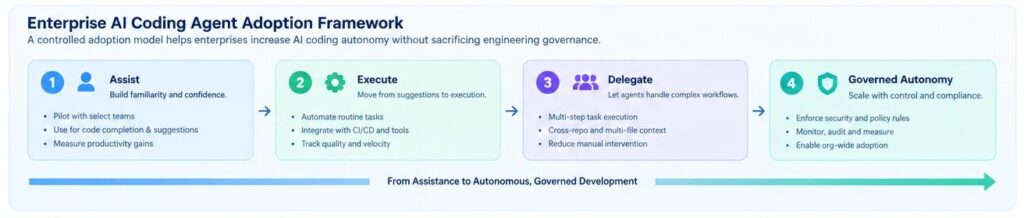
A useful operating model is:
Human defines intent → Agent executes → Automated controls verify → Human approves consequential changes
That model gives organizations the productivity benefits of agentic coding without treating AI output as inherently trustworthy.
Common Mistakes When Choosing AI Coding Agents
The most common mistake is selecting an AI coding agent based only on benchmark scores or feature lists. Enterprise teams should instead evaluate real repository performance, security requirements, workflow integration, verification quality, total usage cost, and the level of autonomy appropriate for each engineering task.
Avoid these mistakes:
- Choosing the highest benchmark score without testing your own codebase
- Comparing tools only on autocomplete quality
- Ignoring context and repository architecture
- Giving agents unrestricted production access
- Measuring generated lines of code instead of completed engineering work
- Skipping automated tests and code review
- Assuming one agent will be optimal for every workflow
- Ignoring token or usage-based costs
- Deploying autonomous agents without rollback mechanisms
- Treating AI-generated code as production-ready by default
The strongest emerging pattern is therefore task-specific agent selection, not a one-tool-for-everything strategy. Recent 2026 comparisons also increasingly frame the market around different workflows rather than a single universal winner.
Final Verdict: What Are the Best AI Coding Agents in 2026?
There is no universal winner among AI coding agents in 2026. Claude Code and Codex are strong choices for autonomous engineering, Cursor excels at AI-native IDE development, GitHub Copilot is compelling for GitHub-centric enterprises, Devin emphasizes delegated software engineering, Kiro brings structure through specifications, and Augment focuses on deep codebase context.
For an enterprise shortlist:
| Enterprise Need | Strong Shortlist |
|---|---|
| Complex engineering | Claude Code, Codex |
| Developer productivity | Cursor, GitHub Copilot |
| GitHub ecosystem | GitHub Copilot |
| Autonomous task delegation | Devin, Codex |
| Structured development | Kiro |
| Large/complex repositories | Augment, Cursor |
| Google Cloud | Gemini Code Assist |
| AWS ecosystem | Kiro / Amazon Q Developer transition path |
| Flexible experimentation | Cline |
| Multi-tool strategy | Cursor + Claude Code/Codex/Copilot |
The bigger shift is not which tool wins a leaderboard.
It is that AI coding agents are becoming part of the software engineering operating model.
For enterprise teams, the winning approach is to combine the right agent with the right context, permissions, testing, governance, and human checkpoints.
That is how organizations move from AI-assisted coding to scalable agentic software engineering.
FAQs: AI Coding Agents in 2026
1. What are the best AI coding agents in 2026?
The leading AI coding agents in 2026 include Claude Code, OpenAI Codex, Cursor, GitHub Copilot, Windsurf, Gemini Code Assist, Cline, Devin, Kiro, and Augment. The best option depends on your development environment, repository complexity, autonomy requirements, and enterprise controls.
2. Which AI coding agent is best for enterprise software development?
GitHub Copilot, Claude Code, Codex, Devin, Kiro, and Augment are strong enterprise candidates, but the best choice depends on your existing engineering ecosystem and governance requirements. Enterprises should run a proof of concept against representative repositories before standardizing on one tool.
3. Is Cursor better than GitHub Copilot?
Cursor and GitHub Copilot solve overlapping but different problems. Cursor is an AI-native development environment with a strong agent workflow, while Copilot has deep integration with GitHub and multiple developer environments. The better choice depends on whether IDE experience or enterprise GitHub integration is the bigger priority.
4. Is Claude Code better than Cursor?
There is no universal winner. Claude Code is particularly strong for terminal-driven, complex engineering tasks, while Cursor provides an integrated AI-native IDE experience and supports multiple models. Teams should evaluate both using their own repositories and development workflows.
5. Can AI coding agents replace software developers?
AI coding agents can automate substantial portions of software development, but they do not eliminate the need for software engineers. Architecture, requirements, security, system design, trade-off decisions, production ownership, and engineering governance still require human expertise.
6. Are AI coding agents safe for enterprise codebases?
They can be used safely when implemented with appropriate access controls, isolated environments, secrets management, auditability, testing, code review, and human approval for high-impact actions. Enterprise deployment should be governed by risk rather than unrestricted agent autonomy.
7. What is the difference between agentic coding and AI-assisted coding?
AI-assisted coding generally helps a developer generate or understand code, whereas agentic coding allows an AI agent to plan and execute multi-step engineering tasks using tools such as code search, file editing, terminal commands, and testing
8. How should enterprises evaluate AI coding agents?
Evaluate them against code quality, task completion rate, repository context, test effectiveness, security, autonomy, integration, governance, developer experience, and total cost. A realistic proof of concept using your own codebase is more valuable than relying solely on public benchmarks.
Related Reads
- AI Data Engineering: Building Autonomous Enterprise Data Pipelines.
- AI Coding Agents in Enterprise Software Development: Use Cases, Risks & Best Practices
- How to Build AI-Native Applications for Enterprise Scale.
- Legacy Modernization Services in 2026: How Enterprises Are Cutting Costs with AI
- Enterprise AI agent adoption challenges
- AI-Native Engineering Explained: The Enterprise Guide to AI-Driven Software Development