The debate around Tableau vs Power BI has persisted for over a decade, but in 2026, the comparison carries far greater strategic weight than ever before. What was once a discussion about dashboards and charts has evolved into a broader evaluation of enterprise BI tools, unified analytics platforms, and long-term data strategy. With the emergence of Microsoft Fabric analytics, business intelligence in enterprise environments is being reshaped around integrated data, AI, governance, and scalability.
For CTOs, CDOs, and analytics leaders, choosing between Tableau vs Power BI is no longer a tooling decision—it is an architectural commitment. The rise of Power BI in Microsoft Fabric introduces a fundamentally different value equation, particularly for organizations already invested in Azure, Microsoft 365, and enterprise-grade data governance.
This guide examines Tableau vs Power BI through an enterprise lens—focusing on ROI, total cost of ownership, operating models, and future readiness. Rather than feature checklists, we analyze how each platform supports modern enterprise analytics, scales across complex organizations, and aligns with the Microsoft Fabric era.
Related Insights: What Is Power BI Copilot? 5 Enterprise Strategies to Be Ready
TL;DR Summary
- Tableau vs Power BI is no longer just a visualization debate—it’s an enterprise platform decision
- Microsoft Fabric fundamentally changes Power BI’s enterprise value proposition
- Tableau remains strong in visualization depth but faces ecosystem trade-offs
- Power BI benefits from unified analytics, governance, and cost efficiency in Fabric
- Enterprises must evaluate ROI, operating models, and future AI readiness—not features alone
What Is Microsoft Fabric and Why It Matters for BI Tools
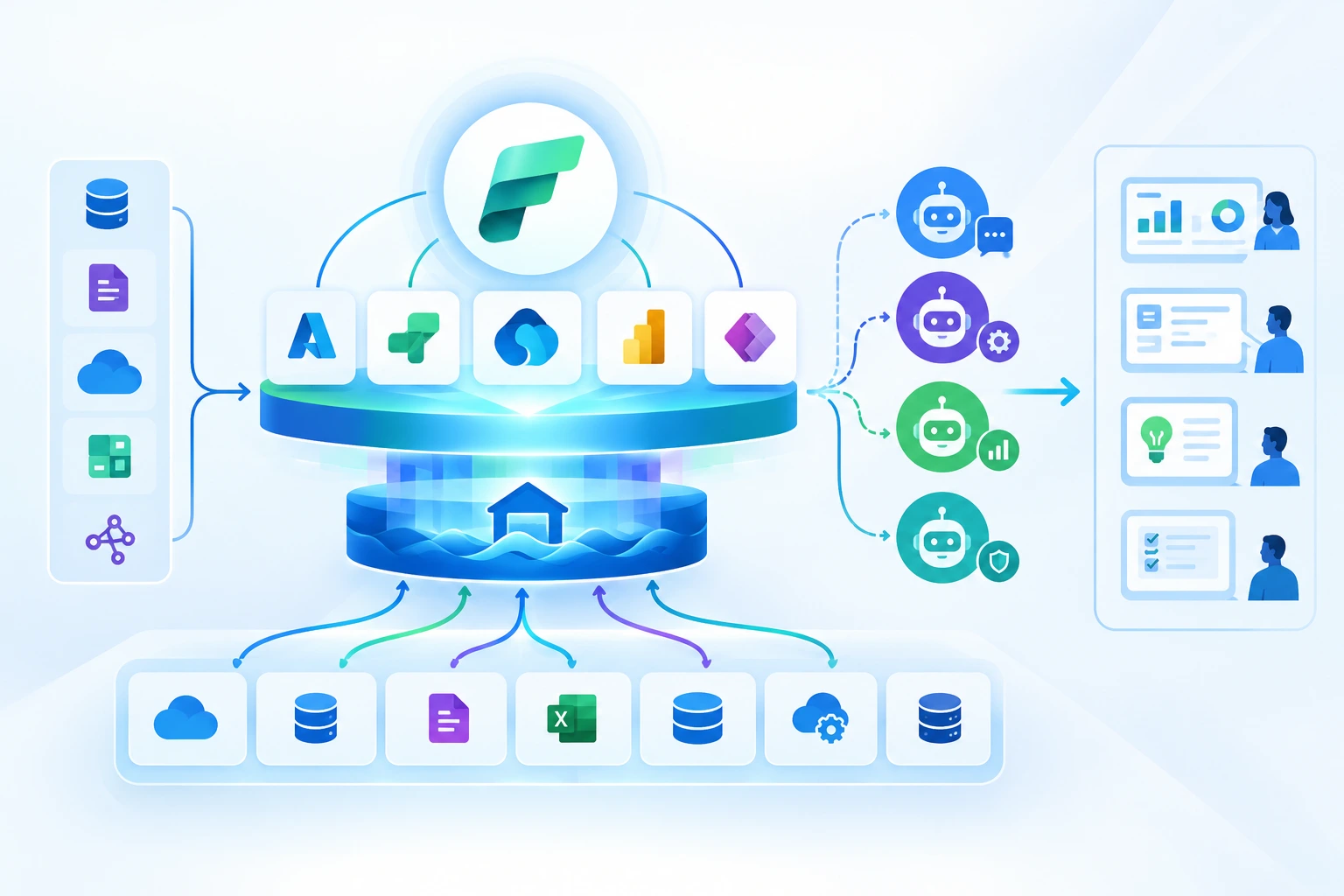
Microsoft Fabric represents a significant shift in how enterprises architect analytics platforms. Instead of managing fragmented tools for data integration, engineering, warehousing, BI, and AI, Fabric introduces a unified analytics SaaS platform built on a single data foundation—OneLake.
At its core, Microsoft Fabric architecture unifies multiple workloads: data ingestion, transformation, real-time analytics, data science, and business intelligence. Power BI is no longer a standalone visualization layer; it becomes a native analytics experience embedded within the same platform that manages enterprise data at scale.
This matters because enterprise BI tools are increasingly constrained not by visualization capabilities, but by data fragmentation, governance complexity, and operational overhead. Traditional BI architectures require multiple handoffs between systems, teams, and technologies—introducing latency, cost, and risk.
Fabric addresses these challenges by:
Unified data foundation
All analytics workloads operate on a shared, governed data layer. This eliminates duplication between data warehouses, lakes, and BI semantic models.
End-to-end governance
Security, lineage, and compliance are applied consistently across ingestion, transformation, and reporting—critical for regulated industries.
Native AI enablement
Fabric is designed to support advanced analytics, Copilot experiences, and machine learning without exporting data across platforms.
In this context, Power BI in Microsoft Fabric gains a structural advantage. It is no longer just competing with Tableau on visualization quality but operating as part of a broader enterprise analytics system. This shift fundamentally reframes the Tableau vs Power BI discussion from a feature comparison to a platform strategy decision.
For enterprises modernizing analytics, Fabric raises a critical question: should BI remain a loosely integrated tool, or become a native capability of a unified analytics platform?
Related Insights: To understand how this fits into broader analytics modernization, many leaders start by evaluating Microsoft Fabric vs Power BI: What Enterprise Leaders Need to Know as part of their platform strategy.
Tableau vs Power BI: Feature-by-Feature Comparison
A feature-level comparison between Tableau vs Power BI remains relevant—but only when evaluated through enterprise use cases rather than isolated analyst workflows. Both platforms are mature, capable, and widely adopted. The differences emerge in how features scale, integrate, and govern across complex organizations.
Data Visualization Capabilities
Tableau built its reputation on best-in-class visualization. Its strength lies in expressive, flexible visuals that allow analysts to explore data intuitively. Many organizations still value Tableau data visualization benefits for exploratory analytics, especially where design precision and storytelling are paramount.
Tableau’s visualization engine offers:
- Highly customizable charts and layouts
- Strong support for exploratory, ad-hoc analysis
- Advanced calculated fields and visual analytics
- Smooth performance for in-memory datasets
Power BI, by contrast, prioritizes consistency, standardization, and integration. While its visual flexibility has improved significantly, Power BI emphasizes reusable semantic models and governed dashboards over free-form exploration. Power BI data modeling plays a central role, enabling centralized measures, KPIs, and definitions shared across the enterprise.
In enterprise environments, this distinction matters. Tableau often excels in analyst-driven discovery, while Power BI aligns more naturally with standardized executive reporting, governed metrics, and scalable consumption. The question becomes less about which tool is “better” and more about which aligns with the organization’s analytics operating model.
Enterprise Scalability & Governance
Enterprise BI tools must support thousands of users, multiple business units, and strict governance requirements. This is where feature parity begins to diverge in practice.
Power BI benefits from deep integration with Azure Active Directory, Microsoft Purview, and Fabric’s unified security model. Role-based access, data sensitivity labels, and lineage tracking are applied consistently across the analytics lifecycle. For organizations prioritizing business intelligence in enterprise contexts—especially regulated industries—this unified governance model reduces risk and operational overhead.
Tableau offers robust governance capabilities, including site roles, content permissions, and cataloging through Tableau Data Management. However, these often require additional configuration, licensing, and integration with third-party governance tools. In complex enterprises, governance becomes an ongoing operational effort rather than a native platform capability.
Scalability is not just about performance—it is about managing change, access, and trust at scale. In this dimension, Power BI’s alignment with Microsoft Fabric analytics strengthens its enterprise positioning.
Integration & Ecosystem
Integration has become a decisive factor in Tableau vs Power BI evaluations. Modern enterprises operate across cloud platforms, SaaS applications, and data ecosystems that demand seamless interoperability.
Tableau remains platform-agnostic, supporting a wide range of data sources and deployment models. This flexibility appeals to organizations with heterogeneous technology stacks or multi-cloud strategies.
Power BI, however, gains momentum through ecosystem depth rather than breadth. Integration with Microsoft Fabric analytics, Azure Synapse, Data Factory, and Microsoft 365 creates a tightly coupled analytics experience. Dashboards, reports, and insights flow naturally into Teams, SharePoint, and enterprise workflows.
For enterprises already standardized on Microsoft, this integration reduces friction and accelerates adoption. The more Fabric becomes central to enterprise analytics, the more Power BI’s ecosystem advantage compounds.
Related Insights: See how your enterprise can develop self-service capabilities and integrate augmented analytics/AI modules in our solution offerings.
Enterprise Value: ROI & Total Cost of Ownership (TCO)
When evaluating Tableau vs Power BI, enterprises must look beyond licensing fees and assess long-term economic impact. Enterprise value is shaped by implementation complexity, operational efficiency, scalability, and alignment with broader data strategy.
Licensing & Pricing Overview
Power BI pricing is structured to scale with enterprise needs, particularly when bundled within Microsoft Fabric or Microsoft 365 agreements. Capacity-based pricing allows organizations to align costs with usage, while Fabric simplifies licensing across analytics workloads.
Tableau pricing follows a role-based subscription model, separating creators, explorers, and viewers. While this model provides flexibility, it can become costly at scale—especially when analytics adoption expands beyond core analyst teams.
From a TCO perspective, pricing alone is only part of the equation. Enterprises must consider:
- Infrastructure and platform costs
- Governance and security tooling
- Integration and data movement overhead
- Support and operational staffing
Power BI’s integration within Fabric often reduces these ancillary costs by consolidating platforms. Tableau deployments, particularly in hybrid or multi-cloud environments, may require additional tooling to achieve comparable enterprise capabilities.
Related Insights: Learn more about Microsoft Architecture to understand how you can modernize your platform to become AI-ready.
ROI for Large Organizations
Tableau enterprise value is strongest in organizations where analytics maturity is high, analysts are deeply embedded in business units, and visualization flexibility drives decision-making. In such cases, Tableau can deliver strong ROI through faster insights and richer analysis.
Power BI enterprise value, however, increasingly extends beyond BI. In the Fabric era, ROI is driven by unified analytics, reduced data duplication, and faster time-to-value for AI and advanced analytics initiatives. Enterprises benefit from:
- Lower operational complexity
- Faster onboarding of new use cases
- Consistent metrics and governance
- Alignment with future AI investments
For executive leaders, ROI is measured not just in analyst productivity, but in enterprise-wide decision velocity, risk reduction, and strategic agility.
Related Insights: Read more on how Microsoft Fabric AI solutions fundamentally transform how enterprises unify data, automate intelligence, and deploy AI at scale in our blog.
How Techment Helps Enterprises Navigate BI Decisions
Choosing between Tableau vs Power BI requires more than a technical comparison—it demands a clear understanding of enterprise data strategy, operating models, and future-state architecture. Techment helps organizations evaluate BI platforms in the context of broader analytics modernization initiatives.
Through unified data strategy and analytics modernization services, Techment supports enterprises in aligning BI tools with Microsoft Fabric analytics, governance frameworks, and AI readiness. From platform assessment to enterprise-scale implementation, Techment ensures BI investments deliver measurable business value.
Related Insights: Learn more in our partnership page and understand the strategic benefits we bring as a Microsoft solutions partner.
Microsoft Fabric Era: Why Power BI Gains an Advantage
The emergence of Microsoft Fabric fundamentally alters the Tableau vs Power BI debate by shifting the center of gravity from visualization to platform economics, operating models, and AI readiness. In prior eras, BI tools competed primarily on analyst experience. In the Fabric era, enterprise analytics success is defined by integration, governance, and scale.
Unified Analytics Changes the BI Value Equation
Microsoft Fabric consolidates data engineering, data science, real-time analytics, and business intelligence into a single SaaS platform. This consolidation has direct implications for Power BI’s enterprise positioning.
Power BI is no longer dependent on external data warehouses or complex semantic layer synchronization. Instead, it operates directly on governed data products within OneLake. This eliminates common enterprise pain points such as duplicated datasets, inconsistent KPIs, and latency between data engineering and reporting teams.
For enterprises, this translates into:
- Faster time-to-insight as data pipelines and BI consume the same data foundation
- Reduced operational overhead by minimizing tool sprawl
- Improved trust in metrics through centralized governance
In contrast, Tableau typically remains decoupled from the underlying data platform. While this provides flexibility, it also perpetuates architectural fragmentation—an increasingly costly trade-off at enterprise scale.
AI and Advanced Analytics Readiness
Enterprise analytics strategies in 2026 are inseparable from AI ambitions. Predictive analytics, generative insights, and conversational BI are rapidly becoming baseline expectations.
Power BI benefits directly from Fabric’s AI-native design. Copilot experiences, embedded machine learning workflows, and semantic understanding are built into the platform. This positions Power BI as a downstream consumer of enterprise AI capabilities rather than a disconnected reporting layer.
Tableau continues to invest in AI-driven features, particularly through Salesforce’s ecosystem. However, enterprises often face integration complexity when aligning Tableau insights with centralized data science platforms and governance models.
For organizations pursuing AI at scale, the Microsoft Fabric vs Power BI conversation becomes almost inseparable—Power BI is effectively the visualization and consumption layer of a broader AI-ready analytics platform.
Operating Model Simplicity at Scale
Large enterprises increasingly evaluate platforms based on operating efficiency rather than marginal feature advantages. Fabric simplifies analytics operating models by aligning teams around a shared platform, security model, and data lifecycle.
Power BI inherits these benefits directly. Tableau, while powerful, often requires parallel investments in data engineering platforms, governance tooling, and integration layers to achieve comparable enterprise outcomes.
In the Fabric era, Power BI’s advantage is not that it replaces Tableau’s strengths—but that it reduces the total system complexity enterprises must manage.
Related Insights: Read what Microsoft Fabric is, how it works, why organizations are rapidly adopting it, and what leaders must know in our latest blog – What Is Microsoft Fabric? A Comprehensive Overview for Modern Data Leaders.
Real-World Use Cases: Which Tool Wins for Enterprise?
Abstract comparisons only go so far. The real test of Tableau vs Power BI lies in how each platform performs across industry-specific enterprise scenarios.
Use Case: Financial Services
Financial services organizations operate under intense regulatory scrutiny, with stringent requirements for data lineage, access control, and auditability.
Power BI, integrated with Microsoft Fabric analytics and Microsoft Purview, offers native capabilities for sensitivity labeling, role-based access, and end-to-end lineage tracking. These features reduce compliance risk while enabling self-service analytics within controlled boundaries.
Tableau can support financial services use cases, particularly for advanced analyst workflows. However, enterprises often need additional governance layers to meet regulatory expectations, increasing operational overhead.
Enterprise takeaway:
For highly regulated environments, Power BI’s alignment with enterprise governance frameworks often delivers faster compliance and lower risk.
Use Case: Retail & Demand Forecasting
Retail analytics demands agility—rapid iteration, exploratory analysis, and the ability to visualize complex patterns across customer behavior, inventory, and supply chains.
Tableau’s visualization flexibility and exploratory capabilities make it well-suited for demand forecasting and merchandising analytics. Analysts can quickly prototype insights and adapt to changing business questions.
Power BI performs strongly when demand forecasting is embedded within broader enterprise analytics workflows—especially when integrated with Fabric’s real-time analytics and machine learning capabilities.
Enterprise takeaway:
Tableau excels in analyst-led exploration, while Power BI gains strength when forecasting is operationalized at scale.
Use Case: Manufacturing & IoT BI
Manufacturing enterprises increasingly rely on real-time data from IoT devices, operational systems, and digital twins.
Microsoft Fabric’s real-time analytics capabilities, combined with Power BI dashboards, enable near-real-time operational visibility across plants and assets. Integration with Azure IoT services further strengthens this use case.
Tableau can visualize IoT data effectively, but often depends on external streaming and processing platforms to manage data velocity and scale.
Enterprise takeaway:
For IoT-heavy environments, Power BI’s integration with Fabric and Azure often provides a more cohesive end-to-end solution.
Related Insights: How Leaders Are Using Microsoft Fabric AI Use Cases to Operationalize AI at Scale
Tableau vs Power BI: Enterprise BI Comparison
| Dimension | Power BI | Tableau |
|---|---|---|
| Primary Strength | End-to-end analytics tightly integrated with the Microsoft ecosystem | Best-in-class data visualization and visual exploration |
| Ease of Use | Easy for report consumption; report creation requires DAX and data modeling skills | Intuitive for analysts; steep learning curve for non-technical business users |
| Data Visualization | Strong standard visuals, improving rapidly but less flexible for custom design | Industry-leading, highly customizable, and visually expressive |
| Self-Service Analytics | Limited without analyst support due to DAX and model dependencies | Better exploratory analysis, but still analyst-centric |
| AI & Advanced Analytics | Copilot available with Fabric/Premium; AI works best on curated datasets | AI features (e.g., Pulse) exist but are detached from core workflows |
| Conversational Analytics | Emerging via Copilot, but not fully native | Limited; relies on dashboards and predefined views |
| Data Freshness | Import or DirectQuery—trade-off between performance and real-time access | Extract-based approach can lead to stale data |
| Enterprise Scalability | Scales well in Azure and Microsoft Fabric environments | Scales well but often requires additional infrastructure planning |
| Performance at Scale | Strong with Fabric and Azure optimization | Performance depends heavily on extract design and tuning |
| Governance & Security | Strong within Microsoft ecosystem; Azure AD integration | Robust governance, but typically IT-controlled |
| Cross-Platform Integration | Best suited for Microsoft-centric stacks | More platform-agnostic; integrates well across tools |
| Embedding Capabilities | Power BI Embedded available, but implementation is complex | Embedding often relies on iFrames and feels disconnected |
| Developer Experience | Strong APIs, but learning curve for customization | Flexible APIs; customization can be resource-intensive |
| Pricing Model | Generally lower entry cost; scales with Premium/Fabric licensing | Higher licensing costs, especially at enterprise scale |
| Total Cost of Ownership (TCO) | Lower for Microsoft-aligned enterprises | Higher due to licensing and infrastructure overhead |
| Best Fit For | Enterprises standardized on Microsoft Azure and Microsoft Fabric | Organizations prioritizing advanced visualization and analyst-driven insights |
How Techment Helps Enterprises Align BI with Fabric Strategy
Enterprises evaluating Tableau vs Power BI often underestimate the complexity of transitioning analytics operating models. The challenge is not selecting a tool—it is aligning BI decisions with long-term data, cloud, and AI strategies.
Techment works with enterprises to assess BI platforms within the broader context of Microsoft Fabric analytics, governance maturity, and AI readiness. Rather than forcing tool migrations, Techment helps organizations define where each platform delivers value—and where consolidation drives efficiency.
Related Insight: Read our blog on what Microsoft Fabric is, how it works, why organizations are rapidly adopting it, and what leaders must know to leverage it effectively.
Final Verdict: Best BI Tool for Enterprise in the Fabric Era
The Tableau vs Power BI decision in 2026 is less about visual polish and more about enterprise alignment. Tableau remains a powerful platform for visualization excellence and analyst autonomy. For organizations where exploratory analytics is the dominant requirement, Tableau continues to deliver value.
However, the rise of Microsoft Fabric shifts the enterprise calculus. Power BI’s role within a unified analytics platform fundamentally enhances its enterprise value—reducing complexity, accelerating AI initiatives, and improving governance at scale.
For enterprises standardizing on Microsoft technologies, Power BI increasingly represents not just a BI tool, but a strategic analytics capability embedded within the fabric of the organization.
Related Insight: Our Microsoft Data and AI Partner blog explores the strategic value a Microsoft Data and AI Partner brings to enterprises — and why the organizations leading the AI revolution are doing it with the right partner beside them.
Conclusion
As enterprises modernize analytics for 2026 and beyond, the Tableau vs Power BI conversation must evolve. The Microsoft Fabric era demands platforms that scale operationally, govern consistently, and enable AI-driven insights across the business.
Tableau and Power BI are both capable tools—but they serve different enterprise priorities. The most successful organizations will evaluate BI not in isolation, but as part of a cohesive data and analytics strategy.
Techment partners with enterprises to navigate these decisions—ensuring BI platforms align with long-term business outcomes, not short-term feature preferences.
Related Insight: Explore how unified analytics enhances decisions and why Microsoft solutions partner can accelerate your market growth in our latest blog on Microsoft Data Fabric vs Traditional Data Warehousing: What Leaders Need to Know
FAQs: Tableau vs Power BI in 2026
Is Power BI better than Tableau for enterprise analytics?
Power BI is often better suited for enterprises prioritizing unified analytics, governance, and integration with Microsoft Fabric. Tableau remains strong for advanced visualization and analyst-driven exploration.
Does Microsoft Fabric replace Power BI?
No. Microsoft Fabric includes Power BI as its native business intelligence layer. Fabric enhances Power BI’s capabilities by embedding it within a unified analytics platform.
Can Tableau work with Microsoft Fabric?
Yes. Tableau can connect to data stored in Fabric via supported data sources. However, it does not natively participate in Fabric’s unified governance and AI workflows.
Which has better pricing for enterprises?
Power BI pricing is generally more cost-effective at scale, especially when bundled with Microsoft Fabric or Microsoft 365. Tableau pricing can become expensive as user counts and governance needs grow.
Which tool is more future-proof for enterprise analytics?
Power BI’s tight integration with Microsoft Fabric analytics positions it strongly for future AI-driven and real-time enterprise use cases.