
Microsoft Fabric vs Power BI — What’s the Real Difference?
Enterprise leaders evaluating analytics platforms are not just comparing tools — they are comparing architectures.
At a high level:
- Power BI is a business intelligence and visualization tool.
- Microsoft Fabric is a unified enterprise analytics platform that includes data engineering, real-time analytics, storage, governance, and Power BI.
The key difference is scope.
Power BI helps organizations analyze and visualize data.
Fabric helps organizations build and manage the entire data lifecycle — from ingestion to AI-driven insights.
If your organization is deciding between a BI tool and a unified analytics platform, this guide breaks down architecture, pricing, governance, scalability, AI readiness, and enterprise use cases — so you can make a future-ready decision.
TL;DR — Executive Summary
- Power BI is a visualization and business intelligence tool, ideal for dashboards, analytics, and user-centric insights delivery.
- Microsoft Fabric is a unified, enterprise-grade analytics platform that handles ingestion, engineering, storage, real-time analytics, and BI in one framework.
- Fabric is not a replacement for Power BI — Fabric integrates Power BI as its visualization layer.
- Choose Power BI alone for simple reporting environments; choose Fabric + Power BI for scalable enterprise data estates, governed AI pipelines, and multi-domain analytics.
- Enterprises should evaluate their needs across scalability, governance, data complexity, AI maturity, and cost models before comparing Microsoft Fabric vs Power BI.
Choosing the right analytics platform is no longer a simple tooling decision — it is now a strategic business choice with direct implications for enterprise agility, operating efficiency, and AI readiness. As organizations shift toward cloud-native data ecosystems and unified intelligence platforms, the debate of Microsoft Fabric vs Power BI has become one of the most pressing questions for CIOs, CDOs, and enterprise transformation leaders.
Power BI has long been the gold standard for business intelligence and visualization. Its ease of use, strong Microsoft integration, and flexible licensing have made it one of the most widely adopted BI tools in the world. But the analytics landscape has evolved. Enterprises now require unified data architectures, real-time intelligence, multi-cloud scalability, and AI-driven automation across the full data lifecycle. Microsoft Fabric was created to meet this demand — offering a unified, end-to-end data and analytics platform that connects engineering, integration, storage, governance, and BI under one architecture.
Microsoft Fabric vs Power BI analysis goes far beyond feature comparison. It provides a strategic evaluation framework for enterprise leaders, supported by industry research, real-world use cases, cost considerations, and transformation roadmaps. You’ll come away with clarity on when to deploy each platform — and how the two can work together to build a future-ready, AI-accelerated analytics ecosystem.
Side-by-Side Comparison: Microsoft Fabric vs Power BI
| Category | Power BI | Microsoft Fabric |
|---|---|---|
| Platform Scope | Business intelligence tool | End-to-end analytics platform |
| Data Engineering | Limited | Full Spark-based engineering |
| Real-Time Analytics | No native streaming engine | Yes (Real-Time Analytics + KQL) |
| Storage | Dataset-based | OneLake unified storage |
| Governance | Report-level | Cross-domain enterprise governance |
| AI & ML | AI visuals, AutoML (limited) | Full ML lifecycle + lakehouse |
| Ideal For | Dashboards & reporting | Enterprise-scale analytics ecosystems |
Read more about our partnership before you dive deep.
Microsoft Fabric vs Power BI: Why This Decision Matters for Enterprises
The shift from fragmented BI tools to unified analytics platforms is now a defining theme of modern enterprise data strategy. According to Gartner, “By 2027, 60% of data and analytics leaders will face critical failures in managing synthetic data”. This consolidation is driven by a clear business imperative: traditional BI tools are no longer enough to support advanced analytics, AI workloads, and real-time decision intelligence.
This is where the Microsoft Fabric vs Power BI decision becomes pivotal.
Power BI: Purpose-Built for Business Intelligence
Power BI is optimized for business users, analysts, and decision-makers needing self-service reporting, KPI monitoring, and interactive dashboards. Its strength lies in:
- Fast insights
- Rich visualization
- Low training overhead
- Tight Microsoft 365 integration
- Cost-effective licensing
Microsoft Fabric vs Power BI: What Is Designed for Enterprise-Scale Data Transformation
Fabric introduces a paradigm shift — treating data analytics not as a siloed activity but as an integrated lifecycle spanning ingestion, engineering, storage, governance, real-time processing, and visualization. With OneLake, Fabric unifies data assets into a single logical storage layer. With Synapse Data Engineering, Data Science, Real-Time Analytics, and Power BI, it becomes a complete end-to-end platform.
Research from McKinsey shows that enterprises using unified data architectures experience 20–30% faster time-to-insight and up to 45% lower data management costs. This is precisely the value Fabric is engineered to unlock.
Why the Comparison – Microsoft Fabric vs Power BI Matters
C-suite leaders must determine whether they need:
- A BI tool for visualization, or
- A full analytics platform to enable scalable, governed, AI-ready data ecosystems
Fabric represents architectural modernization. Power BI represents analytics democratization.
Choosing the right fit determines your organization’s operational efficiency, cost trajectory, and AI transformation capability for the next 5–10 years.
Read what Microsoft Fabric is, how it works, why organizations are rapidly adopting it, and what leaders must know in our latest blog – What Is Microsoft Fabric? A Comprehensive Overview for Modern Data Leaders.
What Is Power BI? A Deep Dive for Enterprise Leaders
Power BI is a business intelligence (BI) platform designed for interactive reporting, dashboards, and self-service analytics. It enables business users to transform structured data into visual insights without deep engineering expertise.
It excels in:
- Executive dashboards
- KPI tracking
- Department-level reporting
- Embedded analytics
However, Power BI does not function as a full-scale data platform. It relies on external systems for ingestion, transformation, and large-scale engineering.
Limitations to Consider
- Not built for large-scale data engineering
- Requires Premium for advanced AI or large datasets
- Not suitable as a full data platform
Power BI excels as a BI consumption layer, not as an enterprise data management or engineering engine.
Build a strong data foundation with enterprise-grade data management strategies:
Data Management for Enterprises: Roadmap
What Is Microsoft Fabric? Understanding the Unified Analytics Platform
Microsoft Fabric is a unified enterprise analytics platform that consolidates data engineering, data science, real-time analytics, storage, governance, and business intelligence into a single ecosystem.
Unlike standalone BI tools, Fabric supports the entire analytics lifecycle — from ingestion to AI deployment — through a shared compute and storage layer (OneLake).
It is designed for:
Enterprise governance modernization
Multi-domain enterprise data estates
AI and machine learning pipelines
Real-time analytics workloads

Core Capabilities of Microsoft Fabric Vs Power BI
1. OneLake: The Unified Storage Layer
OneLake acts as a “single source of truth” for the entire enterprise.
- Delta format standardization
- Automatic governance policies
- Multi-domain data mesh support
This eliminates copy-based data silos and dramatically reduces pipeline complexity.
2. Synapse Data Engineering
Fabric brings Apache Spark-based engineering, notebooks, and pipelines into one workspace, enabling scalable processing for large enterprise datasets.
3. Real-Time Analytics (RTA)
Built on Kusto Query Engine (KQL), Fabric allows organizations to analyze streaming and real-time data.
Accenture reports that real-time insights can reduce operational latency signficantly.
4. Data Science & ML
Fabric integrates notebooks, models, AutoML, and MLOps — enabling data science workflows without platform switching.
5. Built-In Power BI
Power BI becomes the native visualization layer within Fabric, enabling a seamless end-to-end workflow from ingestion to insights.
Why Fabric Matters for CIOs & CDOs
When comparing Microsoft Fabric vs Power BI, we understand that fabric as a platform is designed to support enterprise-scale use cases:
- Cross-domain data mesh
- AI and LLM pipelines
- Financial, supply chain, and operations analytics
- Real-time intelligence
- Multi-source ingestion at scale
- Governed data estate modernization
IDC notes that enterprises adopting unified analytics platforms achieve up to much faster project delivery.
Fabric positions organizations for the next decade of cloud-first, AI-driven analytics.
Explore Why Microsoft Fabric AI Solutions Are Changing the Way Enterprises Build Intelligence
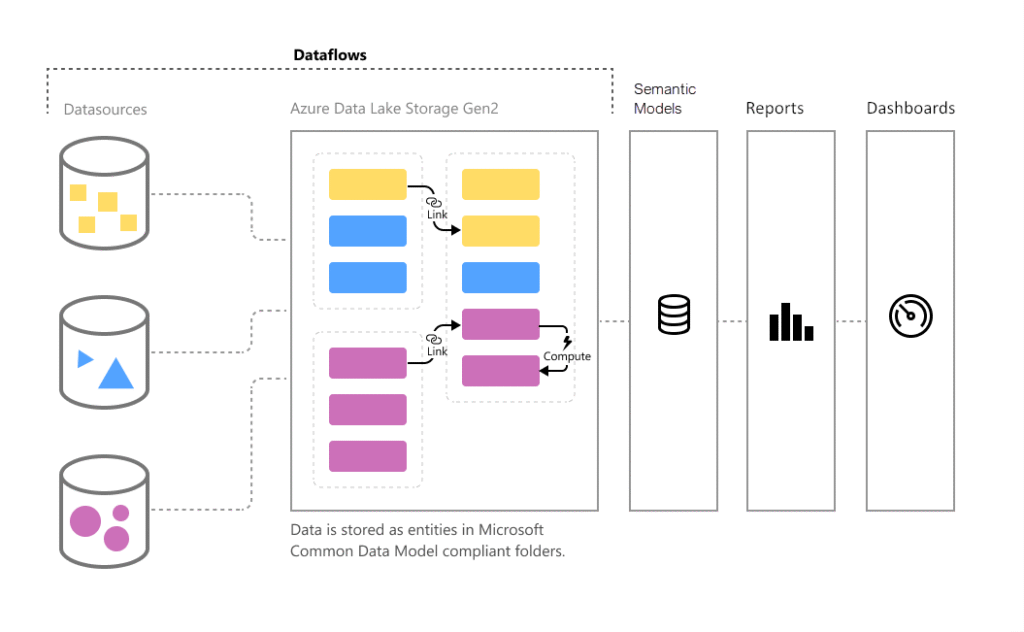
Architecture Differences: BI Tool vs Unified Data Platform
The fundamental distinction between Power BI and Microsoft Fabric lies in architectural scope.
Power BI operates primarily at the semantic modeling and visualization layer.
Fabric operates across:
- Data ingestion
- Data engineering
- Data storage
- Governance
- Machine learning
- Real-time analytics
- Visualization
Microsoft Fabric vs Power BI: Feature-by-Feature Comparison
Understanding the difference between Microsoft Fabric and Power BI requires analyzing how each addresses the components of the modern data lifecycle.
1. Data Ingestion & Integration
- Fabric: Enterprise-grade pipelines, integration with 200+ sources, Spark-based transformations, Dataflow Gen2, ingestion from structured + semi-structured + streaming data.
- Power BI: Limited extract/transform/load (ETL); Dataflows suitable for small to medium workloads.
Advantage: Fabric
2. Data Engineering
- Fabric: Full Spark compute, notebooks, orchestration, Git integration, and environment-level CI/CD.
- Power BI: Data modeling only; no engineering or pipeline capabilities.
Advantage: Fabric
3. Data Storage
- Fabric: OneLake (Delta format) enables unified, versioned, inclusive storage.
- Power BI: Dataset-based storage, capacity-bound.
Advantage: Fabric
4. Business Intelligence & Visualization
- Power BI: Best-in-class BI and visualization engine.
- Fabric: Uses Power BI as its visualization layer.
Advantage: Power BI (pure BI use cases)
5. Governance & Security
- Fabric: Centralized governance across domains, lineage, security, metadata, and policy enforcement.
- Power BI: Governance for reports and datasets only.
Advantage: Fabric
6. AI & ML
- Fabric: AutoML, ML models, lakehouse integration, and native support for advanced analytics.
- Power BI: AI visuals and automated insights.
Advantage: Fabric
7. User Personas Supported
- Power BI: Analysts, business teams, report creators.
- Fabric: Data engineers, data scientists, BI teams, governance teams, IT, business.
Advantage: Fabric (enterprise environments)
Summary Table
| Capability | Power BI | Microsoft Fabric |
| Visualization | ⭐⭐⭐⭐⭐ | ⭐⭐⭐⭐⭐ |
| Data Engineering | ⭐⭐ | ⭐⭐⭐⭐⭐ |
| Governance | ⭐⭐⭐ | ⭐⭐⭐⭐⭐ |
| Real-Time Analytics | ⭐⭐⭐ | ⭐⭐⭐⭐⭐ |
| AI & ML | ⭐⭐⭐ | ⭐⭐⭐⭐⭐ |
| Cost Efficiency | ⭐⭐⭐⭐⭐ | ⭐⭐⭐ |
| Enterprise Scalability | ⭐⭐⭐ | ⭐⭐⭐⭐⭐ |
Stay ahead of emerging cloud-data trends shaping analytics decisions:
Cloud-Native Data Engineering: The Future of Scalability for the Enterprise
Licensing & Pricing: Microsoft Fabric vs Power BI
Evaluating Microsoft Fabric vs Power BI requires understanding how each platform handles pricing, scalability, and consumption models. These cost structures determine not only the initial investment but also long-term operational economics.
Microsoft Fabric vs Power BI Pricing Overview
Power BI is designed to be cost-efficient, making it especially appealing for small and mid-sized departments.
Power BI Pro—$14/user/month
- Ideal for teams needing collaboration and report sharing
- Suitable for departmental analytics
- Users can publish to the Power BI service
Power BI Premium Per User (PPU)—$24/user/month
- Unlocks AI features, larger datasets, and advanced refresh
- Highly cost-effective compared to enterprise BI competitors
Power BI Premium Capacity (P SKUs)
This model provides dedicated capacity and is ideal for:
- Large-scale organizational BI
- High-volume refreshes
- Embedded analytics scenarios
- Enterprises with complex reporting needs
Pricing varies by capacity level (P1 to P5), with P1 starting near $4,995/month.
Takeaway:
Power BI provides multiple price tiers that scale linearly with user adoption, making it attractive for traditional BI usage.
Microsoft Fabric vs Power BI Pricing Overview
Fabric adopts a capacity-based “pay for what you consume” model, unified across all Fabric workloads, including:
- Data Factory
- Data Engineering
- Data Science
- Real-Time Analytics
- Power BI
- OneLake storage
Fabric Capacity Units (F SKUs)
Fabric pricing is based on “Capacity Units (CUs),” charged per hour. This model supports dynamic scaling and unified billing across services.
Key Fabric Cost Drivers When Studying Microsoft Fabric vs Power BI
Fabric pricing becomes advantageous for organizations that require:
- Heavy data engineering workloads
- Multi-domain governance
- Real-time analytics
- Enterprise-wide ingestion pipelines
- Unified storage and compute
According to Microsoft, unified Fabric environments can reduce total data infrastructure cost by up to 40% when consolidating multiple analytics tools (Source: Microsoft Build Conference).
Which Is More Cost-Effective – Microsoft Fabric vs Power BI?
- Choose Power BI when you need affordable, department-level BI for dashboards.
- Choose Fabric when you want to consolidate data engineering, pipelines, storage, real-time analytics, and BI into one enterprise system.
The total cost of ownership (TCO) depends on your need for scalability, governance, and end-to-end orchestration.
We help enterprises build governance-by-design foundations, know more about our data services here.
Use Cases & Best-Fit Scenarios
Understanding Microsoft Fabric vs Power BI requires aligning platform capabilities with business needs. Below is a strategic breakdown for enterprise decision-makers.
Power BI — Best for Business Intelligence Workloads
1. Self-Service Analytics
Empowers analysts, managers, and domain teams to explore data independently.
2. Executive Dashboards
Ideal for KPI visualization, forecasting, and enterprise scorecards.
3. Departmental Analytics
Finance, HR, Sales, Marketing, and Operations teams benefit from Power BI’s intuitive UX.
4. Embedded Analytics (Applications)
The Power BI Embedded SKU allows organizations to embed interactive dashboards into SaaS products.
5. Quick Wins in BI Modernization
Great for organizations early in their analytics maturity journey.
Power BI is best when your organization needs rapid insights without heavy engineering.
Microsoft Fabric — Best for End-to-End Enterprise Data Ecosystems
1. Unified Data Engineering & Integration
Consolidates:
- ETL/ELT
- Data ingestion
- Pipeline automation
- Data modeling
This is particularly valuable for large data estates.
2. Multi-Domain Data Mesh Architectures
Fabric supports organizational data domains without creating silos.
3. Real-Time & Operational Analytics
Fabric’s Real-Time Analytics platform uses KQL to handle streaming workloads.
4. AI/ML Workflows
Fabric supports notebooks, machine learning models, AutoML, and MLOps — essential for AI-first enterprises.
5. Large-Scale Data Science Initiatives
OneLake and Delta Lake formats simplify experimentation and collaboration.
6. Enterprise Governance & Compliance
Centralized policies, lineage, and metadata enable secure, governed analytics.
Fabric is best when your organization needs a unified, scalable, AI-ready data platform.
Read all about Microsoft Fabric Pricing Explained: Know Your Costs Before You Build
Pros & Cons: Microsoft Fabric vs Power BI
A clear comparison enables more strategic decision-making.
Pros of Power BI
- Extremely user-friendly
- Strong visualization and reporting
- Low cost of entry
- Seamless integration with Microsoft 365
- EVeryone in the organization can adopt quickly
Cons of Power BI
- Limited engineering and transformation capabilities
- Advanced AI features require Premium
- Not suited for real-time, petabyte-scale workloads
Pros of Microsoft Fabric
- Unified analytics (ingestion → engineering → BI)
- OneLake eliminates data silos
- Strong governance and security
- Scales across domains and cloud environments
- Supports advanced AI/ML and real-time processing
- Ideal for enterprise modernization
⚠️ Cons of Microsoft Fabric
- Higher initial investment
- Steeper learning curve
- Requires organizational alignment across multiple teams
Read what Microsoft Fabric is, how it works, why organizations are rapidly adopting it, and what leaders must know in our latest blog – What Is Microsoft Fabric? A Comprehensive Overview for Modern Data Leaders.
ROI & Cost Framework: Choosing Fabric or Power BI
Choosing the right platform requires analyzing return on investment (ROI). McKinsey notes that data-driven organizations achieve 23× greater customer acquisition and 19× profitability.
Below is a decision model tailored for CIOs and CDOs evaluating Microsoft Fabric vs Power BI.
ROI Drivers for Power BI
- Minimal training costs
- Low subscription fees
- Fast deployment
- High adoption across business teams
- Low engineering overhead
Best ROI for organizations with:
- Well-structured data
- Basic-to-moderate reporting needs
- Limited data engineering requirements
ROI Drivers for Microsoft Fabric
- Reduced dependency on multiple analytics tools
- Lower pipeline maintenance due to unified storage
- Smarter cost distribution via capacity units
- Lower data duplication and storage sprawl
- Accelerated AI/ML use-case development
- Improved governance and regulatory compliance
According to Accenture, organizations implementing unified data architectures see up to 50% lower TCO over 3–5 years.
Total Cost of Ownership (TCO) Lens
| Cost Dimension | Power BI | Fabric |
| Licenses | Low | Medium–High |
| Engineering | Low | Medium |
| Storage | Medium | Low (OneLake consolidation) |
| Governance | Medium | Low |
| Scalability | Medium | High |
Explore the strategic value a Microsoft Data and AI Partner brings to enterprises in our latest blog on What a Microsoft Data and AI Partner Brings to Your Data Strategy
Adoption Roadmap: When to Choose Fabric, Power BI, or Both
Here is a pragmatic roadmap for CIOs, CTOs, and CDOs.
Scenario 1: Choose Power BI Only
Select Power BI when you have:
- Lightweight reporting needs
- High business user adoption
- Limited engineering workloads
- A small-to-mid-size department or team
Example:
A finance team building dashboards for forecasting.
Scenario 2: Choose Microsoft Fabric Only
Choose Fabric when:
- You are designing a new cloud analytics platform
- You want to consolidate engineering, data science, and BI
- You require real-time analytics
- You want unified governance
Example:
A large retailer managing inventory, logistics, real-time operations, and multiple data domains.
Scenario 3: Choose Both (The Most Common Scenario)
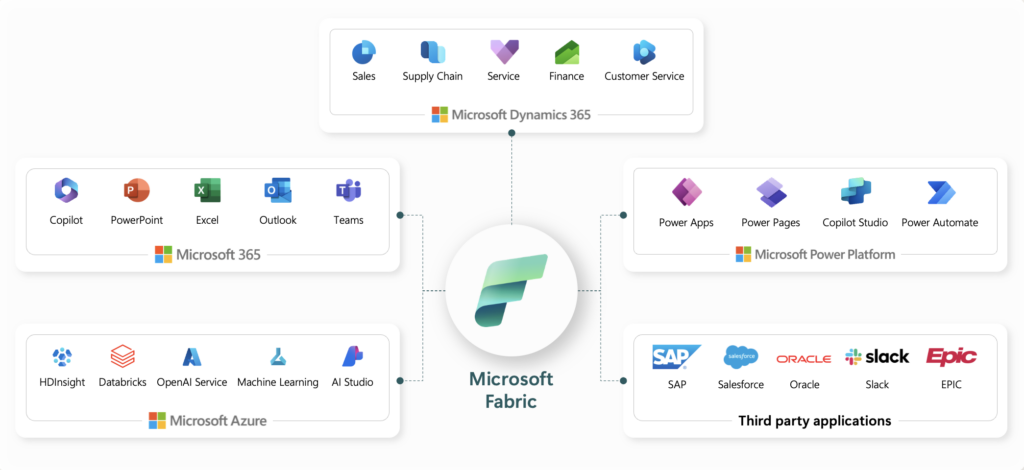
In most enterprises, the ideal architecture is:
Fabric = Data backbone + engineering + governance
Power BI = Visualization + reporting + insights consumption
This combination provides:
- Complete analytics lifecycle
- Reduced data fragmentation
- Unified storage
- AI-readiness
- Better governance
This is the architecture Microsoft itself recommends.
Explore deeper enterprise cloud strategies: Why Is Data Orchestration: Making Pipelines Smarter Imperative To Understand
Enterprise Decision Matrix: Fabric vs Power BI
Use this matrix to align platform choice with enterprise needs.
1. Analytics Maturity
- Low maturity: Power BI
- Mid maturity: Power BI + Dataflows
- High maturity: Fabric + Power BI
2. Data Complexity
- Simple datasets: Power BI
- Moderate complexity: Power BI Premium
- High complexity or streaming data: Fabric
3. Governance Requirements
- Minimal governance: Power BI
- Enterprise-grade governance: Fabric
4. AI/ML Requirements
- Basic forecasting: Power BI
- Advanced ML pipelines: Fabric
5. Scalability
- <5 TB data: Power BI
- >5 TB data across domains: Fabric
See how Microsoft Data Fabric compares against traditional data warehousing across scalability, governance, AI readiness, cost, and decision intelligence.
Conclusion
The debate of Microsoft Fabric vs Power BI is not about choosing a winner — it is about aligning the right platform with the strategic goals of the enterprise. Power BI remains one of the world’s most powerful business intelligence tools, delivering democratized insights and rapid visualization. Microsoft Fabric, meanwhile, represents the future of unified analytics — a platform engineered for scale, governance, AI readiness, and end-to-end transformation.
For CIOs, CDOs, and enterprise leaders, the most critical question is not “Which tool is better?” but rather “Which architecture accelerates our transformation, improves governance, and positions us for AI-driven growth?”
In most scenarios, the answer is Power BI + Microsoft Fabric. Together, they create a harmonized analytics ecosystem that can evolve with business needs, eliminate fragmentation, and support enterprise-grade intelligence.
Organizations that modernize their data architecture with unified platforms like Fabric consistently achieve:
- Faster time-to-insight
- Lower TCO
- Improved governance
- Stronger AI/ML readiness
- Higher innovation velocity
As enterprises move into a decade defined by AI and data-driven decision-making, building the right analytics foundation is more critical than ever.
Explore our blog on Leveraging Data Transformation for Modern Analyticsto understand the evolution of data transformation, modern frameworks, architectures, patterns, tools, and enterprise best practices.
FAQs
1. Is Microsoft Fabric replacing Power BI?
No. Microsoft Fabric incorporates Power BI as its visualization layer. Instead of replacing Power BI, Fabric enhances it by adding engineering, storage, governance, and AI capabilities.
2. How do I decide whether to use Microsoft Fabric or Power BI?
Use Power BI for dashboards and business intelligence. Use Fabric when you need a unified platform covering ingestion, engineering, governance, data science, and real-time analytics.
3. What is the biggest difference between Microsoft Fabric vs Power BI?
Power BI is a visualization & BI tool; Fabric is an end-to-end analytics platform. Fabric unifies data engineering, storage, and real-time analytics with Power BI built in.
4. Is Microsoft Fabric better for AI and ML?
Yes. Fabric includes AutoML, notebooks, MLOps, and Delta Lake architecture — making it significantly more powerful than Power BI for data science workloads.
5. Is Power BI enough for small businesses?
Yes. Power BI alone is often sufficient for SMBs with low engineering needs and moderate reporting requirements.
6. Can Microsoft Fabric and Power BI work together?
Absolutely. In fact, the most common enterprise pattern is using Fabric for the backend and Power BI for analytics and visualization.
7. What governance challenges does Fabric solve?
Fabric centralizes metadata, lineage, policies, and domain-level permissions — reducing compliance risk and simplifying multi-domain governance.
For broader context, see AI-ready enterprise checklist for Microsoft Fabric.