
Microsoft Fabric OneLake best practices include designing a clear workspace and domain structure, using Delta Lake and shortcuts appropriately, applying least-privilege security, governing data through the OneLake catalog, optimizing workloads and capacity, and monitoring performance and costs. Enterprises should also establish ownership, lifecycle, naming, deployment, and data-quality standards before scaling OneLake across business domains.
TL;DR
- Microsoft Fabric OneLake provides a unified data foundation for enterprise analytics, data engineering, and AI workloads.
- Design OneLake around business domains, data ownership, and clear workspace structures rather than individual projects.
- Use OneLake shortcuts to share governed data and minimize unnecessary duplication.
- Apply least-privilege security using appropriate workspace, item, and data-level controls.
- Establish governance early, including ownership, metadata, classification, lineage, quality, and lifecycle policies.
- Use Bronze, Silver, and Gold data layers where a medallion architecture fits the workload.
- Optimize Fabric capacity and workload performance together, rather than treating storage and compute independently.
- Implement operational controls for monitoring, CI/CD, data quality, cost management, and lifecycle management.
- Build OneLake with AI readiness in mind by making trusted, discoverable, and governed data accessible to analytics and AI workloads.
- The goal is not simply to centralize data—it is to create a governed, reusable, scalable foundation for enterprise data and AI.
Executive Summary
Microsoft Fabric OneLake best practices help enterprises turn OneLake from a centralized data repository into a governed, scalable foundation for analytics, AI, and modern data engineering. OneLake is automatically provisioned with every Fabric tenant and provides a unified logical data lake across Fabric workloads. Microsoft positions it as a shared foundation for storing, accessing, governing, and analyzing organizational data.
The challenge is not simply putting data into OneLake. Enterprise teams need to decide how data should be organized, secured, shared, optimized, monitored, and governed at scale.
This guide focuses on the practices that matter most: architecture, security, governance, shortcuts, performance, capacity, cost management, and operational discipline.
What Is Microsoft OneLake?
Microsoft OneLake is the unified logical data lake for Microsoft Fabric. It provides a single organizational data foundation for analytics and AI workloads, with Fabric tenants automatically provisioned with OneLake. Data can be organized through workspaces, domains, and Fabric data items while supporting open formats such as Delta Parquet and Iceberg.
OneLake is designed to reduce the proliferation of disconnected data lakes and duplicated datasets.
Its architecture brings together:
- Fabric workspaces
- Lakehouses
- Warehouses
- Eventhouses
- KQL databases
- Semantic models
- Data pipelines
- Shortcuts
- OneLake catalog
- Fabric domains
The key architectural principle is one logical data lake with distributed ownership.
Microsoft’s current architecture guidance describes OneLake as a hierarchical foundation in which tenants contain workspaces, and workspaces contain Fabric data items.
Read our blog on What Is Microsoft Fabric? A Comprehensive Overview for Modern Data Leaders
7 Microsoft Fabric OneLake Best Practices
The most important Microsoft Fabric OneLake best practices are to establish a governed workspace structure, centralize ownership of critical data, use shortcuts to avoid unnecessary duplication, enforce least-privilege access, optimize storage and queries, monitor shared capacity, and continuously manage data quality and lifecycle.
1. Design OneLake Around Business Domains
Avoid creating workspaces simply because individual teams request them.
Instead, establish a logical structure around:
- Business domains
- Data ownership
- Security boundaries
- Development environments
- Production workloads
- Regulatory requirements
Fabric domains can help organize workspaces around business areas while supporting delegated governance and discovery through the OneLake catalog.
Recommended principle
Organize OneLake around how the business owns and consumes data—not around how individual projects happen to be structured.
Read our blog on Microsoft Fabric Semantic Models Explained: The Enterprise Guide to Building Trusted, AI-Ready Business Intelligence
2. Minimize Data Duplication with OneLake Shortcuts
OneLake shortcuts allow teams to reference data without unnecessarily creating another physical copy. They are useful for sharing data across workspaces and connecting to supported external storage while helping maintain a unified data foundation.
Data duplication creates more than storage costs.
It can also create:
- Conflicting versions
- Additional pipelines
- Data synchronization problems
- Governance complexity
- Unclear ownership
Shortcuts provide an important mechanism for sharing data while retaining centralized governance.
Microsoft’s current OneLake security guidance recommends a pattern in which data ownership and security are established in a primary workspace and downstream teams consume the data through shortcuts.
Best practice
Secure data at its source, then share it rather than repeatedly copying it.
3. Apply Least-Privilege Security
OneLake security should follow the principle of least privilege by granting users only the access they need. Enterprises should combine workspace roles, item-level permissions, and OneLake security controls for granular access to folders, tables, rows, and columns where required.
Security should be designed before large-scale data onboarding.
Consider:
| Security Requirement | Recommended Consideration |
|---|---|
| Workspace administration | Workspace roles |
| Item-specific access | Item-level permissions |
| Sensitive tables | OneLake security |
| Sensitive columns | Column-level controls |
| Sensitive records | Row-level security |
| Cross-workspace consumption | Controlled shortcuts |
| Regulatory data | Strong ownership and governance |
Avoid giving broad workspace permissions simply because a user needs access to one dataset.
4. Establish Governance Before Scaling
Enterprise OneLake governance should define ownership, naming, domains, metadata, data quality, classification, lineage, endorsement, lifecycle, and access policies before the platform expands across teams. The OneLake catalog can support discovery and governance by providing visibility into data assets and their governance posture.
A common enterprise mistake is:
Build first → govern later.
That approach becomes increasingly expensive as the number of workspaces and data assets grows.
Establish standards for:
- Data ownership
- Workspace naming
- Domain assignment
- Metadata
- Data classification
- Sensitivity labels
- Data quality
- Retention
- Endorsement
- Lineage
- Access reviews
The goal is to make trusted data easy to find and safe to use.
5. Use a Medallion Architecture Where It Fits
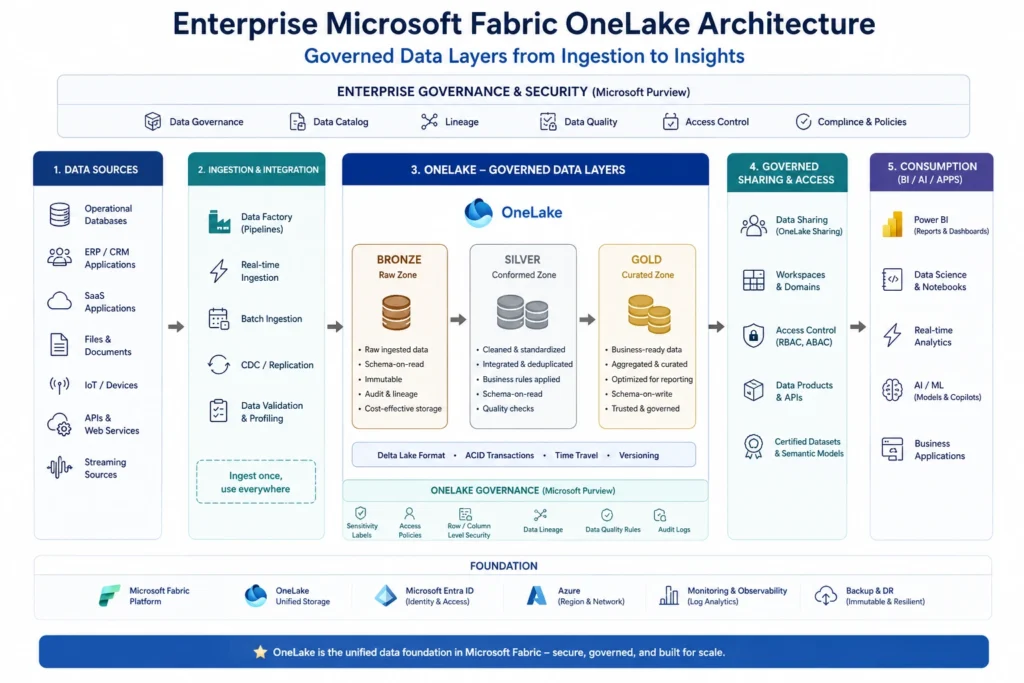
A medallion architecture organizes data into progressive layers—typically Bronze, Silver, and Gold—to separate ingestion, transformation, and consumption. In Microsoft Fabric, this pattern can help structure Lakehouse workloads, although enterprises should adapt it to their actual data and business requirements rather than treating it as mandatory.
A practical model is:
Bronze → Silver → Gold
| Layer | Purpose |
|---|---|
| Bronze | Raw or minimally processed data |
| Silver | Cleaned, validated, standardized data |
| Gold | Business-ready analytical data |
The important principle is not the naming convention.
It is clear separation of responsibilities and data quality expectations between stages.
Read our blog on Microsoft Fabric Architecture Explained: Complete Enterprise Guide (2026)
6. Optimize Performance and Capacity Together
OneLake performance depends on both data design and Fabric capacity management. Enterprises should optimize queries and data layout while monitoring capacity utilization, isolating performance-sensitive workloads when necessary, and scaling resources based on actual workload behavior.
OneLake is the storage foundation, but Fabric workloads consume shared compute resources.
Spark jobs, pipelines, queries, and semantic model operations can compete for capacity.
Therefore, monitor:
- Capacity utilization
- Query performance
- Pipeline duration
- Spark workload consumption
- Refresh performance
- Throttling
- Concurrency
Microsoft recommends isolating performance-sensitive workloads on dedicated capacity when shared workloads could create unpredictable performance.
Performance principle
Don’t optimize storage in isolation. Optimize the entire data-to-query path.
7. Build Data Lifecycle and Operational Controls
OneLake should be managed as an operational data platform rather than passive storage. Enterprises should define data ingestion, transformation, consumption, retention, monitoring, quality, deployment, and retirement processes to keep the environment reliable and cost-efficient as data volumes grow.
As OneLake adoption increases, unmanaged data growth can become a significant challenge.
Create policies for:
Ingest → Validate → Transform → Publish → Consume → Monitor → Retain → Retire
Also integrate operational practices such as:
- Git-based development
- Deployment pipelines
- Automated testing
- Monitoring
- Data quality checks
- Incident management
- Cost monitoring
Microsoft’s Fabric Well-Architected guidance emphasizes reliability, security, cost optimization, operational excellence, and performance efficiency as core design considerations.
OneLake Architecture: Recommended Enterprise Pattern
A scalable OneLake architecture typically combines centralized data ownership with distributed consumption. Core data can be governed in primary workspaces, while domains and downstream workspaces provide controlled access for analytics, reporting, data science, and AI workloads.
A simplified enterprise pattern is:
Source Systems
↓
Ingestion / Mirroring / Data Integration
↓
Primary Lakehouse / Data Store
↓
Bronze → Silver → Gold
↓
OneLake Shortcuts / Governed Sharing
↓
Semantic Models / BI / AI / Data Science
This architecture supports a key enterprise principle:
Centralize governance without centralizing every team’s delivery responsibility.
Microsoft’s Fabric Well-Architected guidance provides a broader framework for evaluating reliability, security, cost optimization, operational excellence, and performance efficiency across Fabric workloads.
OneLake Best Practices: Quick Reference
| Area | Best Practice |
|---|---|
| Architecture | Organize around domains and ownership |
| Storage | Prefer shared data over unnecessary duplication |
| Shortcuts | Use them for governed data sharing |
| Security | Apply least privilege |
| Governance | Establish standards before scaling |
| Data Modeling | Use appropriate medallion or domain patterns |
| Performance | Monitor data and compute together |
| Capacity | Isolate demanding workloads when necessary |
| Operations | Use CI/CD, monitoring, and testing |
| Discovery | Maintain metadata and endorsements |
| Lifecycle | Define retention and retirement policies |
| AI Readiness | Make trusted, governed data accessible to AI workloads |
Common OneLake Mistakes to Avoid
The most common OneLake mistakes include uncontrolled workspace creation, excessive data duplication, overly broad permissions, weak metadata, insufficient capacity monitoring, and treating governance as a post-implementation activity. These issues can increase cost, security risk, and operational complexity as Fabric adoption scales.
Avoid:
❌ Creating workspaces without clear ownership
❌ Copying datasets unnecessarily
❌ Giving users excessive workspace permissions
❌ Ignoring data classification
❌ Treating metadata as optional
❌ Running all workloads on shared capacity without monitoring
❌ Building data products without lifecycle ownership
❌ Optimizing individual queries without assessing overall capacity usage
Enterprise OneLake Implementation Checklist
Before scaling Microsoft Fabric OneLake across an enterprise, validate six areas: architecture, security, governance, performance, operations, and cost. A structured readiness checklist helps prevent uncontrolled growth and creates a consistent foundation for analytics and AI workloads.
Architecture
- Business domains defined
- Workspace ownership established
- Data flow documented
- Storage architecture standardized
Security
- Least-privilege model implemented
- Sensitive data classified
- Access policies documented
- Security reviewed periodically
Governance
- Naming conventions defined
- Metadata standards established
- Data owners assigned
- Catalog and endorsement practices established
Performance & Cost
- Capacity utilization monitored
- Heavy workloads identified
- Query and pipeline performance measured
- Capacity scaling rules established
Operations
- Git/CI/CD practices implemented
- Deployment process defined
- Monitoring enabled
- Data lifecycle established
Conclusion
Microsoft Fabric OneLake best practices are ultimately about more than organizing data in a lake. They provide the foundation for building a governed, scalable, high-performance data platform that can support enterprise analytics, AI, and future data products.
The strongest implementations combine domain-based architecture, centralized ownership, governed sharing, least-privilege security, disciplined capacity management, strong metadata, and continuous operational monitoring.
For enterprises adopting Fabric at scale, the objective should be simple:
OneLake should make enterprise data easier to govern, easier to discover, easier to reuse, and safer to activate for analytics and AI.
FAQs
1. What are the best practices for Microsoft Fabric OneLake?
The core practices are to establish domain and workspace ownership, use shortcuts to reduce unnecessary duplication, implement least-privilege security, govern metadata and data quality, optimize capacity and workloads, and establish lifecycle and operational controls.
2. Why is OneLake important in Microsoft Fabric?
OneLake provides a unified organizational data foundation for Fabric analytics and AI workloads. It reduces the need for disconnected data lakes and enables multiple Fabric experiences to work against shared data.
3. Should enterprises copy data between OneLake workspaces?
Not by default. Where appropriate, OneLake shortcuts can provide governed access to existing data without creating unnecessary copies. The right approach depends on ownership, security, workload, and architectural requirements.
4. How should enterprises secure OneLake?
Use least privilege and apply permissions at the appropriate level. Depending on requirements, enterprises can combine workspace roles, item permissions, and OneLake security controls for granular data access
5. How can organizations improve OneLake performance?
Monitor both data and compute behavior. Optimize table and query design, manage capacity utilization, isolate demanding workloads when needed, and continuously monitor query, pipeline, and Spark performance
Related Reads
- What Is Microsoft Fabric? A Comprehensive Overview for Enterprise Leaders
- Microsoft Fabric vs Snowflake: A Data Management Showdown
- AI-Ready Enterprise Checklist with Microsoft Fabric
- RAG in 2026: How Retrieval-Augmented Generation Works for Enterprise AI
- RAG architectures
- Agentic AI Use Cases: 7 Enterprise Examples Driving Autonomous Operations
- Enterprise AI Strategy in 2026: A Practical Guide for CIOs and Data Leaders
- Is Your Enterprise AI-Ready? Explore our A Fabric-Focused Readiness Checklist
- RAG vs Knowledge Graphs: Which Performs Better for Enterprise AI?