
Why Power BI Security Has Become a Boardroom Priority
Enterprise analytics is no longer confined to centralized BI teams. Business users now access dashboards across finance, operations, healthcare, HR, supply chain, and executive leadership functions. While this democratization of analytics creates agility, it also introduces a new category of enterprise risk: uncontrolled data exposure.
The reality is simple—Power BI security is no longer optional governance overhead. It has become a strategic enterprise requirement.
Organizations are increasingly consolidating sensitive operational, financial, and customer intelligence into Power BI environments. A single dashboard may combine ERP data, CRM records, workforce metrics, customer behavior analytics, and regulated information. Without robust controls, even minor misconfigurations can expose highly sensitive data to unintended audiences.
According to Microsoft and enterprise cybersecurity studies, identity compromise and permission mismanagement remain among the most common causes of enterprise data breaches. In modern analytics environments, the problem often originates from excessive permissions, unsecured sharing, weak governance, or inadequate visibility into downstream report access.
This is where Power BI security best practices become essential.
Forward-looking enterprises no longer rely on isolated controls like workspace access or MFA alone. Instead, they implement a layered security architecture that secures every stage of the analytics lifecycle—from authentication to report sharing.
In this guide, we examine 12 Power BI security best practices enterprises should implement in 2026 to protect sensitive data, strengthen governance, improve compliance readiness, and scale analytics securely.
For organizations modernizing analytics ecosystems, security should be aligned with broader data strategy initiatives such as data governance, platform modernization, and AI readiness. Techment explores this connection in its enterprise perspective on data governance and trusted analytics Why Modern Data Platforms Are Critical for RAG Success in Enterprises.
TL;DR
- Power BI security best practices now require a multi-layered enterprise approach—not just workspace permissions.
- Enterprises must secure identity, network access, semantic models, governance, sharing, and monitoring simultaneously.
- Row-Level Security (RLS) and Object-Level Security (OLS) protect sensitive business data at scale.
- Microsoft Purview, DLP policies, and audit logging are becoming foundational for compliance-heavy industries.
- Organizations that treat Power BI security as a governance capability—not merely a reporting tool setting—reduce enterprise data exposure significantly.
Why Enterprises Need a Layered Power BI Security Strategy
Power BI security is often misunderstood as a single configuration exercise.
Many enterprises assume enabling Microsoft authentication or assigning workspace permissions is enough. In practice, security failures usually emerge from overlooked dependencies across identity, governance, sharing, or semantic model configuration.
Effective enterprise security follows a defense-in-depth model.
Rather than depending on a single control, organizations create multiple layers of protection so one misconfiguration does not compromise the entire environment.
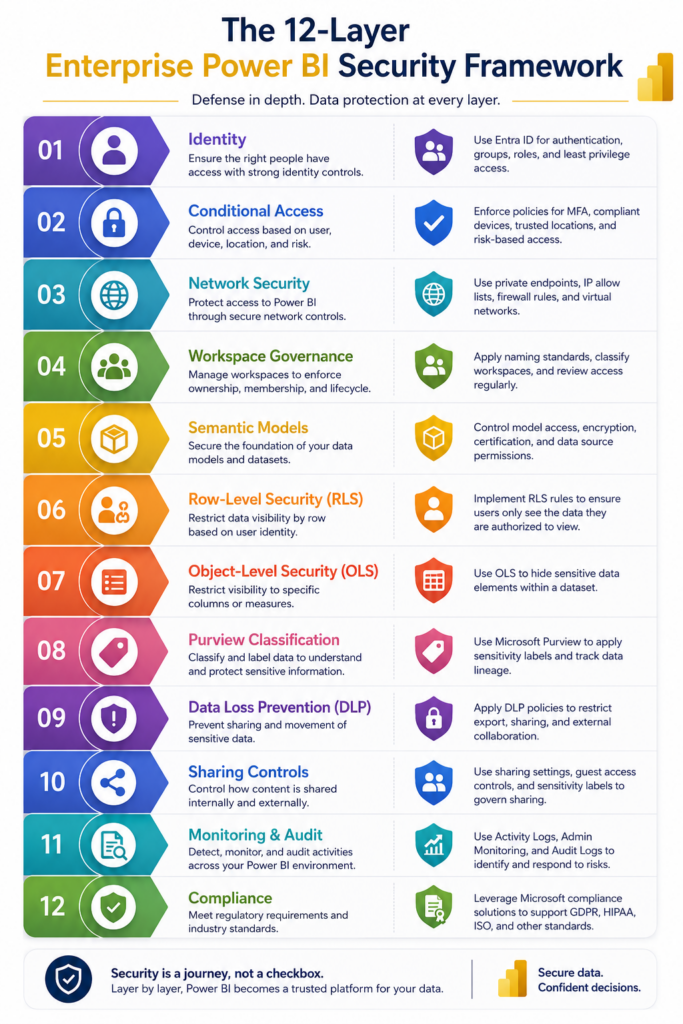
A mature Power BI security architecture generally includes:
- Identity and access security
- Conditional access and device compliance
- Workspace governance
- Semantic model protection
- Row-Level Security (RLS)
- Object-Level Security (OLS)
- Data classification and sensitivity labeling
- Data Loss Prevention (DLP)
- External sharing controls
- Audit monitoring and observability
- Compliance enforcement
- Governance operating models
Why Single-Layer Security Fails
Many organizations secure only one layer—usually workspace permissions.
However, consider this scenario:
A financial analyst has Viewer access to a report. The workspace appears secure. Yet the report allows export access, underlying semantic models expose confidential salary data, and no sensitivity label restricts downstream usage.
Technically, access was “correct.”
Strategically, governance failed.
This illustrates why enterprise Power BI security requires multiple independent control points.
The Enterprise Security Maturity Shift
The most mature organizations no longer view Power BI as a standalone BI tool.
Instead, they treat it as an enterprise data product ecosystem governed similarly to cloud platforms, AI systems, and business-critical applications.
This shift becomes especially important as Microsoft Fabric adoption grows and analytics ecosystems become increasingly interconnected.
Organizations building enterprise-scale analytics capabilities should align security with broader modernization strategies. Techment discusses this architectural evolution in:
Microsoft Fabric Architecture: A CTO’s Guide to Modern Analytics & AI
1. Strengthen Identity Security with Microsoft Entra ID and Conditional Access
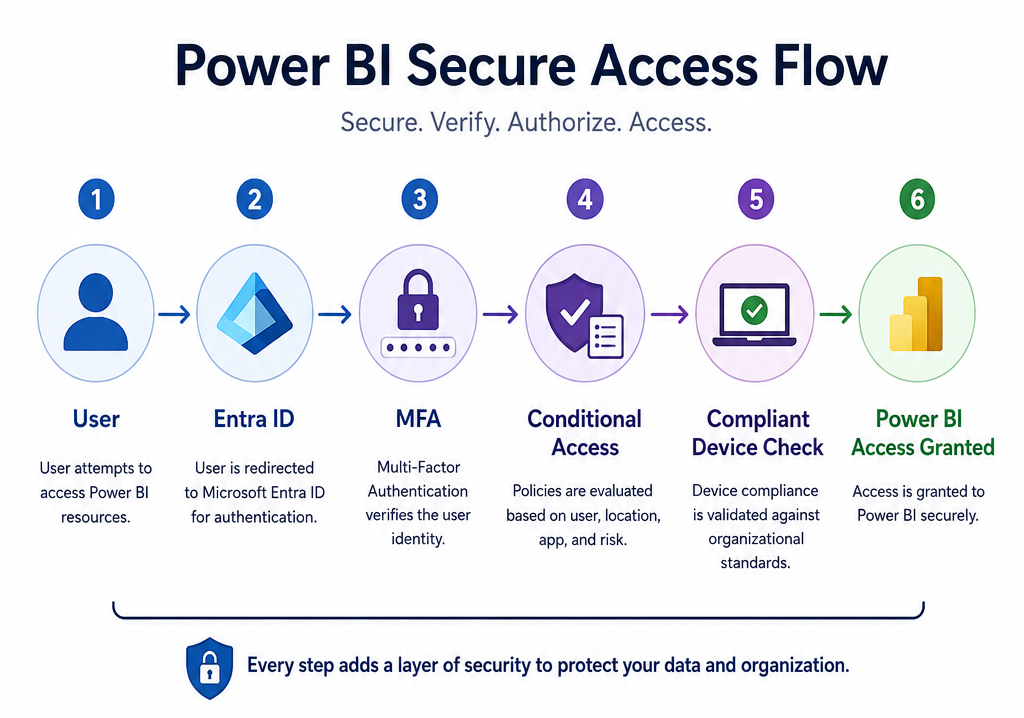
Among all Power BI security best practices, identity protection delivers the highest immediate risk reduction.
Most breaches occur because attackers compromise identities—not because they bypass encryption.
Since Power BI integrates deeply with Microsoft Entra ID (formerly Azure Active Directory), enterprises should use identity controls aggressively.
Enforce Multi-Factor Authentication Everywhere
MFA should be mandatory for all Power BI users.
This includes:
- Executives
- Report consumers
- Developers
- Service administrators
- External B2B collaborators
Without MFA, compromised credentials can expose entire analytics ecosystems.
For highly regulated industries such as healthcare and financial services, MFA is often considered table stakes for compliance readiness.
Use Conditional Access Policies
Conditional access enables organizations to restrict Power BI access dynamically.
Recommended enterprise policies include:
Require Managed Devices
Sensitive dashboards should only be accessible from compliant corporate devices.
This reduces risk from:
- Personal laptops
- Unmanaged mobile phones
- Public Wi-Fi access
- Non-compliant endpoints
Restrict Geographic Access
Organizations operating in limited regions should block sign-ins from unauthorized geographies.
Example:
A U.S.-based enterprise with no international operations should not allow Power BI access attempts from unknown regions.
Apply Session Controls
Not every dashboard requires unlimited session access.
Highly sensitive reports should use:
- Session expiration policies
- Idle timeouts
- Download restrictions
Use Service Principals for Automation
Many enterprises still rely on user accounts for automation.
This creates avoidable risk.
Instead, use service principals for:
- CI/CD pipelines
- REST API integrations
- Automated refreshes
- XMLA endpoint access
Benefits include:
- Better permission isolation
- Certificate-based authentication
- Reduced credential exposure
- Clearer audit visibility
Enterprise Takeaway
Identity is the first—and arguably most critical—layer of Power BI security.
If identity governance is weak, downstream controls such as RLS or workspace permissions provide limited protection.
For organizations building secure analytics foundations, governance and identity should evolve together. Techment discusses enterprise readiness for secure, scalable data ecosystems here: 7 Proven Strategies to Build Secure, Scalable AI with Microsoft Azure
2. Implement Least-Privilege Workspace Governance
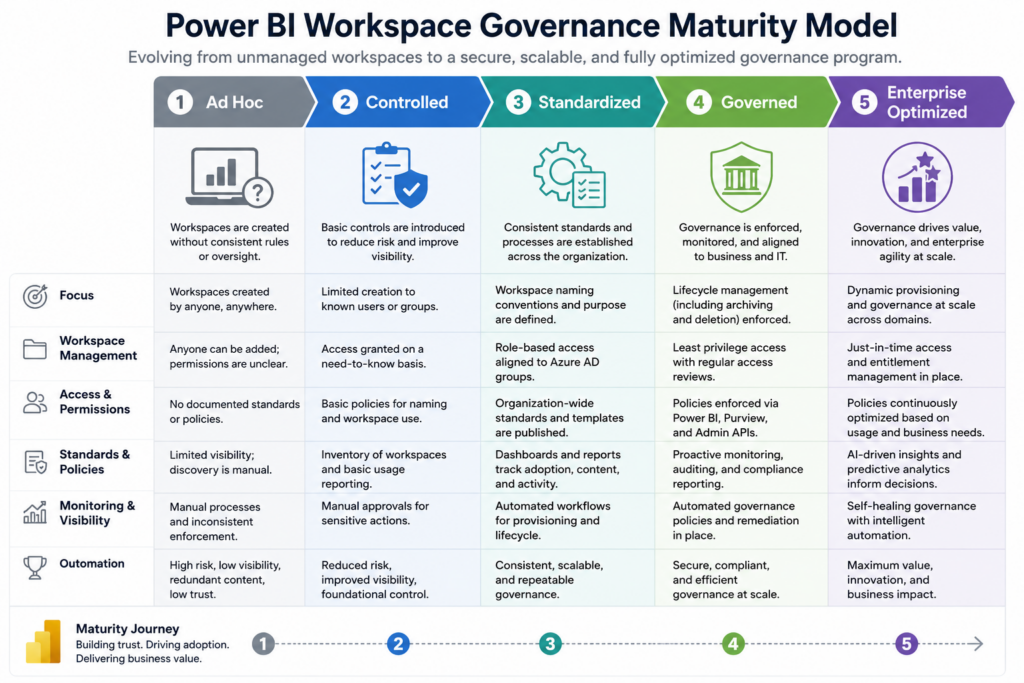
One of the most overlooked Power BI security best practices for enterprise environments is workspace sprawl.
As adoption grows, organizations frequently accumulate hundreds of workspaces with inconsistent permissions, duplicated access models, and unclear ownership.
The result is governance chaos.
Why Workspace Governance Matters
Workspaces are not just collaboration containers.
They represent security boundaries.
Poorly governed workspaces often create risks such as:
- Unauthorized data access
- Excessive administrative privileges
- Shadow analytics environments
- Compliance violations
- Untracked report sharing
A secure enterprise Power BI environment starts with disciplined workspace governance.
Follow Role-Based Access Design
Power BI offers four primary workspace roles:
Admin
Should be restricted to:
- Platform administrators
- Designated workspace owners
Best practice:
Limit to 2–3 individuals maximum.
Admins can:
- Delete workspaces
- Modify access
- Publish applications
- Manage settings
Overassigning Admin access creates unnecessary risk.
Member
Appropriate for:
- Senior BI developers
- Certified report publishers
- Analytics engineering teams
Members should be carefully governed because they can create and modify assets.
Contributor
Ideal for:
- Junior analysts
- Data contributors
- Content creators
Contributors can edit but should not manage security boundaries.
Viewer
Best for:
- Business users
- Department leaders
- Executives
Viewer access minimizes unnecessary privileges.
Never Assign Permissions Individually
Enterprise organizations should avoid assigning workspace permissions directly to individuals.
Instead, use:
Microsoft Entra Security Groups
Benefits include:
- Centralized identity governance
- Faster onboarding/offboarding
- Better compliance visibility
- Reduced permission drift
When employees change roles or leave the company, IT can update group membership centrally without manually auditing Power BI access.
Separate Workspaces by Sensitivity Level
A major governance mistake is mixing highly sensitive reports with general operational dashboards.
Instead, segment environments.
Example:
Confidential Workspace
Executive compensation
Financial forecasts
Regulated data
Operational Workspace
Business KPIs
Team dashboards
General reporting
Security boundaries become significantly easier to manage.
3. Secure Enterprise Data with Row-Level Security (RLS)
When enterprises discuss Power BI data security, Row-Level Security (RLS) is often the first capability mentioned—and for good reason.
However, many organizations implement it incorrectly or rely on it too heavily as a standalone control.
RLS ensures users only see authorized records within the same report.
Instead of duplicating reports for different audiences, enterprises apply dynamic filters based on user identity.
How Row-Level Security Works
RLS applies filters to datasets based on login context.
Example:
A regional sales leader logs in.
Instead of viewing global revenue data, they see only:
- Their geography
- Their customers
- Their assigned accounts
The report remains identical.
Only the data changes.
Common Enterprise RLS Use Cases
Regional Segmentation
Each geography views only its territory.
Example:
North America leaders cannot view APAC revenue data.
Multi-Business Unit Governance
Business divisions only access their own financial or operational metrics.
Healthcare Data Protection
Clinical teams see only relevant patient populations.
Franchise or Multi-Tenant Models
External partners access only their respective organizational data.
Dynamic RLS vs Static RLS
Enterprises should prioritize dynamic RLS whenever possible.
Why?
Static RLS creates administrative complexity at scale.
Dynamic models leverage:
USERPRINCIPALNAME()
This allows access rules to scale automatically based on identity mapping.
Enterprise Consideration
RLS is powerful—but incomplete.
It protects rows.
It does not hide columns, tables, or sensitive metadata.
That is where Object-Level Security (OLS) becomes essential.
4. Protect Sensitive Data with Object-Level Security (OLS)
While Row-Level Security (RLS) determines which records users can access, Object-Level Security (OLS) determines what data structures users can even see.
This distinction matters significantly in enterprise environments.
Many organizations assume hiding a report page or restricting a visual is sufficient protection. It is not.
If sensitive columns remain exposed in the semantic model, experienced users—or connected tools—can still access them.
This is why Power BI security best practices increasingly recommend combining RLS and OLS.
RLS vs OLS: Understanding the Difference
Think of security in two dimensions:
RLS = Horizontal Security
Controls rows of data
Example:
A sales leader sees only their regional customers.
OLS = Vertical Security
Controls columns and tables
Example:
Finance users can access salary fields, while sales teams cannot even see those fields exist.
Enterprise Use Cases for OLS
HR and Compensation Analytics
Sensitive fields such as:
- Employee salary
- Bonus compensation
- Performance scores
should only be visible to HR and executive stakeholders.
Financial Reporting
Finance teams may need:
- Cost center allocations
- Margin details
- Budget variance calculations
that business users should not access.
Healthcare and PHI Protection
Healthcare organizations frequently restrict:
- Patient identifiers
- Medical record numbers
- Clinical notes
to specific authorized roles.
Executive Strategy Dashboards
Board-level forecasting models may include confidential assumptions not intended for broader operational teams.
Why OLS Matters More in 2026
With increasing adoption of:
- Semantic model reuse
- Fabric unified analytics
- Self-service BI
- AI-assisted querying
hidden data models become increasingly vulnerable.
OLS creates a stronger protection layer by restricting unauthorized visibility directly at the model level.
Best Practice: Combine RLS + OLS
The strongest enterprise implementations use both.
Example:
A regional sales manager:
- Sees only their regional rows (RLS)
- Cannot access profit margin calculations (OLS)
This dramatically reduces accidental overexposure.
Recommended Visual
Infographic: RLS vs OLS in Power BI
Visual comparison:
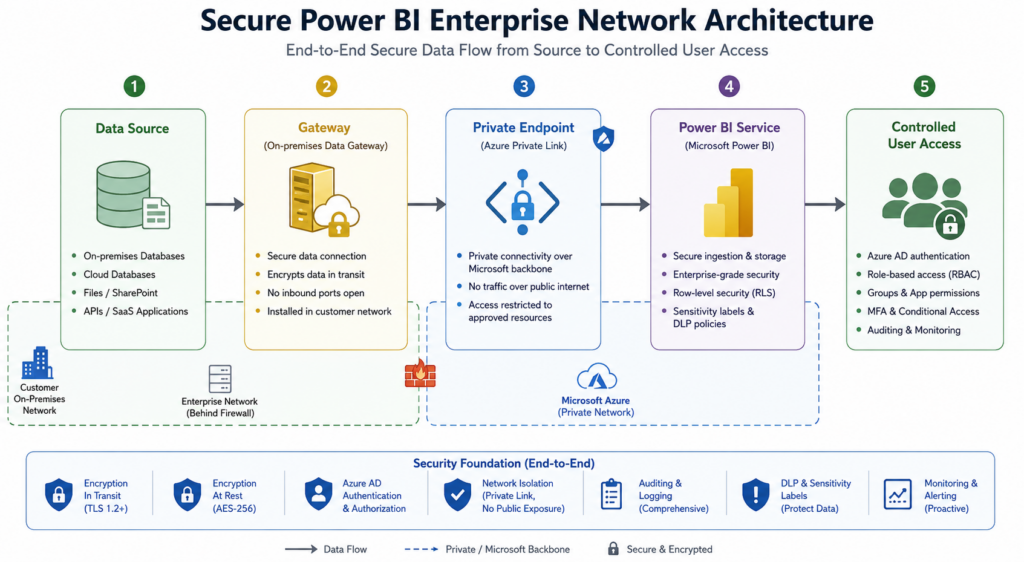
5. Secure Network Access with Private Endpoints and Gateway Hardening
Enterprise analytics security cannot stop at identities and permissions.
The network layer matters.
As analytics environments become increasingly hybrid, organizations must secure how Power BI communicates across cloud and on-premises infrastructure.
Use Private Endpoints for Sensitive Workloads
For regulated industries, private networking is becoming standard practice.
Using Azure Private Link, enterprises can route Power BI traffic privately instead of exposing workloads to public internet pathways.
Benefits include:
- Reduced attack surface
- Private traffic routing
- Improved compliance posture
- Stronger data exfiltration controls
This is especially valuable for:
- Healthcare
- Financial services
- Government agencies
- Defense contractors
Secure the On-Premises Data Gateway
Many enterprises still rely on on-premises systems.
The Power BI gateway often becomes a hidden security risk.
Common mistakes include:
- Installing gateways on database servers
- Excessive admin access
- Delayed patching cycles
- Poor monitoring
Gateway Security Best Practices
Deploy on Dedicated Infrastructure
Never host gateways on:
- Domain controllers
- Production database servers
Use isolated infrastructure.
Restrict Gateway Administrators
Only a limited number of approved administrators should manage gateway access.
Patch Frequently
Microsoft releases frequent security and reliability updates.
Outdated gateways become attack vectors.
Monitor Gateway Health
Failed refresh attempts and suspicious connectivity patterns should trigger alerts.
Enterprise Insight
The safest Power BI environments treat gateways as production-grade infrastructure—not lightweight connectors.
Organizations modernizing enterprise cloud analytics should align Power BI networking with broader Azure modernization strategies: Microsoft Azure for Enterprises: Cloud, AI & Modernization
6. Use Microsoft Purview for Data Classification and Sensitivity Labels
Data governance and Power BI security are increasingly inseparable.
One of the most impactful Power BI security best practices for enterprise environments is applying Microsoft Purview sensitivity labels.
Labels help organizations classify content consistently and apply downstream protections automatically.
Why Classification Matters
Not all dashboards carry the same risk profile.
Examples:
Public Data
Marketing performance dashboards
Internal Data
Department KPIs
Confidential Data
Financial planning, customer intelligence
Highly Confidential Data
PHI, regulated financial records, legal investigations
Without classification, organizations cannot apply differentiated security controls.
How Sensitivity Labels Improve Security
Labels influence downstream actions such as:
- Export restrictions
- External sharing controls
- Watermarking
- Encryption enforcement
- File protection
For example:
A Highly Confidential Power BI report may automatically restrict Excel export.
Establish Enterprise Labeling Standards
Mature organizations standardize classifications enterprise-wide.
Recommended hierarchy:
Public
Safe for external audiences
Internal
Internal operational reporting
Confidential
Sensitive business intelligence
Highly Confidential
Regulated or business-critical information
Mandatory Labeling Policies
Many enterprises now require users to apply labels before report publication.
This improves:
- Governance consistency
- Audit readiness
- Compliance alignment
Enterprise Insight
Classification becomes especially important as organizations prepare data foundations for AI and Microsoft Fabric adoption.
Techment explores secure enterprise data readiness in:
Fabric AI Readiness: How to Prepare Your Data for Scalable AI Adoption
7. Implement Data Loss Prevention (DLP) Policies
Sensitive analytics environments require more than passive governance.
They require proactive prevention.
This is where Data Loss Prevention (DLP) policies become essential.
DLP identifies and prevents risky data exposure before it happens.
What DLP Protects Against
Examples include:
- Exposure of financial account information
- Personally identifiable information (PII)
- Healthcare identifiers
- Regulated customer records
DLP policies can detect:
- Credit card numbers
- Tax identifiers
- Patient IDs
- Confidential financial fields
Common Enterprise DLP Scenarios
Block Improper Sharing
Prevent users from sharing highly sensitive reports externally.
Trigger Compliance Alerts
Notify governance teams when sensitive content appears without proper classification.
Restrict Unauthorized Exports
Prevent exports to unsecured destinations.
Why DLP Is Growing in Importance
As self-service analytics expands, centralized governance teams cannot manually inspect every dashboard.
DLP creates scalable policy enforcement.
This becomes increasingly critical in enterprises with:
- Hundreds of workspaces
- Thousands of report consumers
- Decentralized analytics ownership
Enterprise Insight
Data quality, governance, and security increasingly converge.
Organizations building trusted analytics environments should strengthen governance foundations in parallel. For governance strategies: Data Governance for data quality.
8. Restrict External Sharing and Data Export Risks
One poorly governed sharing setting can undermine every other control.
This is why secure sharing is among the most important Power BI security best practices.
Disable “Publish to Web”
If there is one enterprise recommendation that deserves universal agreement:
Disable Publish to Web.
This feature generates public URLs accessible without authentication.
For regulated organizations, this presents unacceptable risk.
Restrict Export Permissions
Data export should never be universally enabled.
Consider restricting:
- Export to Excel
- Export underlying data
- PDF downloads
especially for confidential datasets.
Govern External Collaboration Carefully
External sharing should only be allowed when:
- Business justification exists
- B2B controls are configured
- Contracts and compliance requirements are
9. Strengthen Monitoring, Audit Logging, and Threat Detection
Security without observability is incomplete.
Enterprises must continuously monitor Power BI activity.
What Audit Logs Capture
Logs provide visibility into:
- Report views
- Workspace access changes
- Sharing activity
- Data exports
- Administrative actions
Integrate with SIEM Platforms
Mature organizations route logs into:
- Microsoft Sentinel
- Splunk
- Datadog
to identify anomalous activity patterns.
Examples:
- Large exports
- Unusual login behavior
- Excessive sharing activity
Conduct Quarterly Access Reviews
At minimum:
Review:
- Workspace access
- Admin privileges
- Stale accounts
- Departed employees
Quarterly reviews improve compliance readiness substantially.
10. Align Power BI Security with Compliance Requirements
Compliance readiness should never be retrofitted.
It must be architected.
HIPAA
Healthcare organizations should implement:
- MFA
- RLS + OLS
- Sensitivity labels
- Long-term logging
- Gateway hardening
SOC 2
Organizations should demonstrate:
- Role-based access control
- Documented access reviews
- Change management evidence
GDPR
Key considerations include:
- Data minimization
- Restricted sharing
- Consent governance
ISO 27001
Security governance should align with enterprise information security frameworks.
11. Build a Secure Operating Model for Power BI Governance
Technology alone does not solve security.
Governance models matter equally.
High-performing enterprises establish:
Central Governance Teams
Responsible for:
- Standards
- Policies
- Compliance oversight
Federated Analytics Ownership
Business teams innovate within approved boundaries.
Certified Data Products
Only approved semantic models become enterprise standards.
Organizations modernizing analytics platforms increasingly align Power BI governance with broader Microsoft Fabric strategies:
What Is Microsoft Fabric? A Comprehensive Overview
12. Prepare for the Future of Power BI Security in the AI Era
AI is reshaping enterprise analytics.
Natural language querying, Copilot experiences, and Fabric-powered intelligence increase both opportunity and risk.
Future-ready organizations will prioritize:
- Context-aware access
- Zero trust analytics
- AI governance integration
- Strong metadata management
The future of Power BI security best practices will increasingly depend on how well enterprises govern both analytics and AI together.
How Techment Helps Enterprises Secure Power BI at Scale
Enterprise Power BI security is rarely solved through isolated configurations.
Organizations require a strategic approach spanning:
- Data modernization
- Governance frameworks
- Secure Microsoft ecosystem implementation
- AI readiness
- Enterprise analytics operating models
Techment helps enterprises design secure analytics foundations through:
- Power BI governance and security architecture
- Microsoft Fabric implementation
- Data quality and governance frameworks
- AI-ready data modernization
- Enterprise analytics transformation
From roadmap creation to enterprise-scale deployment, Techment supports organizations in building secure, governed, and scalable analytics ecosystems.
Conclusion
As enterprise analytics environments become increasingly decentralized, Power BI security can no longer be treated as an afterthought.
Organizations that adopt a layered, governance-first approach are better positioned to protect sensitive data, reduce compliance risk, and scale analytics confidently.
The most effective Power BI security best practices combine identity protection, workspace governance, semantic model security, data classification, DLP, monitoring, and compliance alignment into a unified framework.
Ultimately, Power BI security is not only about preventing breaches—it is about building trust in enterprise analytics.
For organizations seeking to modernize analytics securely, Techment can help design the governance, architecture, and implementation roadmap needed for long-term success.
FAQs
1. What is the most important Power BI security best practice?
Identity security with MFA and conditional access is often the highest-impact first step because compromised credentials remain a leading breach vector.
2. What is the difference between RLS and OLS in Power BI?
RLS controls which rows users can access, while OLS controls which columns or tables users can see.
3. Can Power BI support HIPAA compliance?
Yes, when implemented with proper governance, including MFA, audit logging, sensitivity labels, RLS, and controlled access policies.
4. How often should enterprises review Power BI access?
Quarterly reviews are recommended for most organizations, particularly those operating under SOC 2 or regulated compliance frameworks.
5. Should enterprises disable Power BI exports?
Not universally. Sensitive datasets should have controlled export policies aligned to risk classification.