
Mobile test automation reduces repetitive regression effort, improves cross-platform coverage, and accelerates release feedback. A maintainable framework combining Appium, WebdriverIO, and Page Object Model can support iOS and Android testing. AI-assisted tools can accelerate development and debugging, but ROI depends on reliable tests, controlled infrastructure costs, maintainable architecture, and human review.
Summary
Mobile applications are becoming increasingly complex, with frequent releases, multiple operating systems, device variations, screen sizes, permissions, and network conditions. As applications evolve, relying entirely on manual testing becomes increasingly expensive and difficult to scale.
Mobile test automation can improve regression speed, test coverage, release confidence, and long-term testing efficiency. However, successful automation requires more than selecting a tool and creating test scripts. It requires a well-defined architecture, appropriate device coverage, skilled engineering, reliable reporting, and continuous maintenance.
A practical approach is to combine Appium, WebdriverIO, and Page Object Model (POM) to build a maintainable cross-platform automation framework for iOS and Android. AI-assisted development tools, such as Claude Code, can further accelerate framework development, test creation, debugging, and maintenance.
The objective is not to automate everything. It is to build a scalable quality engineering solution that automates the right tests, on the right devices, at the right stage of the delivery pipeline.
TL;DR: Mobile Test Automation at a Glance
- Manual testing costs increase with complexity: Frequent releases, growing regression suites, and expanding device coverage increase repetitive execution effort.
- Automation requires an upfront investment: Framework development, infrastructure, device access, engineering skills, and ongoing maintenance contribute to the total cost of ownership.
- Appium, WebdriverIO, and POM provide a maintainable foundation: Together, they support cross-platform automation while separating business-level tests from platform-specific UI implementation.
- AI-assisted engineering can accelerate development: AI coding assistants can help generate test scaffolding, develop Page Objects, investigate failures, and refactor code, provided outputs are reviewed and validated.
- Device coverage should be risk-based: Simulators, emulators, real devices, and cloud device labs each serve different testing needs.
- CI/CD integration improves feedback: A layered execution strategy helps teams validate critical workflows early and run broader regression suites at appropriate stages.
- ROI depends on more than execution speed: Coverage, reliability, maintenance effort, defect detection, and release confidence should all be considered.
- The objective is quality engineering: Manual testing, automation, and AI-assisted development work best together when each is used where it adds the most value.
The Costs of Manual Mobile Test Automation
Manual mobile testing is often the easiest way to begin validating an application. QA engineers can install the application, execute test cases, verify workflows, and report defects without requiring an automation framework.
However, the cost of manual testing increases as application complexity, release frequency, and device coverage grow.
Repetitive Regression Effort
Mobile applications frequently require regression testing after new features, bug fixes, API changes, UI updates, OS upgrades, and production hotfixes.
When the same scenarios must be executed repeatedly, manual regression becomes expensive. Automated tests can execute stable, repeatable scenarios consistently and reduce the time required to validate each release.
Limited Device and OS Coverage
Mobile applications may need to support multiple combinations of:
- iOS and Android versions
- iPhone and Android device models
- Screen sizes and resolutions
- Hardware capabilities
- Network conditions
- Application versions
Manually validating every relevant combination is difficult and expensive. Automation makes it possible to reuse business scenarios across selected devices and platforms, increasing coverage without proportionally increasing manual execution effort.
Human Error and Delayed Feedback
Repetitive manual execution can result in missed steps, inconsistent validation, incorrect test data, and incomplete evidence.
Long regression cycles can also delay feedback to development teams, allowing defects to remain undetected until later stages.
Inefficient Use of QA Expertise
Experienced QA engineers may spend significant time executing repetitive regression scenarios instead of focusing on exploratory testing, risk analysis, API testing, performance testing, and product quality.
Automation should increase the effectiveness of QA engineers, not simply replace manual testing.
Read our blog on Test Automation Implementation: Transforming Software Quality
The Hidden Costs of Manual Testing
Manual testing has costs beyond direct execution time. These costs can affect release schedules, test coverage, and the availability of QA expertise for higher-value activities.
- Documentation and evidence: Preparing test results, screenshots, execution records, and defect reports requires additional effort.
- Escaped defects: Limited execution capacity can leave gaps in regression and compatibility coverage, increasing the risk of production defects.
- Employee utilization: Repetitive work can reduce the time available for complex investigations and quality improvement.
- Release delays: Extended regression cycles can slow release decisions and reduce the time available for other validation activities.
The business impact of manual testing should therefore be evaluated in terms of execution effort, release speed, coverage, and the risk of defects reaching customers.
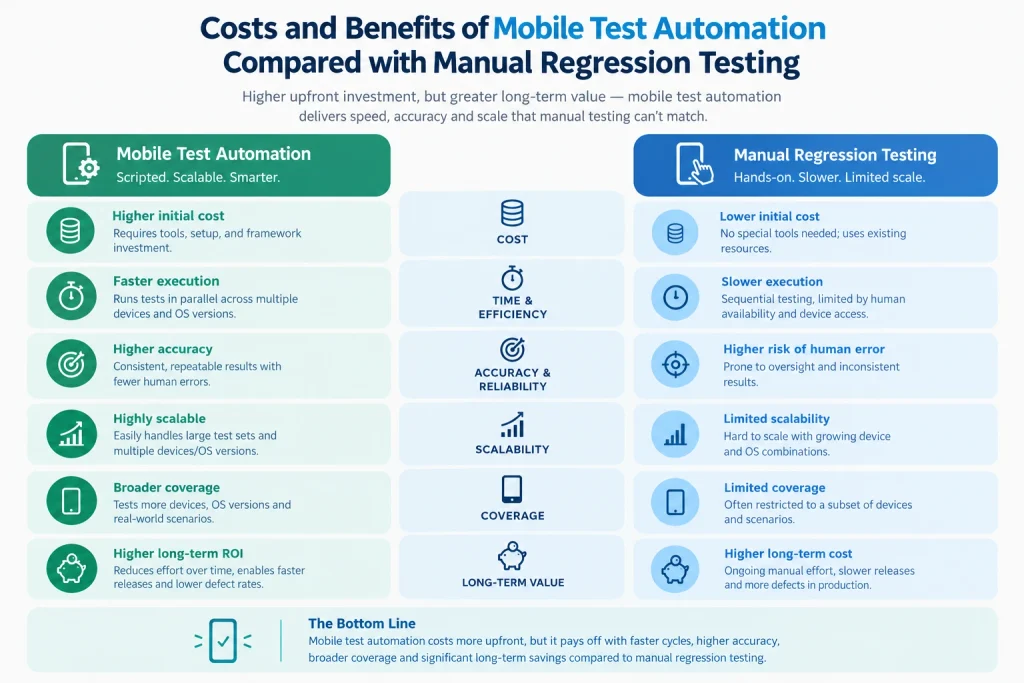
The Costs of Mobile Test Automation
Mobile test automation requires an initial investment and ongoing engineering effort. Although Appium is open source, the overall solution is not free to build or maintain.
A realistic automation budget should account for:
- Framework development and maintenance
- Automation engineering skills
- Real devices and simulators or emulators
- Cloud device infrastructure, where required
- CI/CD infrastructure
- Test data and environment management
- Reporting and failure diagnostics
- Debugging and ongoing stabilization
Commercial automation platforms may also introduce licensing and support fees. Their value should be assessed against the features, infrastructure, and engineering effort they save.
The key is to evaluate the total cost of ownership rather than the price of the automation tool alone.
Appium as the Mobile Test Automation Foundation
Appium provides an open-source foundation for automating native, hybrid, and mobile web applications. When combined with WebdriverIO and a maintainable test architecture, it can support cross-platform automation for iOS and Android.
A cross-platform mobile automation solution can combine:
- Appium: The mobile automation interface.
- WebdriverIO: The automation API, test execution environment, and integration layer.
- XCUITest: The underlying automation technology commonly used for iOS.
- UiAutomator2: The underlying automation technology commonly used for Android.
- Mocha: The test framework for organizing and executing test scenarios.
- Allure: The reporting layer for execution results and failure evidence.
This combination allows teams to establish a common automation strategy while accommodating platform-specific behavior.
However, selecting the right tools is only the starting point. The architecture determines whether the framework remains maintainable as the application and test suite grow.
Read our blog on Mobile Testing Without Limits: Accelerate Quality with AI-Powered Test Automation
Building a Maintainable Appium POM Architecture
Page Object Model (POM) provides an abstraction between business-level tests and the application’s user interface. It helps prevent locators, UI interactions, and platform-specific implementation details from being scattered across test cases.
A scalable Appium POM framework should follow these architectural principles.
Business-Level Tests
Tests should describe the business behavior being validated, such as login, registration, password reset, navigation, or purchase workflows.
This makes tests easier to understand and reduces their dependence on implementation details.
Page Objects and Platform Abstraction
Page Objects encapsulate screen elements, locators, screen-level actions, and relevant validations.
Because iOS and Android may have different element identifiers, navigation patterns, dialogs, and system controls, platform-specific implementations should handle those differences.
Where business behavior is the same, the test scenario should remain common across platforms. Platform-specific differences should be introduced only where necessary.
Reusable Components and Utilities
Frequently used UI elements and common framework behaviors should be centralized.
Examples include reusable alert and permission handlers, navigation components, date pickers, wait strategies, screenshot capture, logging, and test-data utilities.
This reduces duplication and makes changes easier to manage.
Configuration and Environment Management
Device, platform, application, and environment settings should be separated from test logic.
This allows the same business scenarios to run against simulators, emulators, real devices, and cloud devices without embedding environment-specific settings in individual tests.
Reporting and Diagnostics
A useful automation framework should capture the information required to investigate failures, including the error message, stack trace, screenshot, platform, device, OS version, application version, and execution duration.
An Allure-based reporting solution can centralize execution results and failure evidence, helping teams distinguish application defects from automation, environment, and infrastructure issues.
The central architectural principle is simple: tests describe what the user is doing, while the framework manages how that behavior is implemented on each platform.
This separation reduces duplication, improves maintainability, and supports long-term framework growth.
Cross-Platform Execution Strategy
A major benefit of the Appium POM approach is the ability to reuse business scenarios across iOS and Android.
The execution model separates business intent from platform implementation, allowing the framework to handle differences in locators, navigation, permissions, gestures, and system dialogs.
For example, a login scenario should validate the same business requirement on both platforms, even if the underlying UI implementation differs.
Platform-specific behavior should be isolated in the appropriate Page Objects and utilities rather than repeated throughout the test suite.
This approach reduces maintenance effort and makes it easier to extend automation coverage as new devices and OS versions are introduced.
AI-Assisted Mobile Test Automation Engineering: Claude Code and AI Tools
AI-assisted development tools are changing how QA teams design, implement, maintain, and troubleshoot automation frameworks.
Tools such as Claude Code and other AI coding assistants can accelerate framework development, test creation, code review, failure analysis, and maintenance.
However, AI delivers the greatest value when it operates within a well-defined automation architecture rather than generating isolated scripts without regard for framework standards.
Framework Development and Architecture
AI tools can assist with:
- Generating initial framework components based on established design standards.
- Creating and reviewing WebdriverIO configuration.
- Improving code organization and reusability.
- Identifying duplicated implementations and architectural inconsistencies.
- Maintaining framework documentation and coding conventions.
Page Object and Locator Development
AI can help create Page Object methods from documented requirements and verified locators, analyze iOS and Android page-source output, and suggest more maintainable selector strategies.
It can also identify opportunities to centralize locators and move repeated interactions into reusable components.
However, generated locators must be validated against the actual application and target device. AI should not be treated as an authoritative source of live UI structure.
Cross-Platform Test Development
AI can help develop common business-level tests while identifying differences between iOS and Android implementations.
Typical applications include:
- Generating reusable test scenarios.
- Identifying platform-specific UI behavior.
- Developing alert and permission handling.
- Suggesting positive, negative, boundary, and data-driven scenarios.
- Identifying missing test conditions from requirements.
Generated tests must be reviewed against business requirements, expected behavior, and risk priorities.
Failure Analysis and Debugging
AI assistants can analyze Appium logs, WebdriverIO errors, stack traces, and relevant page-source output to suggest potential causes of failure.
They can help distinguish among locator problems, synchronization issues, application defects, device failures, and environment problems.
AI-generated explanations should be treated as hypotheses. Root causes must be confirmed through reproducible execution and appropriate debugging.
Automation Maintenance and Refactoring
AI tools can assist with:
- Refactoring duplicated code.
- Updating Page Objects after UI changes.
- Reviewing synchronization strategies.
- Investigating recurring flaky tests.
- Improving test readability.
- Maintaining coding standards.
These capabilities can reduce repetitive engineering effort, but they do not eliminate the need for code review and regression validation.
Using Claude Code Within the Appium POM Framework
Claude Code can assist with repository-level development tasks when provided with appropriate project context and access.
For example, it can help engineers understand the existing architecture before changing files, implement Page Objects and utilities, review related changes, investigate test failures, and refactor code while preserving established conventions.
For effective use, define project-level instructions covering:
- Appium POM architecture
- ES module conventions
- Naming and locator standards
- Platform-specific implementation rules
- Test execution and reporting practices
- Code review and quality requirements
AI-generated changes should be reviewed, tested, and approved through the same engineering process as other code changes.
AI Governance and Quality Controls
AI should operate within defined engineering guardrails.
- Architecture first: Generated changes must follow the established framework design.
- Human review: QA engineers must validate code, locators, assertions, and test scenarios.
- Controlled execution: Destructive operations, device resets, installations, and external system changes require appropriate authorization.
- Data protection: Credentials, access tokens, customer data, and signing certificates must not be exposed to AI tools without approved safeguards.
- Quality gates: Generated changes must pass code review and relevant automated checks.
- Traceability: Significant AI-assisted changes should be tracked like other framework changes.
Measuring AI Effectiveness
The impact of AI should be measured using engineering outcomes rather than code-generation volume.
Useful metrics include:
- Time required to develop and review a test.
- Time required to create or update a Page Object.
- Defect rate in AI-generated code.
- Percentage of generated tests accepted after review.
- Time required to diagnose automation failures.
- Reduction in duplicated code and maintenance effort.
- Impact on test stability and regression reliability.
AI-generated code is not automatically high-quality code. Its value depends on correctness, review effort, maintainability, and the reliability of the resulting tests.
The objective is to combine AI-assisted development with sound QA architecture to make automation faster to build, easier to maintain, and more reliable to execute.
Real Devices vs. Simulators and Emulators
Both real devices and virtual devices have an important role in a cost-effective mobile automation strategy. The right combination depends on testing objectives, hardware requirements, platform coverage, and budget.
Simulators and Emulators
They are useful for development, smoke testing, frequent regression, CI execution, and fast feedback. They can provide broad coverage without requiring the organization to purchase every device.
However, they cannot reproduce every aspect of real hardware and operating conditions.
Real Devices
Real devices are important for validating hardware-dependent and device-specific behavior, including:
- Camera and hardware integration
- Biometrics
- Push notifications
- Device permissions
- Hardware-specific defects
- Real network behavior
- Device-specific performance characteristics
The optimal strategy is not to choose one over the other. It is to combine them according to business risk, technical requirements, and budget.
Cloud Device Labs and Device Coverage
Cloud-based device platforms provide access to a wider range of devices without requiring an organization to purchase and maintain every device internally.
They can be useful when teams need broader OS coverage, real-device testing, parallel execution, or access to devices that are difficult to maintain locally.
However, cloud testing introduces additional costs, and its value depends on actual coverage requirements.
Building a Risk-Based Device Matrix
Instead of selecting devices randomly, prioritize them using:
- Production analytics and customer usage
- Supported OS versions
- Business-critical platforms
- Market share
- Historical defects
- Hardware requirements
- Application compatibility risks
A practical device strategy can use three tiers:
- Tier 1 — Critical devices: The devices and OS versions representing the highest business and customer risk.
- Tier 2 — High-usage devices: Devices representing significant customer usage.
- Tier 3 — Compatibility devices: Selected devices and OS versions used to validate broader compatibility.
This approach offers a more sustainable investment than attempting to automate every possible device combination.
CI/CD Integration
The value of automation increases when it becomes part of the software delivery pipeline. A layered execution strategy provides appropriate feedback at different stages without requiring the full regression suite to run after every change.
- Pull request and build validation: Run a focused smoke suite to detect critical issues quickly.
- Continuous integration: Validate important functional scenarios against supported platforms.
- Scheduled regression: Execute broader suites across selected devices and OS versions.
- Release validation: Run critical business workflows on real devices and selected cloud-device combinations before release.
The objective is to provide fast feedback during development while maintaining sufficient coverage for release decisions.
Execution scope should be balanced against pipeline duration, infrastructure cost, test reliability, and the risk of delaying development unnecessarily.
What Should Be Automated?
Not every test case should be automated. High-value candidates generally include:
- Frequently executed scenarios
- Stable functionality
- Business-critical workflows
- Repetitive regression tests
- Data-driven scenarios
- Time-consuming manual tests
- Cross-platform scenarios
- Smoke tests
- Critical end-to-end workflows
Automation may provide less value for exploratory testing, usability evaluation, highly subjective validation, one-time investigations, and functionality that changes too frequently to justify its maintenance cost.
The decision should consider execution frequency, business risk, stability, maintenance effort, and the cost of failure.
The goal is not 100% automation. It is to maximize business value from automation investment while retaining human judgment where it adds the most value.
Automation Maintenance and Reliability
Automation should be treated as a continuously maintained engineering product. Mobile applications change through UI redesigns, locator changes, navigation updates, authentication changes, OS upgrades, permission changes, and API modifications.
A well-structured POM architecture reduces the impact of these changes by centralizing UI implementation and common behavior.
However, good architecture alone does not guarantee reliable automation. Tests also require appropriate synchronization, stable locators, controlled test data, reliable environments, and effective failure diagnostics.
Common problems that increase maintenance costs include:
- Excessive hard-coded waits
- Duplicated locators and test logic
- Fragile selectors
- Platform-specific logic inside business tests
- Poor test data management
- Unreliable assertions
- Inadequate reporting
- High test flakiness
- Missing CI/CD integration
A framework that produces frequent false failures can lose stakeholder confidence, leading teams to ignore test results and return to manual regression.
Reliability should therefore be treated as a core quality attribute of the automation solution.
Measuring Automation ROI
Automation ROI should be measured using more than the number of automated test cases. It should account for coverage, efficiency, reliability, defect detection, maintainability, and business impact.
Coverage
- Critical workflows automated
- Platform and OS coverage
- Device coverage
- Risk-based scenario coverage
Efficiency
- Regression execution time
- Manual hours saved
- Parallel execution capacity
- Release validation time
Reliability
- Automation pass rate
- Flaky-test percentage
- False failure rate
- Test stability over time
Defect Detection
- Defects detected before production
- Regression defects detected
- Escaped defects
- Time to identify and resolve failures
Maintainability
- Time required to fix automation failures
- Locator maintenance effort
- Test duplication
- Framework maintenance effort
Business Impact
- Faster feedback to developers
- Reduced regression cycle time
- More frequent release readiness assessments
- Improved confidence in release decisions
A simple starting point is to compare the total manual effort avoided with the ongoing cost of automation engineering, infrastructure, tools, and maintenance.
For example, if manual regression takes 30 hours per release and a reliable automated suite reduces equivalent execution and review effort to 4 hours, the potential saving is 26 hours per release.
Actual savings must also account for test setup, result analysis, failure investigation, and ongoing maintenance. Automated execution time alone does not represent the full cost of validating a release.
Read our blog on How Enterprises Build Production-Ready AI Systems With AI-Native Application Architecture
Manual Testing and Automation Should Work Together
The objective should not be manual testing versus automation.
It should be:
Manual Testing + Automation = Quality Engineering
Automation is well suited to repetitive validation, regression, smoke testing, data-driven scenarios, cross-platform execution, and continuous feedback.
QA engineers remain essential for exploratory testing, risk analysis, product understanding, usability assessment, complex investigations, test strategy, and quality architecture.
AI-assisted tools can further accelerate engineering work, but they also require human oversight, sound design principles, and measurable quality controls.
The strongest model combines automation’s speed and repeatability with human judgment and AI-assisted productivity.
Conclusion
The question should not simply be:
“Is mobile test automation expensive?”
The better question is:
“What is the cost of not having scalable mobile test automation?”
Manual testing can appear inexpensive initially, but costs increase as application complexity grows, release frequency increases, device coverage expands, and regression suites become larger.
A well-designed mobile automation strategy requires investment in automation engineering, Appium, WebdriverIO, POM architecture, devices, CI/CD, reporting, and maintenance. AI-assisted tools such as Claude Code can help reduce repetitive development effort, accelerate debugging, and improve engineering productivity when used within appropriate governance and review processes.
The return comes from faster regression, earlier defect detection, broader coverage, repeatable execution, reduced manual effort, and more confident release decisions.
For organizations adopting Appium, WebdriverIO, and Page Object Model, the goal should be to establish a reusable automation platform where:
- Business-level tests focus on user behavior.
- Page Objects abstract UI implementation.
- Platform-specific implementations handle iOS and Android differences.
- Reusable components and utilities reduce duplication.
- Configuration supports multiple devices and environments.
- Reporting provides actionable failure diagnostics.
- CI/CD enables continuous quality validation.
- AI-assisted engineering accelerates development without compromising quality.
Ultimately, successful mobile automation is not defined by the number of automated tests or the volume of AI-generated code.
It is defined by the ability to deliver reliable test coverage, sustainable maintenance costs, faster feedback, and greater confidence in every release.
Frequently Asked Questions
1. What are the benefits of mobile test automation?
Mobile test automation can reduce repetitive regression effort, improve test consistency, increase cross-platform coverage, accelerate feedback, and support more confident release decisions. Its value depends on test reliability, maintenance costs, and the quality of the automation architecture.
2. Is mobile test automation more cost-effective than manual testing?
Mobile test automation can become more cost-effective for frequently repeated, stable, and business-critical scenarios. However, the total cost includes framework development, infrastructure, device coverage, debugging, and maintenance. The best approach combines automation with manual testing where human judgment is essential.
3. What is Page Object Model in mobile automation?
Page Object Model separates business-level test scenarios from screen-specific UI interactions and locators. It helps reduce duplication, isolate platform-specific behavior, and make test suites easier to maintain as mobile applications change.
4. How can AI tools help mobile test automation?
AI coding assistants can help create test scaffolding, develop Page Objects, suggest scenarios, investigate logs, refactor code, and diagnose potential failures. Generated code and explanations must be reviewed and validated before they are relied on.
5. Should mobile automation run on real devices or emulators?
Both have a role. Simulators and emulators support fast feedback and broad routine execution, while real devices help validate hardware-dependent behavior, permissions, biometrics, and device-specific conditions. The selection should be risk-based.
6. How should teams measure mobile test automation ROI?
Teams should track regression time, manual effort saved, test coverage, failure reliability, defect detection, maintenance effort, and release confidence. ROI calculations should include infrastructure, engineering, debugging, and ongoing maintenance costs.
7. What are the most common causes of flaky mobile automation tests?
Common causes include unstable locators, excessive hard-coded waits, unreliable test data, environment instability, duplicated logic, platform-specific implementation issues, and inadequate failure diagnostics. Reliable synchronization, maintainable architecture, and actionable reporting help address these problems.
Related Reads
- 7 Architectural Patterns for AI-Native Enterprise Applications
- Eval-Driven Development: Building Reliable AI Applications
- How to Evaluate an AI Agent Platform: Enterprise Checklist
- Understanding Spec-Driven Development: A Practical Guide
- Why Data Pipelines Work in Development but Fail in Production: 6 Gaps to Test