Microsoft Fabric Semantic Models are business-ready semantic layers that organize enterprise data into reusable, governed, and AI-ready datasets. By centralizing business logic, relationships, calculations, security, and KPIs, Semantic Models enable consistent reporting, self-service analytics, Microsoft Copilot, AI agents, and enterprise decision-making using a single source of truth.
Executive Summary
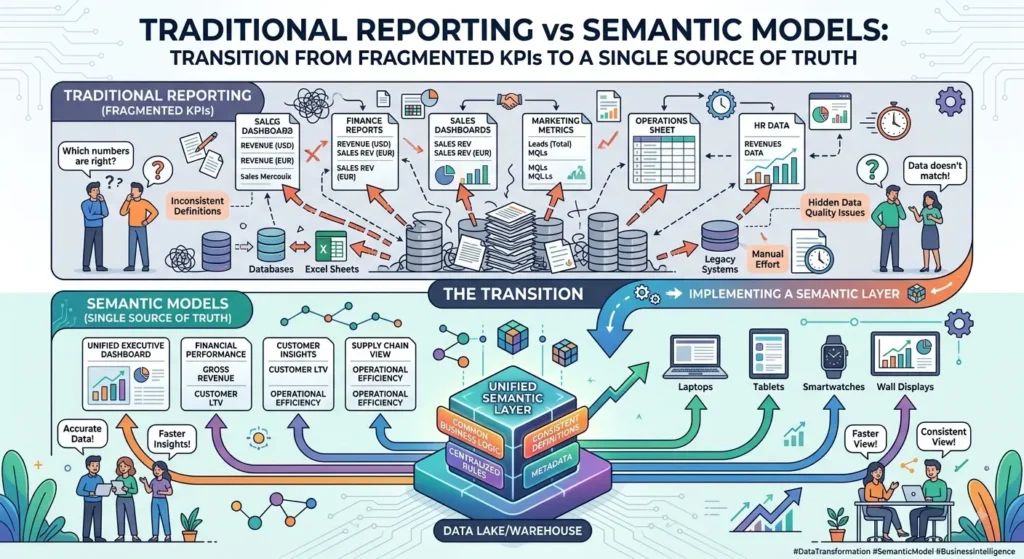
Data has become one of the most valuable enterprise assets, yet many organizations still struggle to convert raw information into consistent, actionable insights. Different departments often calculate the same metrics differently, resulting in conflicting reports, duplicate datasets, and low confidence in business decisions.
Microsoft Fabric addresses this challenge through Semantic Models—a centralized business layer that standardizes business definitions, calculations, relationships, hierarchies, and security across the entire analytics ecosystem.
Rather than recreating logic in every report, organizations can define business rules once and make them available across Power BI, Excel, Microsoft Copilot, AI agents, and other Microsoft Fabric workloads. This not only improves reporting consistency but also creates the trusted business context required for modern AI applications.
As organizations increasingly adopt Generative AI, Agentic AI, and self-service analytics, Semantic Models are evolving from a reporting feature into the foundation of an enterprise-wide intelligent data platform.
Why Microsoft Fabric Semantic Models Matter
Microsoft Fabric Semantic Models create a centralized business layer that standardizes KPIs, calculations, relationships, and security across an organization. This enables consistent reporting, trusted analytics, faster self-service BI, and AI-ready data that supports Microsoft Copilot, AI agents, and enterprise decision-making.
Most organizations have no shortage of data—they have a shortage of trusted business definitions.
Consider a simple business metric such as Revenue.
Finance may calculate revenue after discounts and taxes.
Sales may include pipeline forecasts.
Marketing may report campaign-attributed revenue.
Operations may measure invoiced revenue.
Each definition serves a business purpose, but when multiple versions exist across dashboards and reports, stakeholders spend more time reconciling numbers than making decisions.
Microsoft Fabric Semantic Models solve this problem by introducing a shared semantic layer where business metrics, measures, and hierarchies are defined once and reused everywhere.
Instead of every Power BI report containing its own calculations, Semantic Models ensure that every report, dashboard, AI assistant, and analytics application references the same trusted business logic.
This transforms analytics from “multiple versions of the truth” into “one trusted business language.”Microsoft Learn provides detailed guidance on creating and managing Semantic Models in Microsoft Fabric, including best practices for building reusable business logic, enabling secure data access, and delivering consistent analytics across Power BI and other Fabric workloads.
Enterprise Insight: Organizations don’t fail because they lack dashboards—they struggle because different dashboards answer the same business question differently. Semantic Models eliminate this inconsistency by creating a shared business vocabulary across the enterprise.
What Are Microsoft Fabric Semantic Models?
A Microsoft Fabric Semantic Model is a business-friendly representation of enterprise data that organizes tables, relationships, calculations, hierarchies, and security into a reusable semantic layer. It allows business users, analysts, and AI applications to interact with enterprise data using familiar business concepts rather than complex database structures.
Raw enterprise data is designed for storage and processing—not business understanding.
A typical ERP or CRM database may contain hundreds of normalized tables with technical field names and complex joins. While this structure is efficient for transactional systems, it makes analytics difficult for business users.
Microsoft Fabric Semantic Models abstract this complexity by transforming technical datasets into meaningful business entities.
Instead of interacting with database tables, users work with concepts such as:
Customers
Products
Sales
Revenue
Inventory
Employees
Suppliers
Profitability
Semantic Models also define reusable calculations using DAX (Data Analysis Expressions), establish relationships between datasets, and enforce consistent business definitions across reports and applications.
The result is a business-ready semantic layer that improves usability without changing the underlying data.
Raw Data vs Semantic Models
Raw Enterprise Data
Microsoft Fabric Semantic Model
Technical tables
Business entities
SQL joins
Business relationships
Database columns
Business attributes
Manual calculations
Reusable DAX measures
Complex schema
Business-friendly structure
Technical metadata
Business semantics
Why Semantic Models Are Becoming the Foundation of Enterprise AI
Semantic Models are no longer just a Business Intelligence capability. They provide the trusted business context that enables Microsoft Copilot, AI agents, and enterprise AI applications to interpret data consistently, reducing ambiguity and improving the accuracy of AI-generated insights.
The next generation of enterprise analytics is driven by AI-assisted decision-making.
Whether using Microsoft Copilot, natural language queries, or autonomous AI agents, AI systems require more than access to enterprise data—they need access to consistent business meaning.
Imagine asking Microsoft Copilot:
“Show our top-performing regions this quarter.”
Without a semantic layer, AI may encounter multiple definitions of “performance” or “region” across different datasets.
Semantic Models resolve this ambiguity by exposing standardized business definitions that both humans and AI systems can understand.
This creates a shared knowledge layer that powers:
Microsoft Copilot
AI Agents
Natural Language Querying
Self-Service Analytics
Executive Dashboards
Intelligent Business Applications
As AI adoption accelerates, Semantic Models are becoming the knowledge foundation for enterprise intelligence.
Semantic Models sit between enterprise data and business applications, translating raw datasets into reusable business knowledge. They centralize relationships, measures, security, and metadata so that every report, dashboard, and AI application uses the same trusted business logic.
Microsoft Fabric introduces a semantic layer between enterprise data sources and analytics consumers.
Instead of every report querying raw tables independently, all reports connect to a centralized Semantic Model.
This model:
Organizes business entities
Defines reusable measures
Creates hierarchies
Manages relationships
Applies Row-Level Security (RLS)
Optimizes query execution
Because these definitions exist centrally, any changes automatically propagate across connected reports and dashboards, reducing maintenance while ensuring consistency.
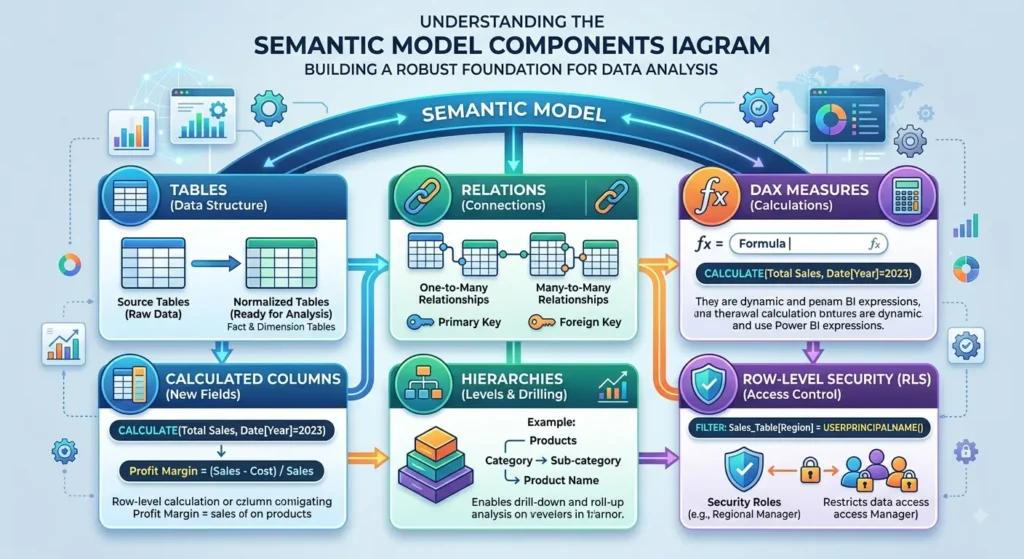
Microsoft Fabric Semantic Models combine business entities, relationships, measures, hierarchies, calculated columns, and security into a reusable semantic layer that supports consistent analytics across the enterprise.
Designing an effective Semantic Model requires more than importing tables. Each component contributes to performance, usability, and governance.
Tables
Represent business entities such as customers, products, invoices, or orders.
Relationships
Define how business entities interact, enabling cross-functional analytics.
Measures
Reusable DAX calculations that standardize business KPIs, including revenue, gross margin, growth rate, or customer lifetime value.
Hierarchies
Organize data into intuitive drill-down paths, such as:
Year → Quarter → Month → Day
or
Region → Country → State → City
Calculated Columns
Create derived attributes without modifying the source system.
Row-Level Security (RLS)
Restricts access based on business roles, ensuring users only view authorized data.
Semantic Model Components
Component
Purpose
Example
Tables
Business entities
Customers
Relationships
Connect entities
Orders ↔ Customers
Measures
Business KPIs
Total Revenue
Hierarchies
Navigation
Year → Quarter → Month
Calculated Columns
Derived values
Profit Category
Row-Level Security
Controlled access
Regional Sales Manager
Key Benefits of Microsoft Fabric Semantic Models
Microsoft Fabric Semantic Models improve analytics consistency, accelerate report development, simplify governance, and create AI-ready business data by centralizing business logic into reusable, governed semantic layers.
Rather than focusing solely on reporting, Semantic Models deliver value across business, technology, and AI initiatives.
Despite their growing importance, Semantic Models are often misunderstood. They are not simply Power BI datasets—they represent a governed enterprise semantic layer that supports analytics, AI, and business intelligence across Microsoft Fabric.
Myth
Reality
Semantic Models are just Power BI datasets
They are enterprise semantic layers shared across Microsoft Fabric.
They replace Data Warehouses
They complement Lakehouses and Warehouses by adding business meaning.
They are only for reporting
They also power Microsoft Copilot, AI agents, Excel, APIs, and analytics applications.
Only BI developers use them
Business users, analysts, and AI systems all benefit from Semantic Models.
Enterprise Decision Framework
When Should You Use Microsoft Fabric Semantic Models?
Business Requirement
Recommendation
Enterprise Reporting
⭐⭐⭐⭐⭐
Self-Service Analytics
⭐⭐⭐⭐⭐
Microsoft Copilot
⭐⭐⭐⭐⭐
AI Agents
⭐⭐⭐⭐⭐
Executive Dashboards
⭐⭐⭐⭐⭐
Departmental Analytics
⭐⭐⭐⭐☆
One-Off Excel Reports
⭐⭐☆☆☆
Key Takeaways
Microsoft Fabric Semantic Models create a governed semantic layer that standardizes business metrics across the enterprise.
They simplify complex data into reusable business entities, relationships, measures, and hierarchies.
Semantic Models improve reporting consistency, reduce duplicate logic, and strengthen data governance.
They provide the trusted business context required by Microsoft Copilot, AI agents, and modern AI-powered analytics.
Organizations adopting Microsoft Fabric should treat Semantic Models as strategic enterprise assets that bridge data engineering, business intelligence, and AI.
Direct Lake vs Import vs DirectQuery
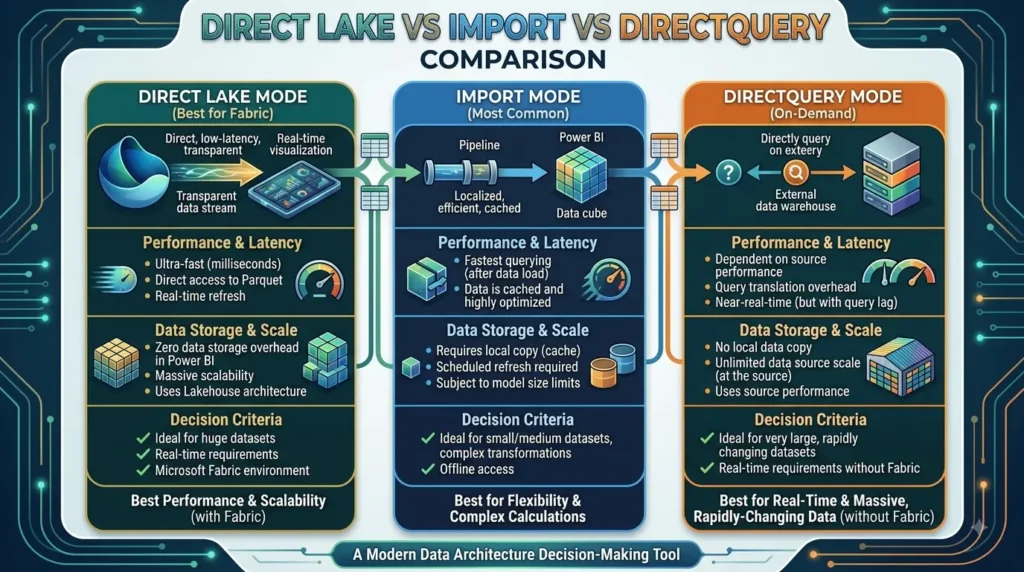
Microsoft Fabric supports three primary storage modes for Semantic Models—Direct Lake, Import, and DirectQuery. Direct Lake is the preferred option for most Microsoft Fabric implementations because it delivers near real-time analytics without duplicating data, combining the performance of Import mode with the freshness of DirectQuery.
Choosing the right storage mode has a significant impact on report performance, scalability, refresh frequency, and infrastructure costs.
Direct Lake
Direct Lake allows Semantic Models to read Delta tables directly from OneLake without importing or duplicating data.
Ideal for:
Microsoft Fabric
Enterprise analytics
Near real-time reporting
Large-scale datasets
Import Mode
Imports data into the Semantic Model for maximum query performance.
Ideal for:
Smaller datasets
Static reporting
High-speed dashboard performance
DirectQuery
Queries the underlying source system every time a report is executed.
Ideal for:
Legacy databases
Operational reporting
External systems
Direct Lake vs Import vs DirectQuery
Capability
Direct Lake
Import
DirectQuery
Data Duplication
No
Yes
No
Refresh Required
Minimal
Yes
No
Query Performance
Excellent
Excellent
Moderate
Near Real-Time Analytics
Yes
No
Yes
Storage Costs
Lower
Higher
Lower
Enterprise Scale
Excellent
Good
Moderate
Microsoft Fabric Optimized
Yes
Partial
Partial
Recommendation: For organizations building enterprise analytics on Microsoft Fabric, Direct Lake is the preferred choice because it combines performance, scalability, and simplified data management without requiring dataset duplication.
Designing Effective Semantic Models
An effective Semantic Model begins with good data modeling. Following proven practices such as star schema design, reusable measures, descriptive naming, and optimized relationships improves performance, usability, and long-term maintainability.
Technology alone does not guarantee good analytics.
Poor data modeling often results in:
Slow reports
Duplicate calculations
Confusing relationships
Difficult maintenance
A well-designed Semantic Model should prioritize simplicity, consistency, and business usability.
Best Practice #1: Build a Star Schema
A star schema separates transactional facts from descriptive dimensions.
Example:
Fact Table
Sales
Dimension Tables
Customer
Product
Date
Geography
This design reduces query complexity while improving performance.
Star Schema vs Snowflake Schema
Feature
Star Schema
Snowflake Schema
Query Performance
Excellent
Moderate
Simplicity
High
Medium
BI Reporting
Excellent
Moderate
Maintenance
Easier
More Complex
Recommended for Fabric
✅ Yes
Limited Use Cases
Best Practice #2: Standardize Measures Using DAX
Measures should be created once and reused across reports rather than recreated repeatedly. Centralized DAX measures improve consistency, simplify maintenance, and ensure every business user works with the same KPIs.
Create reusable enterprise measures inside the Semantic Model.
Embedded Calculations vs Shared Measures
Embedded Reports
Semantic Models
Duplicate formulas
Single reusable measure
Higher maintenance
Centralized updates
Inconsistent KPIs
Standardized KPIs
Difficult governance
Enterprise governance
Best Practice #3: Optimize Relationships
Relationships determine how tables interact inside a Semantic Model. Optimizing relationship cardinality and filtering improves query performance while reducing ambiguity.
Recommended Practices
Prefer one-to-many relationships.
Minimize many-to-many relationships.
Use surrogate keys.
Remove unused relationships.
Avoid circular dependencies.
Relationship Design Checklist
Best Practice
Recommendation
One-to-Many
✅ Preferred
Many-to-Many
Use Sparingly
Bi-directional Filters
Only when necessary
Circular Relationships
Avoid
Composite Models
Evaluate carefully
Row-Level Security (RLS)
Row-Level Security (RLS) restricts data visibility based on user roles, ensuring employees only access data relevant to their responsibilities. It enables secure self-service analytics without duplicating datasets.
For example:
Regional Managers see only their region.
Country Managers see only their country.
Executives view enterprise-wide data.
Instead of creating separate reports for each audience, organizations can publish a single report secured through RLS.
Business Benefits of RLS
Without RLS
With RLS
Multiple reports
Single reusable report
Duplicate datasets
Centralized governance
Higher maintenance
Easier administration
Security risks
Controlled access
Collaboration with Shared Semantic Models
Microsoft Fabric enables multiple business teams to collaborate using shared Semantic Models, ensuring consistent KPIs and reducing duplicated analytical effort across departments.
Rather than each department maintaining separate datasets:
Finance
Marketing
Sales
Operations
can all consume the same enterprise Semantic Model.
This improves:
Collaboration
Data trust
Governance
Report consistency
Departmental Collaboration
Department
Shared Semantic Model Benefit
Finance
Standard financial KPIs
Sales
Consistent revenue reporting
Marketing
Unified campaign metrics
Operations
Trusted operational dashboards
Executive Leadership
Single enterprise view
Monitoring and Performance Optimization
Maintaining Semantic Model performance requires continuous monitoring of query execution, model size, refresh times, unused objects, and DAX efficiency. Optimization is an ongoing process rather than a one-time activity.
Organizations should regularly review:
Query performance
Refresh duration
Unused columns
Unused measures
Model size
Relationship complexity
Microsoft Fabric provides tools such as:
Performance Analyzer
DAX Query View
Capacity Metrics
Fabric Monitoring
Performance Optimization Checklist
Optimization Area
Best Practice
Star Schema
Use wherever possible
DAX
Optimize complex measures
Relationships
Remove unused joins
Columns
Eliminate unnecessary fields
Measures
Reuse centrally
Refresh Strategy
Incremental Refresh
Direct Lake
Preferred storage mode
Microsoft Purview Integration
Microsoft Purview enhances Semantic Models by providing governance, data lineage, metadata management, and compliance tracking. Together, Fabric and Purview enable organizations to build trusted, governed analytics platforms.
Purview enables organizations to answer questions such as:
Where did this KPI originate?
Which reports consume this Semantic Model?
Who modified this dataset?
What upstream systems contribute to this report?
This visibility strengthens governance while improving regulatory compliance.
Fabric + Purview
Capability
Business Benefit
Data Lineage
Complete traceability
Metadata Management
Better discoverability
Compliance
Regulatory readiness
Impact Analysis
Safer model changes
Data Catalog
Enterprise search
Enterprise Design Framework
Choosing the Right Semantic Model Strategy
Business Requirement
Recommendation
Enterprise BI
⭐⭐⭐⭐⭐
Executive Reporting
⭐⭐⭐⭐⭐
Self-Service Analytics
⭐⭐⭐⭐⭐
AI & Copilot
⭐⭐⭐⭐⭐
Department Reporting
⭐⭐⭐⭐☆
Small Excel Reports
⭐⭐☆☆☆
Key Takeaways
Semantic Models act as the enterprise business layer within Microsoft Fabric, connecting OneLake, Lakehouses, Power BI, and AI applications.
Direct Lake is the preferred storage mode for most Microsoft Fabric deployments because it combines high performance with near real-time access and eliminates unnecessary data duplication.
A star schema, reusable DAX measures, optimized relationships, and Row-Level Security (RLS) are essential for building scalable, maintainable Semantic Models.
Shared Semantic Models improve collaboration by enabling all departments to work from the same governed KPIs and business definitions.
Integrating Microsoft Purview enhances governance through data lineage, metadata management, and impact analysis, creating a trusted foundation for enterprise analytics and AI.
Enterprise Use Cases for Microsoft Fabric Semantic Models
Microsoft Fabric Semantic Models enable organizations to standardize business metrics, improve self-service analytics, and create a trusted data foundation for reporting, AI, and enterprise decision-making. By centralizing business logic, organizations reduce duplication while ensuring consistent insights across teams.
Semantic Models extend beyond Power BI reporting. They provide reusable business definitions that support analytics, executive dashboards, Microsoft Copilot, AI agents, and enterprise applications.
Enterprise Use Cases
Business Function
Semantic Model Use Case
Business Value
Executive Reporting
Standardized KPIs
Consistent decision-making
Finance
Revenue & profitability reporting
Single source of truth
Sales
Pipeline & performance dashboards
Faster sales insights
Operations
Inventory & supply chain analytics
Improved operational visibility
HR
Workforce analytics
Better people insights
AI & Copilot
Natural language business queries
Trusted AI responses
Implementation Roadmap
Implementing Semantic Models should follow a phased approach that aligns business goals, data readiness, governance, and user adoption to ensure long-term success.
Phase
Key Activities
Assess
Identify reporting challenges and business KPIs
Design
Build star schema and business measures
Develop
Create Semantic Models and security rules
Deploy
Publish and share across Fabric workspaces
Optimize
Monitor performance and refine models continuously
Common Mistakes to Avoid
Many Semantic Model projects become difficult to maintain because organizations replicate business logic, overcomplicate relationships, or neglect governance. Avoiding these pitfalls improves scalability and long-term performance.
Common Mistake
Best Practice
Duplicate KPI calculations
Centralize measures in the Semantic Model
Using many-to-many relationships excessively
Prefer one-to-many relationships
Ignoring security
Implement Row-Level Security (RLS)
Poor naming conventions
Use business-friendly names
Large, unused datasets
Remove unnecessary columns and measures
Key Takeaways
Microsoft Fabric Semantic Models provide a single source of truth for enterprise analytics.
They centralize business logic, KPIs, and security to ensure consistent reporting across Power BI, Excel, AI applications, and Microsoft Copilot.
Direct Lake, star schema design, reusable DAX measures, and Row-Level Security are essential for building scalable Semantic Models.
Organizations that invest in well-designed Semantic Models improve analytics consistency, accelerate self-service BI, and establish a trusted foundation for enterprise AI.
Conclusion
Microsoft Fabric Semantic Models are more than a reporting layer—they are the business semantic foundation that connects enterprise data with analytics and AI. By standardizing business definitions, centralizing KPIs, and enabling governed self-service analytics, they help organizations make faster, more confident decisions based on trusted data.
As Microsoft Fabric continues to unify data engineering, analytics, and AI, Semantic Models play an increasingly strategic role in enabling Power BI, Microsoft Copilot, AI agents, and intelligent business applications to work from a shared understanding of enterprise data. Organizations that adopt Semantic Models as part of their data strategy will be better positioned to scale analytics, strengthen governance, and unlock greater value from their Microsoft Fabric investments.
Frequently Asked Questions (FAQs)
1. What is a Microsoft Fabric Semantic Model?
A Microsoft Fabric Semantic Model is a business-friendly layer that organizes enterprise data into reusable tables, relationships, measures, hierarchies, and security rules. It enables consistent reporting, self-service analytics, and AI-powered insights across Microsoft Fabric.
2. How are Semantic Models different from Power BI datasets?
Semantic Models are the evolution of Power BI datasets. They serve as reusable enterprise semantic layers that support Power BI, Excel, Microsoft Copilot, AI applications, and other Microsoft Fabric workloads while centralizing business logic and governance.
3. What is Direct Lake in Microsoft Fabric?
Direct Lake is a storage mode that enables Semantic Models to query data directly from OneLake without importing or duplicating datasets. It delivers high-performance, near real-time analytics while reducing storage and refresh overhead.
4. Why are Semantic Models important for AI?
Semantic Models provide trusted business definitions, standardized KPIs, and governed data that improve the accuracy and consistency of AI-generated insights. They enable Microsoft Copilot and AI agents to reason over a shared business context rather than fragmented datasets.
5. What are the best practices for building Semantic Models?
Key best practices include designing a star schema, creating reusable DAX measures, implementing Row-Level Security (RLS), using Direct Lake where appropriate, following clear naming conventions, documenting business definitions, and governing models with Microsoft Purview.
The Techment Editorial Team collaborates with subject matter experts, architects, consultants, and technology leaders to create practical insights on AI, data engineering, cloud modernization, Microsoft Fabric, analytics, and enterprise transformation.