

Microsoft Fabric Security combines identity management, access control, data governance, encryption, compliance, and monitoring to protect enterprise data and AI workloads. By leveraging Microsoft Entra ID, OneLake security, Microsoft Purview, role-based access control, and Zero Trust principles, organizations can securely build scalable, AI-ready data platforms.
TL;DR
- Microsoft Fabric uses Microsoft Entra ID, OneLake, and Microsoft Purview to secure enterprise data.
- Security should be implemented using Zero Trust and least-privilege access.
- Governance is essential for protecting AI models, analytics, and business data.
- Row-Level Security (RLS), sensitivity labels, and workspace isolation reduce data exposure.
- AI-ready organizations require integrated security, compliance, and continuous monitoring—not just access control.
Introduction
Microsoft Fabric Security is more than a collection of security features—it’s the foundation for building trusted, enterprise-grade AI and analytics solutions. As organizations consolidate data into OneLake and adopt AI-driven workloads such as Copilot, AI agents, and Retrieval-Augmented Generation (RAG), protecting sensitive business information becomes increasingly complex.
Traditional security models often rely on isolated controls for databases, storage, and analytics. Microsoft Fabric takes a unified approach by integrating identity management, governance, compliance, and monitoring across the entire analytics ecosystem.
For CIOs, CISOs, enterprise architects, and data leaders, understanding how Microsoft Fabric secures data throughout its lifecycle is essential for reducing risk, meeting regulatory requirements, and enabling responsible AI adoption.
Why Security Matters in Enterprise AI
Enterprise AI systems process sensitive business information, making security and governance essential. Organizations must protect data throughout its lifecycle by implementing identity management, access controls, encryption, compliance, and continuous monitoring to ensure AI systems remain trustworthy, secure, and compliant.
Artificial Intelligence is rapidly becoming embedded in enterprise operations—from intelligent search and customer service to predictive analytics and AI-powered decision-making. These systems often rely on confidential financial data, customer records, intellectual property, and operational information.
Without strong security controls, AI applications can expose organizations to risks such as:
- Unauthorized data access
- Sensitive information leakage
- Regulatory non-compliance
- Insider threats
- Data poisoning
- Excessive AI permissions
- Inaccurate or biased AI outputs due to poor governance
Microsoft Fabric addresses these challenges by integrating security across data storage, analytics, and AI workloads instead of treating them as separate components.
Enterprise Insight
As AI adoption increases, the focus of enterprise security is shifting from simply protecting infrastructure to protecting data and AI interactions. Organizations should implement governance policies before deploying AI copilots or enterprise knowledge assistants to ensure sensitive information is only accessible to authorized users.
Microsoft Fabric Security Architecture
Microsoft Fabric Security uses a layered architecture that combines Microsoft Entra ID, OneLake, workspace permissions, role-based access control, Microsoft Purview, encryption, and monitoring to secure enterprise analytics and AI workloads. This integrated approach simplifies governance while supporting Zero Trust principles.
Unlike traditional analytics platforms that rely on multiple disconnected security tools, Microsoft Fabric delivers security as an integrated platform capability.
Core Security Layers
| Layer | Purpose |
|---|---|
| Microsoft Entra ID | Identity and authentication |
| OneLake Security | Centralized storage permissions |
| Workspace Roles | Team-based access management |
| Role-Based Access Control (RBAC) | Resource authorization |
| Microsoft Purview | Data governance and compliance |
| Encryption | Data protection at rest and in transit |
| Monitoring & Auditing | Activity tracking and threat detection |
These layers work together to ensure users only access the data required for their roles while maintaining centralized governance.
Microsoft Fabric Security Architecture at a Glance
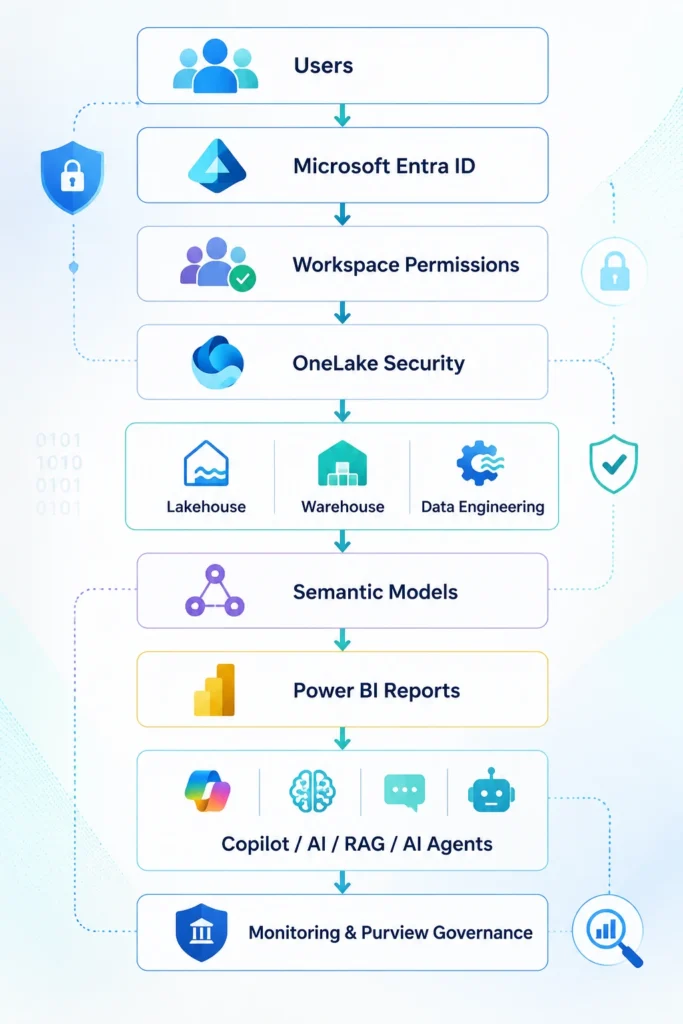
This architecture allows security policies to be applied consistently across data ingestion, storage, analytics, reporting, and AI applications.
Core Microsoft Fabric Security Capabilities
Microsoft Fabric includes built-in security capabilities such as Microsoft Entra ID integration, role-based access control, OneLake security, sensitivity labels, encryption, Microsoft Purview governance, auditing, and compliance features that help organizations secure enterprise data and AI workloads.
Microsoft Fabric provides multiple layers of security that work together to protect enterprise data throughout its lifecycle.
Identity and Authentication
Authentication is managed through Microsoft Entra ID, enabling centralized identity management, conditional access, and multi-factor authentication (MFA). This reduces the need for separate identity providers while strengthening security.
Role-Based Access Control (RBAC)
Microsoft Fabric uses RBAC to ensure users receive only the permissions necessary for their responsibilities. Administrators can define roles at the tenant, workspace, and item levels to support the principle of least privilege.
OneLake Security
OneLake provides centralized storage with consistent access controls across Fabric workloads. Organizations can manage permissions without duplicating data across multiple platforms, simplifying governance and reducing security risks.
Data Protection
Microsoft Fabric protects enterprise data through:
- Encryption at rest
- Encryption in transit
- Sensitivity labels
- Data classification
- Secure sharing
These capabilities help safeguard sensitive information while supporting regulatory compliance.
Governance with Microsoft Purview
Microsoft Purview enables organizations to:
- Discover sensitive data
- Classify business information
- Track data lineage
- Apply governance policies
- Monitor data usage
- Support compliance reporting
Together, these capabilities provide visibility into how enterprise data is stored, accessed, and used across Microsoft Fabric.
Monitoring and Auditing
Security is an ongoing process. Microsoft Fabric includes auditing and activity logging to help administrators:
- Track user activity
- Detect unusual access patterns
- Support forensic investigations
- Meet regulatory audit requirements
- Strengthen operational governance
Enterprise Insight
Implementing Microsoft Fabric’s native security capabilities is only the first step. Enterprise organizations achieve the best outcomes by combining these features with governance policies, Zero Trust principles, regular access reviews, and continuous monitoring to create a secure foundation for AI and analytics.
Techment Perspective: Security Is an AI Enabler, Not a Constraint
Many organizations view security as a compliance requirement that slows innovation. In practice, the opposite is true. A well-governed Microsoft Fabric environment allows data scientists, business analysts, and AI developers to access trusted data securely, accelerating AI adoption while minimizing risk.
For enterprises implementing Generative AI, AI agents, or Retrieval-Augmented Generation (RAG), security should be embedded into platform design from day one—not added after deployment.
Microsoft Fabric Security Best Practices for Enterprise AI
Securing Microsoft Fabric for Enterprise AI requires a layered approach that combines Zero Trust principles, identity management, data governance, least-privilege access, encryption, continuous monitoring, and AI-specific security controls. Organizations that embed security throughout the AI lifecycle can reduce risk while accelerating innovation.
Security in Microsoft Fabric is most effective when it is designed into the platform from the beginning rather than added after deployment. As organizations centralize data in OneLake and build AI-powered analytics, governance becomes a shared responsibility between platform administrators, data engineers, AI teams, and business stakeholders.
1. Adopt Zero Trust Security
Modern enterprise security assumes that no user, device, or application should be trusted by default.
Apply Zero Trust principles by:
- Verifying every identity using Microsoft Entra ID
- Enforcing Multi-Factor Authentication (MFA)
- Using Conditional Access policies
- Regularly reviewing privileged accounts
- Continuously monitoring user behavior
Zero Trust reduces the risk of unauthorized access while supporting secure collaboration across distributed teams.
2. Implement Least-Privilege Access
Grant users only the permissions required to perform their responsibilities.
Best practices include:
- Assign workspace roles carefully.
- Avoid broad administrative permissions.
- Use security groups instead of individual user assignments.
- Review access periodically.
- Remove inactive accounts.
Limiting permissions significantly reduces insider threats and accidental data exposure.
3. Classify and Protect Sensitive Data
Not all enterprise data requires the same level of protection.
Organizations should classify data based on sensitivity levels such as:
- Public
- Internal
- Confidential
- Restricted
Sensitivity labels, encryption, and controlled sharing policies help ensure confidential information remains protected across Fabric workloads.
4. Govern Data with Microsoft Purview
Data governance is essential for trusted AI.
Microsoft Purview enables organizations to:
- Discover sensitive information
- Track data lineage
- Define governance policies
- Classify business data
- Support regulatory compliance
- Improve audit readiness
Governance also improves confidence in AI-generated insights by ensuring models are trained on trusted, well-managed data.
5. Secure AI Workloads from Day One
AI introduces new security considerations beyond traditional analytics.
Organizations should secure:
- AI models
- Training datasets
- Prompt libraries
- Retrieval indexes
- Vector databases
- AI agents
- Business knowledge repositories
Protecting these assets reduces the likelihood of sensitive information being exposed through AI interactions.
Microsoft recommends adopting a Zero Trust security model where every identity, device, application, and request is continuously verified. Combining Zero Trust with Microsoft Fabric’s built-in governance capabilities helps organizations secure enterprise data while enabling scalable AI adoption.
Enterprise Insight: Security should evolve alongside AI maturity. As organizations expand from analytics to AI copilots, RAG applications, and autonomous AI agents, governance policies must extend beyond data to include prompts, models, AI outputs, and user interactions.
Microsoft Fabric Security Governance Framework
An effective Microsoft Fabric governance framework combines identity, data governance, access management, compliance, and continuous monitoring. Aligning these five pillars enables enterprises to build secure, AI-ready data platforms while meeting regulatory and business requirements.
Most organizations implement individual security controls but lack an integrated governance strategy.
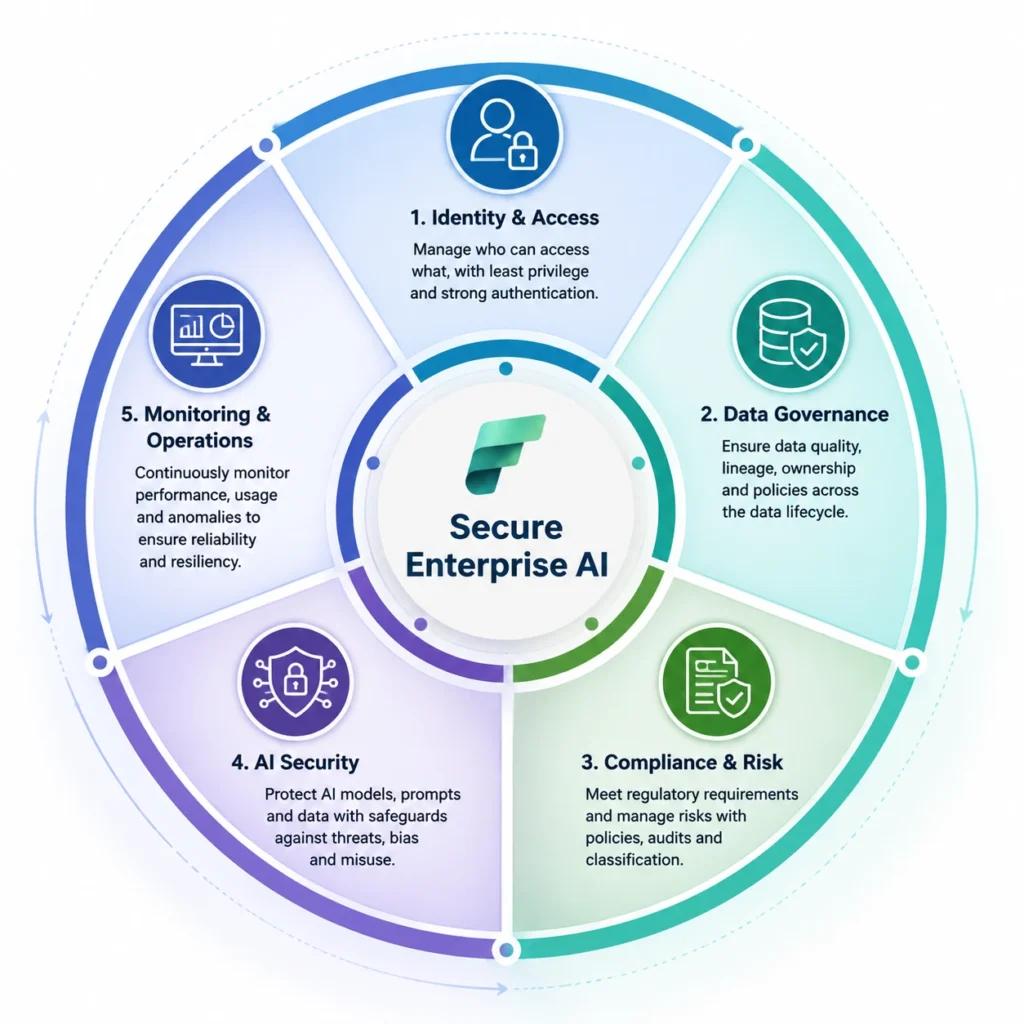
Microsoft Fabric Security Governance Framework™ provides a practical approach to securing enterprise AI workloads.
Five Governance Pillars
| Pillar | Objective | Business Outcome |
|---|---|---|
| Identity & Access | Secure authentication and least-privilege access | Reduced unauthorized access |
| Data Governance | Classify, catalog, and protect enterprise data | Trusted AI-ready data |
| Compliance & Risk | Align with regulatory requirements and internal policies | Improved audit readiness |
| AI Security | Protect AI models, prompts, and enterprise knowledge | Responsible AI adoption |
| Monitoring & Operations | Continuously monitor activity, access, and threats | Proactive risk management |
Unlike traditional governance models that focus only on data protection, this framework extends governance to AI workloads, ensuring secure and scalable enterprise AI adoption.
Securing AI Workloads in Microsoft Fabric
Enterprise AI workloads—including Copilot, Retrieval-Augmented Generation (RAG), machine learning, and AI agents—require additional security controls beyond traditional analytics. Protecting enterprise knowledge, prompts, vector indexes, and AI outputs helps ensure secure and responsible AI deployment.
As organizations integrate AI into Microsoft Fabric, protecting AI interactions becomes just as important as protecting the underlying data.
Securing Retrieval-Augmented Generation (RAG)
RAG applications retrieve enterprise knowledge before generating responses. Without proper governance, AI systems may expose confidential documents or outdated information.
Recommended practices:
- Restrict access to indexed documents.
- Apply sensitivity labels to enterprise content.
- Use role-based retrieval permissions.
- Monitor prompt activity.
- Audit AI responses regularly.
Securing AI Agents
AI agents often execute workflows across multiple business systems.
Best practices include:
- Assign dedicated identities to AI agents.
- Limit agent permissions using least privilege.
- Log all agent actions.
- Validate human approval for sensitive actions.
- Monitor automated workflows continuously.
Protecting Copilot Experiences
Microsoft Copilot respects existing Microsoft 365 and Fabric permissions, but organizations should still:
- Review document permissions before deployment.
- Classify sensitive information.
- Prevent oversharing.
- Implement data loss prevention (DLP) policies.
- Educate users on responsible AI usage.
Traditional Data Platforms vs Microsoft Fabric
| Capability | Traditional Analytics Platforms | Microsoft Fabric |
|---|---|---|
| Identity Management | Multiple identity providers | Microsoft Entra ID |
| Data Storage | Separate storage platforms | Unified OneLake |
| Governance | Independent governance tools | Integrated Microsoft Purview |
| Access Control | Platform-specific permissions | Unified RBAC and workspace roles |
| AI Readiness | Limited integration | Native AI and Copilot integration |
| Compliance | Fragmented auditing | Centralized monitoring and governance |
| Collaboration | Multiple disconnected tools | Unified analytics platform |
Enterprise Insight: A unified platform simplifies governance. By consolidating identity, storage, analytics, and governance, Microsoft Fabric reduces administrative overhead and improves consistency across enterprise data and AI workloads.
Common Security Mistakes in Microsoft Fabric Deployment
Common Microsoft Fabric security mistakes include excessive user permissions, weak governance, inconsistent data classification, inadequate monitoring, and deploying AI workloads without security controls. Addressing these issues early improves compliance, reduces risk, and strengthens enterprise AI adoption.
Avoid these common pitfalls:
1. Granting excessive workspace permissions
Use role-based access and review permissions regularly.
2. Ignoring data classification
Apply sensitivity labels before sharing data.
3. Treating AI security separately from data governance
Govern AI workloads using the same enterprise policies applied to business data.
4. Delaying monitoring and auditing
Continuous monitoring is essential for detecting suspicious activity.\
5. Deploying AI without governance
AI should be governed throughout its lifecycle—from training data to user interactions.
Future Trends in Microsoft Fabric Security
Microsoft Fabric security is evolving toward AI-driven governance, Zero Trust architectures, automated compliance, intelligent threat detection, and secure AI collaboration. Organizations that invest in these capabilities today will be better prepared for future enterprise AI adoption.
Key trends include:
AI-Assisted Security
AI will increasingly automate threat detection, anomaly identification, and compliance monitoring.
Zero Trust by Default
Identity-centric security will continue replacing traditional network-based security models.
Automated Governance
Policy enforcement and compliance reporting will become increasingly automated.
AI Governance
Organizations will extend governance beyond data to include AI models, prompts, vector stores, and generated outputs.
Unified Security Platforms
Integrated platforms such as Microsoft Fabric will continue reducing complexity by combining analytics, governance, and security into a single ecosystem.
Key Takeaways
- Microsoft Fabric provides integrated security across analytics, data engineering, and AI workloads.
- Enterprise AI security requires identity, governance, compliance, and continuous monitoring—not just authentication.
- Zero Trust and least-privilege access should be foundational principles.
- Microsoft Purview strengthens governance by improving data visibility, lineage, and compliance.
- AI workloads such as Copilot, RAG, and AI agents require additional governance beyond traditional analytics.
- Organizations that embed security into Microsoft Fabric from the outset are better positioned to scale AI securely and responsibly.
Conclusion
Microsoft Fabric is more than a unified analytics platform—it provides the security, governance, and compliance capabilities enterprises need to build trusted AI solutions at scale. By combining Microsoft Entra ID, OneLake, Microsoft Purview, role-based access control, and Zero Trust principles, organizations can secure data across its lifecycle while enabling innovation.
However, technology alone is not enough. Long-term success depends on implementing governance frameworks, monitoring user activity, protecting AI workloads, and continuously adapting security practices as enterprise AI evolves.
At Techment, we help enterprises design secure, AI-ready Microsoft Fabric environments by combining expertise in Microsoft Fabric, Data Engineering, AI Strategy, Responsible AI, Microsoft Purview, and Cloud Engineering. Our approach ensures organizations can modernize their data platforms, strengthen governance, and confidently scale AI initiatives while maintaining security and compliance.
Frequently Asked Questions (FAQ)
1. What is Microsoft Fabric Security?
Microsoft Fabric Security is a comprehensive security model that protects enterprise data, analytics, and AI workloads through identity management, role-based access control (RBAC), encryption, governance, monitoring, and compliance. It integrates with Microsoft Entra ID, OneLake, and Microsoft Purview to provide unified security across the Microsoft Fabric platform.
2. How does Microsoft Fabric secure enterprise AI workloads?
Microsoft Fabric secures enterprise AI workloads by combining identity-based access control, data governance, workspace permissions, encryption, sensitivity labels, Microsoft Purview, and continuous monitoring. These capabilities help organizations protect AI models, enterprise knowledge, Copilot experiences, and Retrieval-Augmented Generation (RAG) applications from unauthorized access and data exposure
3. What role does Microsoft Entra ID play in Microsoft Fabric Security?
Microsoft Entra ID serves as the identity and access management foundation for Microsoft Fabric. It enables secure authentication, Single Sign-On (SSO), Multi-Factor Authentication (MFA), Conditional Access, and role-based permissions to ensure only authorized users can access enterprise data and AI resources.
4. Why is Microsoft Purview important for Microsoft Fabric governance?
Microsoft Purview provides centralized data governance by helping organizations discover, classify, catalog, and monitor enterprise data. It improves compliance, tracks data lineage, supports sensitivity labeling, and ensures AI models are built on trusted and well-governed data assets.
5. What are the best practices for securing Microsoft Fabric?
Organizations should adopt Zero Trust principles, implement least-privilege access, classify sensitive data, enable encryption, integrate Microsoft Purview, regularly review permissions, monitor user activity, and secure AI-specific assets such as prompts, vector databases, and AI agents.
6. How does Microsoft Fabric support compliance?
Microsoft Fabric supports enterprise compliance through auditing, data lineage, sensitivity labels, encryption, access controls, Microsoft Purview integration, and Microsoft security services. These capabilities help organizations meet regulatory requirements while maintaining governance across analytics and AI workloads.
7.Can Microsoft Fabric securely support Generative AI and RAG applications?
Yes. Microsoft Fabric provides secure foundations for Generative AI, Retrieval-Augmented Generation (RAG), AI agents, and Copilot experiences by enforcing identity-based access, governance policies, secure data storage, and role-based permissions that ensure AI systems only access authorized enterprise information.
Related Reads
- What Is Microsoft Fabric? A Comprehensive Overview for Enterprise Leaders
- Microsoft Fabric vs Snowflake: A Data Management Showdown
- AI-Ready Enterprise Checklist with Microsoft Fabric
- Microsoft Fabric FabCon 2026 Insights: Key Announcements Driving Real Business Impact in AI & Data
- Microsoft Fabric Architecture: A CTO’s Guide to Modern Analytics & AI
- Data Quality for AI in 2026: Enterprise Guide
- Best Practices for Generative AI Implementation in Business