Introduction: Why Azure Foundry is the Foundation of Enterprise AI Transformation
Enterprise AI has rapidly evolved from isolated pilots to mission-critical systems that drive revenue, efficiency, and innovation. However, most organizations still struggle with fragmented AI ecosystems—multiple tools for model development, orchestration, deployment, and governance. This fragmentation slows innovation and increases operational risk.
This is where Microsoft Foundry emerges as a transformative solution.
Azure Foundry represents a new operating model for enterprise AI, where everything—from models to agents to governance—is unified into a single platform. Instead of stitching together services like Microsoft Azure AI Studio, Azure OpenAI, and custom pipelines, organizations can now build end-to-end AI systems within one cohesive environment.
What makes Foundry especially powerful is its ability to support the entire AI lifecycle:
- Designing intelligent applications
- Deploying models at scale
- Orchestrating AI agents
- Enforcing governance and compliance
This shift is critical because enterprises are no longer building isolated AI features—they are building AI-driven business systems such as:
- Autonomous customer support platforms
- AI-powered sales acceleration engines
- Intelligent document processing pipelines
From a strategic perspective, Azure Foundry is enabling organizations to transition from:
AI experimentation → AI industrialization
This guide is designed to help beginners and enterprise teams understand not just what Azure Foundry is, but how it fits into a modern AI architecture, why it matters, and how to leverage it effectively.
What is Azure Foundry?
Azure Foundry is a unified platform-as-a-service (PaaS) that enables enterprises to build, deploy, and manage AI applications using a single integrated environment. Unlike traditional AI stacks that require multiple services, Foundry consolidates everything into a single control plane and resource model.
At a foundational level, Azure Foundry integrates:
- AI models (including OpenAI and open-source models)
- Agent frameworks for orchestration
- Tooling and APIs for execution
- Governance and monitoring systems
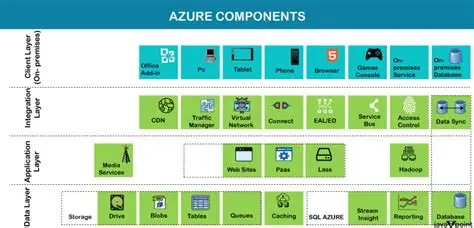
According to Microsoft documentation, Foundry unifies agents, models, and tools with enterprise-ready capabilities like monitoring, tracing, and RBAC .
To simplify:
Azure Foundry acts as the “operating system for enterprise AI”
For more insights on foundational AI architectures, refer to: RAG architectures Enterprise Use Cases in 2026.
Key Components of Azure Foundry Explained
Models
Models form the intelligence layer of modern AI architectures, typically powered by large language models (LLMs) and other machine learning systems. These models are responsible for generating outputs such as text, predictions, recommendations, or classifications based on input data. In enterprise contexts, models are not just standalone components—they are fine-tuned, governed, and aligned with business objectives. Organizations increasingly rely on a combination of proprietary and open-source models to balance performance, cost, and control. The strategic importance of models lies in their ability to encode domain knowledge and continuously improve through feedback loops, making them foundational to scalable AI adoption.
Agents
Agents act as orchestrators within the AI ecosystem. Rather than simply generating outputs, they make decisions, manage workflows, and coordinate interactions between models and external systems. Agents can break down complex tasks into smaller steps, invoke appropriate tools, and adapt dynamically based on context. In enterprise environments, this enables automation of multi-step processes such as customer support resolution, data analysis, or IT operations. Agents are increasingly designed with reasoning capabilities, allowing them to evaluate outcomes and refine their actions over time. This evolution transforms AI from a passive responder into an active participant in business processes.
Tools
Tools represent the actionable layer that agents rely on to interact with the real world. These include APIs, databases, enterprise applications (such as CRM or ERP systems), and external services. Tools extend the capabilities of models and agents by enabling access to real-time data, executing transactions, or triggering workflows. For example, an AI agent might query a database, call a payment API, or retrieve insights from a data warehouse. In enterprise AI architectures, integrating tools securely and efficiently is critical to ensuring that AI systems deliver tangible business value rather than isolated outputs.
Control Plane
The control plane provides the governance backbone of the entire AI system. It encompasses monitoring, security, compliance, and orchestration mechanisms that ensure AI operates responsibly and reliably. This includes managing access controls, tracking model performance, auditing decisions, and enforcing regulatory requirements. As highlighted in enterprise AI strategy frameworks , the control plane is essential for mitigating risks such as bias, data leakage, and operational failures. Without a robust control plane, scaling AI across an organization becomes unsustainable. It ultimately enables trust, accountability, and long-term adoption of AI-driven systems.
To understand how unified analytics can drive enterprise value, explore Microsoft Fabric AI Solutions for Enterprise Intelligence
Breaking It Down Simply
Think of Azure Foundry as:
| Traditional Stack | Azure Foundry Equivalent |
|---|---|
| ML tools | Model catalog |
| APIs | Unified SDK |
| Workflow engines | AI agents |
| Monitoring tools | Built-in observability |
| Governance tools | Native controls |
Why This Matters for Enterprises
Traditional AI development involves:
- Multiple APIs
- Custom orchestration
- External governance tools
Azure Foundry eliminates this complexity by offering:
- A unified SDK and API layer
- A centralized governance framework
- Seamless integration across services
Azure Foundry delivers:
- Speed: Faster AI development lifecycle
- Scale: Enterprise-grade deployment
- Control: Governance + compliance
- Flexibility: Multi-model ecosystem
Strategic Insight
Azure Foundry is not just a tool—it is a platform shift toward agent-based enterprise architectures, where AI systems act autonomously to execute business workflows.
For a deeper perspective on building enterprise-ready AI strategies, explore: Enterprise AI strategy 2026
Evolution: From Fragmented Azure AI Services to Foundry
Before Azure Foundry, enterprises relied on a combination of services within Microsoft Azure to build AI applications. These included Azure OpenAI for model access, Azure AI Studio for development, and Azure Machine Learning for deployment. While powerful individually, these services created a fragmented experience when used together.
This fragmentation led to several enterprise challenges:
- Complex integrations across services
- Inconsistent governance models
- Increased operational overhead
- Difficulty scaling AI solutions
Azure Foundry addresses these challenges by consolidating all capabilities into a single unified platform.
Evolution Breakdown
| Phase | Platform | Limitation |
|---|---|---|
| Phase 1 | Azure AI Services | Siloed capabilities |
| Phase 2 | Azure AI Studio | Partial integration |
| Phase 3 | Azure Foundry | Full unification |
What Changed Technically?
- Multiple SDKs → Unified project client
- Multiple endpoints → Single endpoint architecture
- Fragmented resources → Single Foundry resource model
Business Impact of This Evolution
From a business perspective, this transition delivers:
- Faster time-to-market for AI applications
- Lower engineering costs due to reduced integration work
- Improved governance and compliance
- Better collaboration across teams
Azure Foundry is not just an upgrade—it is a strategic consolidation of Microsoft’s AI ecosystem, designed to support enterprise-scale AI adoption.
To operationalize such capabilities, organizations need robust foundations in data reliability—explored in Microsoft Fabric Architecture: CTO’s Guide to Modern Analytics & AI
Azure Foundry Architecture Explained
Understanding Azure Foundry’s architecture is crucial for designing scalable AI systems. Foundry follows a layered architecture model, where each layer plays a distinct role in the AI lifecycle.
1. Application Layer
This is where end-user applications reside, including:
- Chatbots
- AI copilots
- Automation workflows
These applications interact with users and trigger AI processes.
2. Agent Layer (Core Innovation)
The agent layer is the brain of the system. Agents:
- Execute workflows
- Make decisions
- Call APIs
- Maintain memory
This enables autonomous AI systems, which is a major shift from traditional request-response models.
3. Model Layer
This layer includes:
- Large Language Models (LLMs)
- Fine-tuned models
- Open-source models
It provides the intelligence required for reasoning and generation.
4. Tool Layer
Tools allow agents to interact with:
- Databases
- APIs
- Enterprise systems
This is how AI connects to real-world business operations.
5. Control Plane (Governance Layer)
The control plane ensures:
- Security
- Compliance
- Monitoring
- Policy enforcement
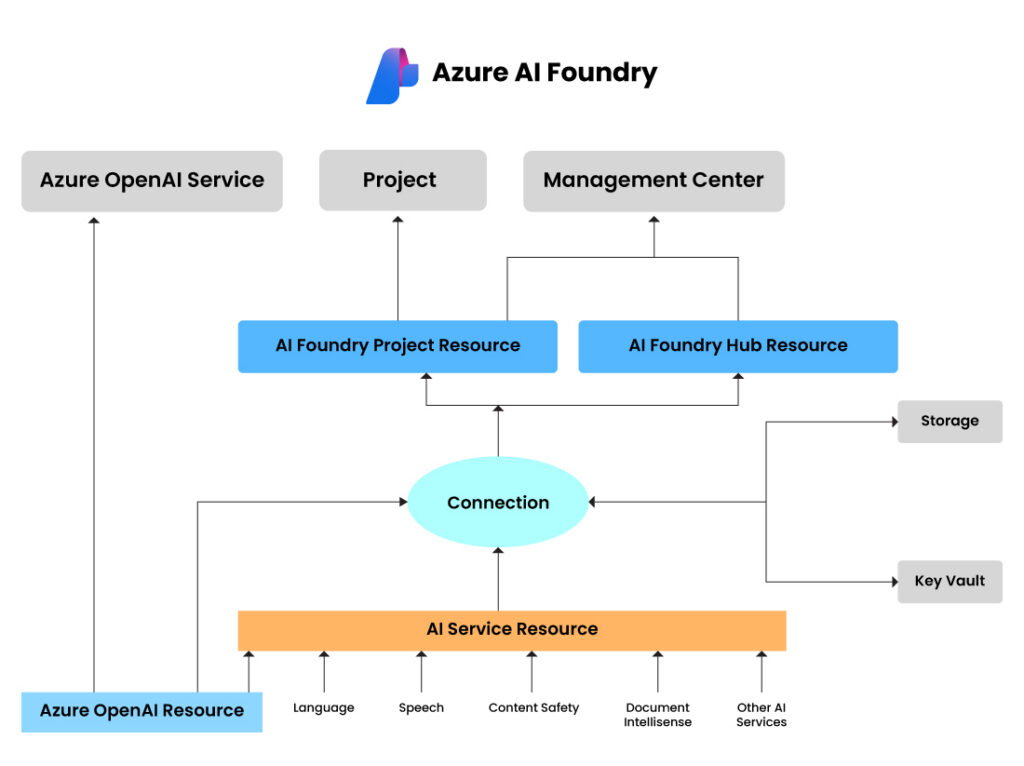
Why This Architecture Matter
This layered approach enables:
- Modular design
- Scalability
- Strong governance
Comparison with Traditional Architecture
| Feature | Traditional AI | Foundry |
|---|---|---|
| Workflow | Manual orchestration | Agent-driven |
| Governance | External | Built-in |
| Integration | Complex | Native |
To understand how modern platforms enable scalable AI, refer to: Microsoft Fabric Architecture: A CTO’s Guide to Modern Analytics & AI
Core Capabilities of Azure Foundry
Azure Foundry’s strength lies in its ability to support the entire AI lifecycle within a single platform. This eliminates the need for multiple tools and enables enterprises to build AI systems faster and more efficiently.
1. Agent-Based AI Development
Azure Foundry enables multi-agent systems, where multiple AI agents collaborate to complete tasks. These agents can:
- Automate workflows
- Make decisions
- Integrate with tools
This represents a shift toward autonomous enterprise systems.
2. Model Flexibility
Foundry provides access to a wide range of models, enabling:
- Use of best-fit models
- Fine-tuning for specific use cases
- Multi-model orchestration
3. Observability and Monitoring
Built-in tools allow teams to:
- Track model performance
- Monitor usage
- Identify issues
4. Governance and Security
Azure Foundry includes:
- RBAC access control
- Policy enforcement
- Audit logs
5. Developer Experience
Developers benefit from:
- Unified APIs
- SDKs
- Integrated tools
Business Value
| Capability | Impact |
|---|---|
| Agents | Automation |
| Models | Flexibility |
| Governance | Risk reduction |
Real-World Use Cases of Azure Foundry (Industry Deep Dive)
Azure Foundry’s true value becomes evident when applied to real-world enterprise scenarios. Unlike traditional AI tools that focus on isolated capabilities, Foundry enables end-to-end intelligent systems that integrate seamlessly into business workflows.
1. Insurance: Intelligent Claims Processing
In the insurance sector, claims processing is often manual, time-consuming, and error-prone. Azure Foundry enables organizations to build AI-driven claims automation systems using agents that:
- Extract data from documents (PDFs, images)
- Validate claims against policies
- Trigger approval workflows
- Detect fraud patterns using AI models
By integrating models, tools, and workflows, insurers can reduce claim processing time by up to 40–60%, while improving accuracy and compliance.
2. Retail: Hyper-Personalized Customer Experiences
Retailers are leveraging Foundry to build real-time personalization engines. AI agents analyze:
- Customer behavior
- Purchase history
- Inventory data
These agents dynamically recommend products, adjust pricing strategies, and optimize promotions.
The result:
- Increased conversion rates
- Higher average order value
- Improved customer retention
3. Healthcare: Clinical Decision Support Systems
Healthcare organizations are using Foundry to develop AI systems that assist clinicians by:
- Analyzing patient records
- Summarizing medical histories
- Suggesting treatment options
Importantly, Foundry’s governance layer ensures data privacy and compliance, which is critical in regulated industries.
4. Manufacturing: Predictive Maintenance
Manufacturers deploy AI agents to monitor IoT sensor data and predict equipment failures. These systems:
- Analyze real-time machine data
- Detect anomalies
- Trigger maintenance workflows
This reduces downtime and increases operational efficiency.
Use Case Impact Table
| Industry | Use Case | Business Outcome |
|---|---|---|
| Insurance | Claims automation | Faster processing |
| Retail | Personalization | Higher revenue |
| Healthcare | Decision support | Better outcomes |
| Manufacturing | Predictive maintenance | Reduced downtime |
Key Insight
Azure Foundry enables a shift from:
AI as a feature → AI as a system of operations
Explore our Gen AI best practices discussed in: Best Practices for Generative AI Implementation in Business
Step-by-Step Guide: How to Get Started with Azure Foundry
Getting started with Azure Foundry requires a structured approach, especially for enterprises aiming to move beyond experimentation into production-grade AI systems.
Step 1: Set Up Your Azure Environment
Begin by creating an account on Microsoft Azure and configuring:
- Subscription
- Resource groups
- Access controls
This foundational setup ensures proper governance and cost management.
Step 2: Create a Foundry Resource
Within Azure, enable Microsoft Foundry and create a Foundry resource. This acts as your central AI workspace.
You’ll then:
- Create projects
- Define environments
- Assign roles (RBAC)
Step 3: Select and Deploy a Model
Browse the model catalog and choose a model based on:
- Use case complexity
- Cost considerations
- Performance requirements
Deploy the model within your project to make it accessible to agents.
Step 4: Build an AI Agen
Define your agent’s:
- Objective
- Workflow
- Tool integrations
Agents can:
- Call APIs
- Access data
- Execute multi-step processes
Step 5: Integrate with Applications
Connect your AI system to:
- Web applications
- Mobile apps
- Enterprise systems
This is where AI becomes part of real business workflows.
Step 6: Monitor and Optimize
Use Foundry’s observability tools to:
- Track performance
- Monitor usage
- Optimize costs
Implementation Checklist
| Step | Action | Outcome |
|---|---|---|
| 1 | Setup Azure | Foundation |
| 2 | Create Foundry | Workspace |
| 3 | Deploy model | Intelligence |
| 4 | Build agent | Automation |
| 5 | Integrate | Business value |
| 6 | Monitor | Optimization |
Internal Link: AI Implementation Roadmap for Enterprises
Pricing & Cost Optimization
Azure Foundry follows a consumption-based pricing model, which means organizations pay based on usage rather than fixed licensing. While this provides flexibility, it also requires careful cost management to avoid unexpected expenses.
Key Cost Drivers
- Model Usage (Tokens)
Costs depend on the number of tokens processed by AI models. - API Calls
Each interaction with models or tools incurs charges. - Compute Resources
Running models and workflows consumes compute power. - Storage
Data storage and retrieval contribute to overall cost.
Pricing Breakdown Table
| Component | Cost Driver | Optimization Strategy |
|---|---|---|
| Models | Tokens | Use smaller models |
| APIs | Calls | Batch requests |
| Compute | Runtime | Auto-scale |
| Storage | Data volume | Optimize retention |
Cost Optimization Strategies
- Right-size models: Use lightweight models for simple tasks
- Prompt engineering: Reduce token usage
- Caching responses: Avoid repeated API calls
- Monitoring usage: Track consumption patterns
Enterprise Insight
Without optimization, AI costs can scale rapidly. However, with proper governance, organizations can achieve:
- High ROI
- Predictable cost structures
- Efficient resource utilization
Explore the architectural, operational, and strategic differences between Multi-Agent Systems vs Single-Agent Architectures.
Governance, Security & Compliance in Azure Foundry
Governance is one of the most critical aspects of enterprise AI adoption. Without proper controls, AI systems can introduce risks such as data leaks, compliance violations, and biased outputs.
Azure Foundry addresses these challenges with built-in governance capabilities.
Key Governance Features
- Role-Based Access Control (RBAC)
Ensures that only authorized users can access resources. - Policy Enforcement
Organizations can define policies for:- Data usage
- Model deployment
- API access
- Monitoring & Observability
Tracks:- Model performance
- Usage patterns
- Security events
- Audit Logs
Provides traceability for compliance and debugging.
Governance Framework Table
| Layer | Control Mechanism |
|---|---|
| Identity | RBAC |
| Data | Encryption |
| Models | Monitoring |
| Usage | Policies |
Why Governance Matters
In industries like healthcare and finance, governance is not optional—it is mandatory. Azure Foundry enables organizations to:
- Meet regulatory requirements
- Ensure responsible AI usage
- Build trust with stakeholders
Expert Insight
Governance is not a barrier to AI innovation—it is an enabler of scalable, trustworthy AI systems.
Explore the key mechanisms through which AI agents driving productivity create exponential efficiency gains in our blog – AI Agents Driving Productivity: How Enterprises Achieve 10x Efficiency.
Challenges in Adopting Azure Foundry and How to Overcome Them
While Azure Foundry provides a powerful platform, enterprises often face challenges during adoption. Understanding these challenges is key to successful implementation.
Challenge 1: Platform Complexity
Azure Foundry introduces new concepts like agents and unified resource models, which can be overwhelming for beginners.
Solution:
- Start with simple use cases
- Provide training for teams
- Use templates and quickstarts
Challenge 2: Integration with Legacy Systems
Enterprises often have existing systems that need to be integrated with AI solutions.
Solution:
- Use Foundry’s tool connectors
- Implement APIs for integration
- Adopt a phased approach
Challenge 3: Skill Gaps
AI development requires expertise in multiple areas, including machine learning, cloud computing, and software engineering.
Solution:
- Upskill internal teams
- Partner with AI experts
- Leverage low-code tools
Challenge 4: Governance Implementation
Defining and enforcing governance policies can be complex.
Solution:
- Establish governance frameworks early
- Align with compliance requirements
- Use built-in tools
Execution Roadmap
| Phase | Focus |
|---|---|
| Phase 1 | Pilot use case |
| Phase 2 | Scale deployment |
| Phase 3 | Optimize and govern |
Guidance for building secure AI environments can be found in frameworks such as AI-Ready Enterprise Checklist for Microsoft Fabric.
Future of Azure Foundry and Enterprise AI
Azure Foundry represents the beginning of a new era in enterprise AI. As the platform evolves, several trends are expected to shape its future.
1. Rise of Agentic AI Systems
AI agents will become more autonomous, capable of:
- Making decisions
- Executing workflows
- Collaborating with other agents
2. Multi-Model Orchestration
Enterprises will increasingly use multiple models for different tasks, orchestrated seamlessly within Foundry.
3. AI-Native Enterprises
Organizations will redesign processes around AI, rather than adding AI as a layer.
4. Increased Focus on Governance
As AI adoption grows, governance will become even more critical, driving innovation in:
- Compliance tools
- Monitoring systems
- Responsible AI frameworks
Future Trends Table
| Trend | Impact |
|---|---|
| Agentic AI | Automation |
| Multi-model | Flexibility |
| AI-native orgs | Transformation |
Strategic Insight
Azure Foundry is positioning itself as the central platform for enterprise AI ecosystems, much like ERP systems did for business operations.
Solutions such as Leveraging Data Transformation for Modern Analytics demonstrate how enterprises can build strong data foundations for AI adoption.
Final Thoughts: Why Azure Foundry is a Strategic Imperative
Azure Foundry is not just another AI platform—it is a strategic foundation for enterprise transformation.
It enables organizations to:
- Build faster
- Scale efficiently
- Govern responsibly
In a world where AI is becoming central to business success, platforms like Azure Foundry will determine which organizations lead—and which fall behind.
FAQs
1. What is Azure Foundry?
Azure Foundry is a unified platform that enables enterprises to build, deploy, and govern AI applications using a single environment.
2. Is Azure Foundry the same as Azure OpenAI?
No, Azure Foundry expands on Azure OpenAI by integrating models, agents, tools, and governance into a single platform.
3. Who should use Azure Foundry?
Developers, data scientists, and enterprise IT teams looking to build scalable AI systems.
4. Is Azure Foundry free?
The platform is free to explore, but usage-based pricing applies for models and resources.
5. What makes Azure Foundry unique?
Its ability to combine:
Agent-based AI
Unified governance
Multi-model flexibility