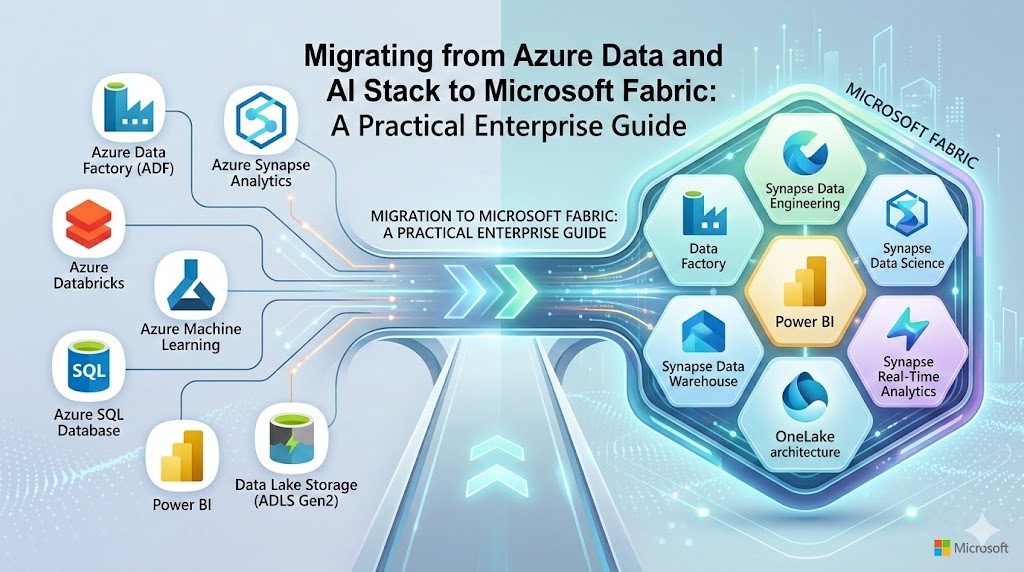
Over the last decade, Microsoft Azure’s data and AI ecosystem has become a foundational analytics platform for enterprises worldwide. Organizations have built extensive architectures using services such as Azure Data Factory, Azure Synapse Analytics, Azure Data Lake Storage, Azure Machine Learning, and Power BI.
Introduction
However, this ecosystem often evolves into a complex constellation of loosely integrated services, each with its own governance model, compute configuration, and operational overhead. Data engineers must manage pipelines across tools, architects must design integration layers, and analytics teams frequently navigate fragmented environments.
Microsoft Fabric fundamentally reimagines this architecture.
By introducing a unified Software-as-a-Service (SaaS) analytics platform, Fabric consolidates data engineering, data science, data warehousing, real-time analytics, and business intelligence into a single integrated environment centered around OneLake.
This shift raises an important strategic question for enterprises:
What does migrating from Azure Data and AI Stack to Microsoft Fabric actually involve?
For organizations already invested heavily in Azure analytics workloads, the answer is nuanced. Some workloads transition seamlessly. Others require restructuring or redesign. Certain capabilities still rely on Azure services during the transition.
This practical enterprise guide explores:
- How Azure data and AI workloads map to Microsoft Fabric capabilities
- Which services are easiest to migrate—and which require redesign
- A migration amenability framework for prioritizing workloads
- Architectural implications of the Fabric SaaS analytics model
- Strategic considerations for enterprise modernization
For CTOs, data platform leaders, and analytics architects, understanding the realities of migrating from Azure Data and AI Stack to Microsoft Fabric is essential to unlocking the next generation of unified enterprise analytics.
TL;DR (Executive Summary)
- Migrating from Azure Data and AI Stack to Microsoft Fabric enables enterprises to consolidate fragmented analytics services into a unified SaaS platform.
- Microsoft Fabric introduces OneLake, integrated analytics engines, and simplified governance across the entire data lifecycle.
- Many Azure services such as ADLS, Synapse, Spark, and Power BI map directly to Fabric equivalents, though migration complexity varies.
- Enterprises should prioritize workloads using a migration amenability vs business criticality framework.
- A phased migration strategy—assessment, preparation, implementation, and optimization—reduces operational risk.
- Fabric represents a strategic shift from PaaS-based analytics stacks to a unified SaaS data platform designed for AI-driven enterprises.
Organizations exploring AI-led transformation often begin by establishing a strong data foundation and governance strategy. Frameworks such as Enterprise AI Strategy in 2026 highlight how aligning AI adoption with enterprise architecture ensures sustainable innovation.
The Strategic Shift: Why Enterprises Are Moving Toward Microsoft Fabric
Enterprise analytics platforms are undergoing a structural transformation. The traditional architecture of multiple loosely coupled data services is giving way to unified data platforms designed to support real-time analytics and AI-driven decision-making.
Microsoft Fabric represents this transition.
The Limits of the Traditional Azure Data Stack
The Azure analytics ecosystem is powerful but fragmented. A typical enterprise data architecture might include:
- Azure Data Factory for pipelines
- Azure Data Lake Storage for storage
- Synapse Analytics for SQL analytics
- Synapse Spark for data engineering
- Azure Machine Learning for ML lifecycle
- Power BI for visualization
While each component is powerful individually, enterprises often struggle with:
Operational complexity- Multiple services require separate configuration, monitoring, and scaling.
Fragmented governance- Data lineage, security policies, and metadata management span several platforms.
Data duplication- Data moves repeatedly across storage layers and analytics services.
Cost unpredictability- Each component has separate compute and pricing models.
Industry research consistently highlights these challenges. Research from reputed organizations note that organizations often struggle to operationalize distributed and fragmented analytics environments due to increased complexity, siloed architectures, and governance challenges—factors that significantly raise the effort required to manage analytics platforms compared to more unified data architectures.
Enterprises building modern analytics platforms—such as those described in Microsoft Fabric Architecture: CTO’s Guide to Modern Analytics & AI—are increasingly designing infrastructure specifically to support AI agents and intelligent automation.
The Microsoft Fabric Vision
Microsoft Fabric addresses these challenges through a unified analytics architecture built around three foundational principles.
OneLake as a universal data foundation
Fabric introduces OneLake as a single logical data lake for the entire organization.
Integrated analytics workloads
Data engineering, warehousing, streaming, AI, and BI all run within the same platform.
SaaS-first architecture
Unlike traditional Azure PaaS services, Fabric abstracts infrastructure management.
This transformation aligns closely with modern data platform strategies discussed in Techment’s perspective on enterprise analytics modernization in
Fabric also integrates natively with Power BI, enabling analytics teams to operate within a unified ecosystem rather than maintaining separate environments.
Read Why Microsoft Fabric AI Solutions Are Changing the Way Enterprises Build Intelligence.
Why This Matters for Enterprise Strategy
For enterprise leaders, migrating from Azure Data and AI Stack to Microsoft Fabric is not just a technical upgrade. It represents a strategic shift toward:
- Simplified platform operations
- Faster analytics development cycles
- Unified governance and data lineage
- AI-ready data architecture
Understanding this shift is the first step toward designing a successful migration roadmap.
For organizations exploring broader governance frameworks, see Data Governance for Data Quality: Future-Proofing Enterprise Data .
Azure Data and AI Workloads and Their Microsoft Fabric Equivalents
Enterprises evaluating migration must first understand how their existing Azure services map to Fabric capabilities.
While many Azure analytics services have direct or partial equivalents, migration complexity varies significantly depending on architecture patterns and workload scale.
Data Lake Storage → OneLake
Azure Data Lake Storage Gen2 remains the foundation of Fabric’s storage architecture.
Fabric’s OneLake is built directly on top of ADLS Gen2 technology but introduces a unified logical data layer accessible across all workloads.
Short-term migration typically does not require physical data movement.
Instead, Fabric provides Shortcuts, allowing data stored in existing Azure Data Lakes to appear within OneLake.
This capability enables organizations to begin migrating analytics workloads before migrating data itself.
Long-term, many enterprises choose to consolidate storage directly into OneLake to maximize Fabric’s unified governance and performance advantages.
Azure Synapse SQL Pools → Fabric Data Warehouse
SQL-based analytics workloads are among the most critical components of enterprise data platforms.
In Azure architectures, these typically run in:
- Serverless SQL pools
- Dedicated SQL pools
Fabric introduces Synapse Data Warehouse, optimized for SQL-based analytics on lakehouse data.
Migrating small data marts is relatively straightforward. Fabric Data Factory’s Copy Wizard enables schema and data migration for datasets in the gigabyte range.
However, large-scale data warehouses require a more structured approach:
- Convert schemas to Fabric-compatible formats
- Export data from Synapse using CETAS
- Stage data in lakehouse storage
- Load into Fabric Warehouse using COPY INTO
Performance optimization is also an important consideration during migration.
Enterprises should validate query patterns, indexing strategies, and workload concurrency before full deployment.
To understand how this fits into broader analytics modernization, many leaders start by evaluating Microsoft Fabric vs Power BI: What Enterprise Leaders Need to Know as part of their platform strategy.
Lakehouse Migration: Synapse Delta Lake to Fabric Lakehouse
Lakehouse architectures are central to modern analytics platforms.
Many Azure environments already use Synapse Delta Lake to unify data lake storage and analytics processing.
Microsoft Fabric extends this concept with Fabric Lakehouse, providing a fully integrated environment where structured and semi-structured data coexist in Delta format.
Data Format Requirements
One critical migration requirement involves data format standardization.
Fabric lakehouses rely heavily on Delta tables, which support:
- ACID transactions
- Time travel
- Schema evolution
Organizations storing data in other formats—such as Parquet or CSV—may need to convert datasets into Delta format during migration.
This step ensures that the data becomes accessible through both SQL analytics engines and Spark compute environments within Fabric.
Architectural Benefits
Migrating to Fabric lakehouse architecture introduces several advantages:
Unified analytics model – Data engineering, data science, and SQL analytics operate on the same storage layer.
Reduced data duplication – Data no longer needs to be copied across multiple analytics services.
Improved governance – Metadata, lineage, and security policies become centralized.
The strategic implications of lakehouse architectures are discussed extensively in Techment’s analysis of modern data platforms and leaders aligning BI with broader AI strategy, can refer to Enterprise AI Strategy in 2026 .

Big Data Engineering: Azure Synapse Spark to Fabric Spark
Spark remains one of the most widely used distributed computing frameworks for large-scale data processing.
Azure Synapse Spark pools are commonly used for:
- ETL pipelines
- Machine learning preparation
- large-scale transformations
Microsoft Fabric includes Fabric Spark, providing an integrated environment for big data processing.
Migration Considerations
Unlike some other services, Spark migration is not entirely automated.
Several components must be recreated manually:
- Spark pools
- configuration settings
- Spark libraries
However, many artifacts can be exported from Azure Synapse and imported into Fabric environments.
These include:
- Spark job definitions
- Hive metastore metadata
Performance Improvements
One major improvement in Fabric Spark is the significantly reduced cluster startup time.
Traditional Spark clusters in Azure may take several minutes to initialize.
Fabric’s serverless Spark model dramatically shortens this time, improving developer productivity and reducing operational overhead.
Enterprise Implications
For data engineering teams, this shift introduces important benefits:
- Faster experimentation cycles
- Reduced infrastructure management
- tighter integration with analytics and BI layers
Fabric Spark is also designed to work seamlessly with Fabric notebooks, enabling unified development environments for engineers and data scientists.
For enterprises pursuing AI-ready data platforms, this integration plays a critical role in enabling modern analytics pipelines.
Read our guide on What Is Power BI Copilot? 5 Enterprise Strategies to Be Ready
Real-Time Data and Streaming Architecture in Microsoft Fabric
Real-time data processing is becoming increasingly important for enterprise analytics.
Industries such as retail, manufacturing, finance, and IoT rely on streaming pipelines to process high-volume event data in near real time.
Azure provides a robust streaming ecosystem built around:
- Event Hubs
- IoT Hub
- Azure Stream Analytics
- Azure Data Explorer
Microsoft Fabric introduces its own real-time analytics components but still relies on Azure services for certain ingestion scenarios.
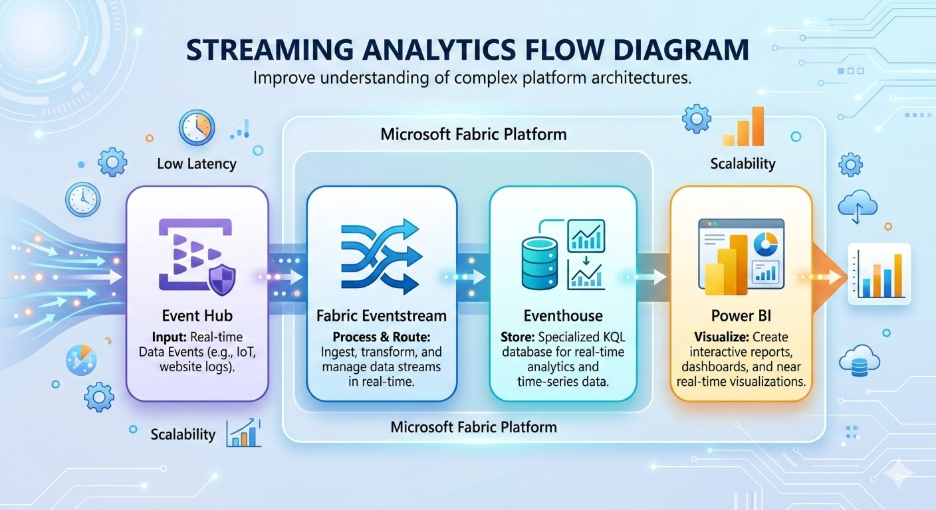
Streaming Architecture in Fabric
Fabric streaming workloads typically involve:
- Stream ingestion
- Azure Event Hub or IoT Hub
- Stream processing
- Fabric Eventstream
- Real-time analytics
- Eventhouse with KQL datasets
- Visualization
- Power BI dashboards
Fabric also introduces advanced capabilities such as:
- data anomaly detection
- forecasting
- real-time event triggers through Data Activator
These features allow organizations to create automated response systems based on streaming data events.
Migration Complexity
Unlike some other workloads, streaming architectures generally require recreation rather than direct migration.
Pipelines must be redesigned to align with Fabric’s event-driven architecture.
This process often involves:
- redefining event schemas
- redesigning stream processing logic
- configuring new analytics destinations
Data Pipelines and Orchestration: Azure Data Factory to Fabric Data Factory
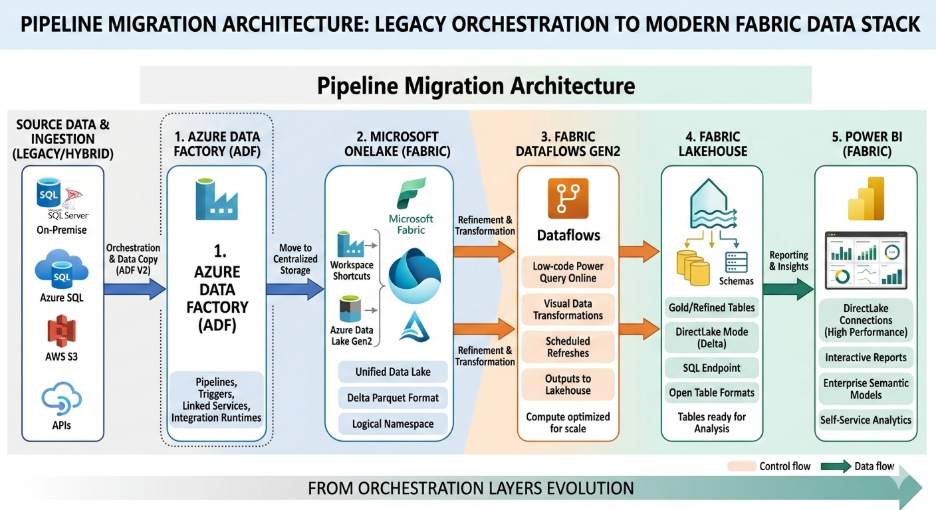
Data integration pipelines form the backbone of enterprise analytics systems. In most Azure environments, orchestration and data movement are handled by Azure Data Factory (ADF) or Synapse pipelines.
When migrating from Azure Data and AI Stack to Microsoft Fabric, the equivalent capability is Fabric Data Factory, which integrates pipeline orchestration, low-code data transformation, and workflow automation into the Fabric ecosystem.
Dataflows Gen1 vs Dataflows Gen2
One of the major architectural changes introduced by Fabric involves the evolution of Power BI dataflows.
- Dataflows Gen1 (Power BI)
- Dataflows Gen2 (Fabric Data Factory)
Dataflows Gen2 offer enhanced scalability and direct integration with OneLake, allowing transformations to operate directly on lakehouse data.
Existing Dataflow Gen1 queries can be migrated by:
- Exporting queries as PQT files
- Importing them into Dataflows Gen2
- Copy-pasting queries directly into Fabric transformation environments
However, enterprises using ADF Mapping Data Flows should be aware that these workflows often require redesign.
Limitations During Migration
Some features from Azure Data Factory are not yet fully available in Fabric.
Key gaps include:
- Native SSIS runtime support
- Full CI/CD pipeline integration
- Advanced enterprise pipeline governance features
While Microsoft continues to expand Fabric’s capabilities, many organizations adopt a hybrid orchestration approach during transition phases.
In this model:
- Existing ADF pipelines continue operating
- Data is written into OneLake
- Fabric workloads consume data from this shared environment
This hybrid model reduces migration risk and ensures operational continuity.
Organizations modernizing analytics platforms often combine orchestration redesign with broader data strategy initiatives such as those discussed in Techment’s insights on enterprise data platforms in in Microsoft Fabric Architecture: CTO’s Guide to Modern Analytics & AI .
Machine Learning Workloads: Azure ML to Fabric Notebooks
Artificial intelligence and machine learning workloads represent one of the most strategic components of modern data platforms.
Azure environments typically rely on Azure Machine Learning Studio for:
- model training
- experiment tracking
- pipeline orchestration
- model deployment
Fabric introduces Fabric Notebooks as the primary environment for machine learning development.
Notebook Migration
In many cases, notebook-based workflows can migrate with minimal refactoring.
Key supported capabilities include:
- Python and Spark notebooks
- MLFlow experiment tracking
- model logging and versioning
Fabric integrates directly with MLFlow endpoints, allowing teams to register and manage models without deploying separate Azure ML instances.
Missing Enterprise ML Features
Despite these capabilities, Fabric currently lacks several enterprise ML governance features available in Azure ML.
These include:
- full data asset lifecycle management
- model interpretability tooling
- job history tracking
- centralized model registry
- event-driven MLOps triggers
Because of these limitations, many enterprises adopt a hybrid ML architecture.
In this model:
- Fabric handles data engineering and feature preparation
- Azure ML manages training pipelines and model deployment
This approach allows organizations to benefit from Fabric’s unified data architecture while maintaining enterprise-grade MLOps capabilities.
For further guidance, see Fabric AI Readiness: How to Prepare Your Data for Scalable AI Adoption .
Data Governance and Security in the Fabric Ecosystem
Enterprise analytics platforms must support robust governance frameworks that address data lineage, access control, regulatory compliance, and metadata management.
Within Azure environments, governance is typically implemented using Microsoft Purview.
Microsoft Fabric introduces a governance integration layer known as Purview Hub.
Governance Capabilities in Fabric
Purview Hub allows enterprises to:
- automatically discover Fabric datasets
- generate data catalogs
- track data lineage across pipelines
- enforce security policies across analytics workloads
Fabric’s tight integration with OneLake enables centralized governance across:
- lakehouses
- data warehouses
- notebooks
- BI artifacts
This simplifies governance architectures compared with traditional multi-platform environments.
Why Governance Matters for Fabric Migration
Migrating from Azure Data and AI Stack to Microsoft Fabric introduces new governance considerations.
For example:
- Access policies may need to be redesigned around OneLake storage structures.
- Metadata lineage should be validated after migration.
- Data classification policies must be updated.
These governance considerations are central to building AI-ready enterprise data platforms, a topic discussed in Techment’s governance and data quality insights within
.

Cross-Cloud Capability Mapping: Fabric vs AWS and GCP Analytics Stacks
Many enterprises operate multi-cloud analytics environments.
When evaluating migrating from Azure Data and AI Stack to Microsoft Fabric, organizations often compare Fabric with competing analytics ecosystems.
Storage Platforms
Fabric relies on OneLake, built on ADLS Gen2.
Comparable cloud storage services include:
- AWS S3
- Google Cloud Storage
These storage systems support large-scale data lakes but require additional services to achieve unified analytics.
Data Warehousing Platforms
Fabric integrates data warehousing through Synapse Data Warehouse.
Equivalent platforms include:
- Amazon Redshift
- Google BigQuery
However, these services remain separate from many surrounding analytics components.
Fabric’s architecture differs because data engineering, warehousing, and BI operate on the same storage layer.
Data Engineering Platforms
Big data processing in Fabric uses Fabric Spark.
Equivalent services include:
- Amazon EMR
- Google Dataproc
While these platforms provide powerful distributed computing, they require separate orchestration and governance frameworks.
Analytics and BI
Fabric integrates analytics directly with Power BI, creating a unified analytics platform.
Other ecosystems rely on separate BI tools such as:
- Amazon QuickSight
- Google Looker
The strategic difference is platform consolidation.
Fabric’s architecture reduces integration complexity by collapsing multiple analytics services into one SaaS environment.
For many enterprises, this consolidation is the primary motivation for migrating from Azure Data and AI Stack to Microsoft Fabric.
Read our guide on Microsoft Fabric vs Azure Data Stack
Migration Methodology: A Four-Stage Framework for Enterprises
Successful migration requires structured planning and execution.
Based on enterprise migration projects, a four-stage framework provides a practical roadmap.
Step 1: Evaluate Existing Workloads
The first step in migrating from Azure Data and AI Stack to Microsoft Fabric involves a comprehensive workload assessment.
Enterprises must identify:
- critical data pipelines
- analytics workloads
- machine learning systems
- reporting dependencies
A useful technique is the Migration Amenability vs Business Criticality matrix.
Workloads fall into below categories:
- High amenability / High criticality
- Ideal candidates for early migration.
- High amenability / Low criticality
- Suitable for pilot implementations.
- Low amenability / High criticality
Require phased migration strategies.
Low amenability / Low criticality
Candidates for long-term modernization.
Step 2: Prepare the Fabric Environment
Once migration candidates are identified, enterprises must prepare their Fabric environments.
Key activities include:
- Provisioning Fabric capacity
- Setting up development environments
- Establishing DevOps workflows
- Defining security models
- Creating migration timelines
Most enterprises implement three Fabric environments:
- Development
- Testing
- Production
This structure ensures safe deployment practices and supports CI/CD pipelines.
Architecture reviews are also critical during this stage.
Organizations should document:
- data schemas
- pipeline dependencies
- access control policies
- data quality requirements
This preparation phase prevents migration disruptions.
Step 3: Implement Migration Workflows
Migration implementation varies depending on workload type.
However, several common activities apply across most scenarios.
Data Migration
For storage systems such as ADLS Gen2, organizations often begin with OneLake shortcuts.
This enables analytics workloads to access data without immediate physical migration.
Eventually, data can be consolidated into OneLake storage.
Lakehouse Layer Implementation
Most Fabric environments follow a medallion architecture:
Bronze layer – raw ingested data
Silver layer – cleansed and standardized data
Gold layer – curated analytics datasets
This layered approach simplifies data governance and improves analytics reliability.
Analytics and BI Migration
Reports and semantic models must be recreated or migrated into Fabric workspaces.
Testing should verify:
- report performance
- dataset accuracy
- dashboard functionality
Testing and Validation
Before production deployment, organizations should conduct:
- unit testing
- integration testing
- user acceptance testing
These steps ensure that migrated workloads operate correctly within the Fabric environment.
Step 4: Post-Migration Optimization
Migration does not end with production deployment.
Fabric environments require ongoing optimization.
Key areas include:
Capacity Utilization
Fabric uses capacity-based pricing, meaning compute resources are allocated based on capacity units.
Monitoring capacity usage helps prevent performance bottlenecks and optimize cost.
Access Control Policies
Security models should be reviewed after migration to ensure compliance with enterprise policies.
Performance Monitoring
Analytics queries, Spark jobs, and pipelines should be monitored to identify optimization opportunities.
Enterprises that continuously optimize Fabric environments typically achieve significant improvements in analytics performance and operational efficiency.
Further explore our insights shared in Hybrid Data Solutions with Microsoft Fabric and Azure
How Techment Helps Enterprises Migrate to Microsoft Fabric
Migrating from Azure Data and AI Stack to Microsoft Fabric requires deep expertise across data engineering, analytics architecture, governance frameworks, and cloud platform strategy.
Techment supports enterprises throughout the migration lifecycle—from strategic planning to platform optimization.
Data Platform Modernization Strategy
Techment works with enterprise leaders to evaluate existing data architectures and design modernization roadmaps aligned with Microsoft Fabric.
This includes:
- analytics platform assessments
- data architecture design
- migration prioritization frameworks
Organizations seeking deeper insights into modern analytics architectures can explore Techment’s perspective on Microsoft Fabric architecture and enterprise analytics platforms.
Migration Implementation
Techment supports full migration implementation including:
- Azure Synapse to Fabric migrations
- OneLake architecture deployment
- lakehouse implementation
- pipeline orchestration modernization
These migrations follow enterprise-grade frameworks designed to minimize downtime and ensure data integrity.
Governance and Data Quality
Strong governance frameworks are critical for analytics modernization.
Techment helps enterprises implement:
- Microsoft Purview governance models
- data lineage tracking
- enterprise data quality frameworks
This ensures analytics platforms remain trusted, compliant, and scalable.
AI-Ready Data Platforms
Beyond analytics migration, Techment helps organizations build AI-ready data platforms.
These environments support:
- machine learning development
- real-time analytics
- advanced data science workflows
By combining deep expertise in Microsoft technologies with enterprise architecture frameworks, Techment helps organizations unlock the full value of Microsoft Fabric.
Conclusion
Migrating from Azure Data and AI Stack to Microsoft Fabric represents a significant step toward modernizing enterprise analytics architectures.
While Azure’s data ecosystem remains powerful, the emergence of Microsoft Fabric signals a broader industry shift toward unified analytics platforms built around lakehouse architectures and SaaS operating models.
For enterprises, the migration journey requires careful planning.
Some workloads transition seamlessly. Others require redesign or hybrid architectures during the transition phase.
Organizations that approach migration strategically—evaluating workload amenability, prioritizing high-value use cases, and implementing phased modernization—can unlock substantial benefits.
These include:
- simplified data architectures
- improved governance and lineage
- faster analytics development
- AI-ready data platforms
As Microsoft Fabric continues to evolve, it will likely become a central platform for enterprise data and analytics strategies.
With the right migration roadmap and technical expertise, organizations can use this transition not just to modernize infrastructure—but to transform how data drives innovation and decision-making.
Techment partners with enterprises across industries to design and implement modern data platforms built on Microsoft technologies, helping organizations turn complex analytics ecosystems into scalable, AI-ready platforms.
Organizations investing in enterprise data reliability—such as those adopting Data Quality for AI in 2026: The Ultimate Blueprint for Accuracy, Trust & Scalable Enterprise Adoption—ensure that AI agents can operate effectively with trusted data inputs.
FAQs: Migrating from Azure Data and AI Stack to Microsoft Fabric
1. Is migrating from Azure Data and AI Stack to Microsoft Fabric mandatory?
No. Azure services will continue to be supported. However, many enterprises adopt Fabric to simplify analytics architectures and enable unified data platforms.
2. Which workloads are easiest to migrate to Fabric?
Storage, Power BI analytics, and certain SQL workloads typically migrate with minimal changes. Complex streaming and machine learning pipelines may require redesign.
3. Does Microsoft Fabric replace Azure Synapse Analytics?
Fabric incorporates many capabilities previously delivered by Synapse. However, some advanced features may still rely on Azure services depending on enterprise architecture.
4. How long does a typical migration take?
Migration timelines vary based on platform complexity. Enterprise migrations often occur over 6–18 months through phased modernization programs.
5. Do organizations need to move all Azure workloads to Fabric?
No. Many enterprises operate hybrid architectures, where Fabric handles analytics workloads while other Azure services support specialized functions.