
Organizations are accelerating their investments in AI, analytics, and real-time decision systems, yet one bottleneck consistently slows progress: data preparation. Despite advancements in modern data platforms, a significant portion of engineering effort is still spent cleaning, transforming, and validating raw datasets before they become analytics or AI-ready. Empowering Self-Service Data Preparation with Data Wrangler in Microsoft Fabric addresses this gap by shifting data shaping capabilities closer to analysts, domain experts, and data engineers within a unified environment.
As enterprise data volumes grow across Lakehouses, pipelines, and real-time sources, manual ETL scripting becomes difficult to scale and maintain. Business teams depend heavily on engineering backlogs for simple transformations, while engineers lose valuable time performing repetitive data cleaning tasks. Microsoft Fabric introduces Data Wrangler as a visual, scalable, and governed data preparation experience embedded directly into the analytics lifecycle.
Unlike traditional standalone data preparation tools, Data Wrangler operates natively within Fabric’s ecosystem—integrating seamlessly with Lakehouse, Notebooks, and Pipelines. This enables organizations to move from fragmented, code-heavy preparation workflows to governed, reusable, and transparent transformation logic that supports both analytics and AI workloads.
TL;DR Summary
- Data preparation remains the most time-consuming phase in analytics and AI pipelines
- Data Wrangler in Microsoft Fabric enables visual, scalable, and self-service data transformation
- Users can launch Data Wrangler directly from Fabric Notebooks after creating a DataFrame
- Generated transformation logic can be exported as Spark code into notebooks
- Native integration with Lakehouse ensures governed and reusable datasets
- Self-service preparation reduces engineering bottlenecks while maintaining enterprise governance
Why Data Preparation Is a Critical Bottleneck in Modern Data Platforms
The Hidden Cost of Manual Data Cleaning
Empowering Self-Service Data Preparation with Data Wrangler in Microsoft Fabric begins with acknowledging a core reality: most data initiatives fail not due to lack of data, but due to the complexity of preparing it. Raw enterprise data is rarely analytics-ready. It often contains missing values, schema inconsistencies, duplicates, and domain-specific anomalies that require continuous refinement.
Traditional approaches rely heavily on custom scripts, notebooks, or ETL pipelines for every transformation. While powerful, these methods create operational friction. Small business-driven changes require code modifications, testing cycles, and redeployments—slowing time-to-insight and increasing dependency on specialized engineering resources.
Related Insights: Microsoft Fabric architecture for modern analytics and AI
What Is Data Wrangler in Microsoft Fabric?
A Native Self-Service Data Preparation Experience
Data Wrangler in Microsoft Fabric is a visual and interactive data preparation tool designed to simplify data exploration, transformation, and profiling within the Fabric workspace. It allows users to inspect datasets, apply transformations, and generate optimized transformation logic without writing extensive code manually.
Rather than replacing engineering workflows, Data Wrangler complements them by generating production-ready Spark logic behind the scenes. This ensures that self-service transformations remain scalable, auditable, and aligned with enterprise data standards.
By operating directly on Fabric datasets stored in OneLake or Lakehouse tables, Data Wrangler eliminates the need for external data preparation tools and reduces data movement across platforms.
Related Insights: Comprehensive overview of Microsoft Fabric
Standalone Prep Tools vs Native Fabric Data Wrangler
| Capability | Standalone Data Prep Tool | Data Wrangler (Fabric Native) |
| Data Movement Required | Yes | No |
| Governance Integration | Limited | Native |
| Lakehouse Compatibility | External connectors | Direct |
| Code Export | Partial | Full Spark export |
| Lineage Tracking | Separate system | Built-in |
Using Data Wrangler Inside Fabric Notebooks
From DataFrame to Cleaned Dataset in Minutes
One of the most powerful capabilities of Data Wrangler in Microsoft Fabric is its tight integration with Fabric Notebooks. Data engineers and analysts can launch Data Wrangler directly after creating a Spark DataFrame within a notebook session.
A typical workflow looks like this:
- Load data from a Lakehouse table or external source into a Spark DataFrame
- Select the DataFrame and launch Data Wrangler from the notebook interface
- Interactively profile the data—identify null values, outliers, and schema inconsistencies
- Apply transformations visually (filter rows, rename columns, split fields, remove duplicates, cast data types, etc.)
- Export the generated Spark code back into the notebook
Instead of writing transformation logic manually, Data Wrangler generates clean, optimized PySpark code representing every transformation step. This code can then be:
- Saved as part of the notebook
- Modularized into reusable functions
- Integrated into Fabric pipelines
- Scheduled for automated execution
This bridges exploratory data preparation and production automation. Engineers can prototype transformations visually, export the generated code, refine it if needed, and operationalize it—without rewriting logic from scratch.
In enterprise environments, this dramatically reduces iteration cycles while preserving engineering standards and reproducibility.
Related Insights: Microsoft Fabric AI solutions for enterprise intelligence
Integrating Data Wrangler into the Microsoft Fabric Architecture
From Raw Data to Curated Lakehouse Tables
Within Microsoft Fabric, Data Wrangler fits naturally into the broader data engineering and analytics architecture. Data can be ingested through pipelines or Dataflows Gen2 and then explored interactively using Data Wrangler before being published as curated datasets.
This integration supports a streamlined workflow:
- Ingest raw data into Lakehouse tables
- Create DataFrame in Notebook
- Clean and transform using Data Wrangler
- Export transformation code
- Persist curated datasets into governed storage
- Automate execution via pipelines or scheduled notebooks
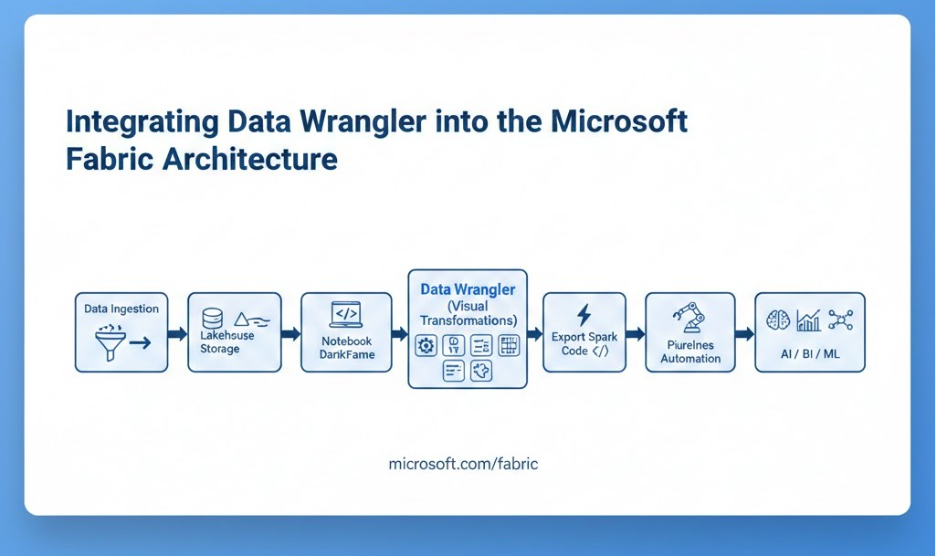
Because transformations occur within Fabric’s unified platform, lineage, governance, and storage consistency are preserved automatically.
Related Insights: Microsoft Fabric vs traditional data warehousing
The Hidden Cost of Manual Data Cleaning
| Dimension | Traditional Manual ETL | Data Wrangler in Microsoft Fabric |
| Transformation Method | Custom scripts (PySpark/SQL) | Visual + auto-generated Spark |
| Business Dependency | Heavy engineering reliance | Self-service for analysts |
| Reproducibility | Depends on documentation | Auto-recorded transformation steps |
| Governance | Separate logging systems | Native Fabric lineage |
| Speed to Insight | Slower iteration cycles | Rapid prototyping |
| Operationalization | Manual pipeline integration | Export-ready production code |
Comparative Table: Manual ETL vs Data Wrangler in Fabric
Key Capabilities That Enable Self-Service at Scale
Visual Data Profiling and Quality Insights
Data Wrangler provides built-in profiling capabilities that help users quickly identify missing values, distribution patterns, and anomalies. This proactive visibility reduces the risk of propagating low-quality data into downstream analytics or AI workloads.
Reusable and Transparent Transformations
Every transformation applied in Data Wrangler is recorded as a sequence of reproducible steps. Exported Spark code ensures transparency and maintainability. Instead of undocumented manual cleaning, organizations gain structured and version-controlled preparation logic.
Seamless Automation and Operationalization
Because Data Wrangler generates executable Spark code, it becomes easy to integrate transformations into enterprise automation frameworks. Teams can parameterize the generated code, schedule it within pipelines, and monitor execution just like any production workload.
Self-service experimentation no longer remains isolated—it transitions smoothly into governed, automated data engineering workflows.
Related Insights: Enterprise AI Strategy in 2026
Supporting AI and Advanced Analytics with Prepared Data
For AI and machine learning workloads, data preparation is not a one-time task but a continuous process. Feature engineering, schema alignment, and enrichment depend on consistent transformation workflows. By combining Notebook-driven DataFrames with Data Wrangler’s visual transformations and code export capability, teams can rapidly prepare AI-ready datasets while maintaining reproducibility.
Curated datasets produced through this workflow can seamlessly feed Lakehouse-based training pipelines, real-time analytics dashboards, and semantic models—ensuring consistency across the entire analytics lifecycle.
Related Insights: Get a deep, enterprise-focused exploration of agentic AI use cases, how agentic AI differs from traditional automation and generative AI, and how enterprises can scale autonomous AI responsibly.
Conclusion
Empowering Self-Service Data Preparation with Data Wrangler in Microsoft Fabric represents a strategic shift from code-heavy, fragmented workflows to unified, governed, and scalable data shaping practices. By enabling users to launch Data Wrangler directly from Notebooks, transform Spark DataFrames visually, export production-ready code, and automate execution, Fabric bridges the gap between exploration and enterprise engineering.
In modern AI-driven organizations, the ability to prepare high-quality data quickly and reproducibly is no longer optional—it is foundational. Data Wrangler ensures that self-service data preparation enhances agility without compromising governance, scalability, or automation.
Related Insights: AI-ready enterprise checklist with Microsoft Fabric
FAQs on Data Wrangler in Microsoft Fabric
1. What is Data Wrangler in Microsoft Fabric?
Data Wrangler in Microsoft Fabric is a visual data preparation tool that cleans and transforms Spark DataFrames inside Fabric Notebooks.
It auto-generates production-ready Spark code for governed, scalable workflows.
2. How do you use Data Wrangler in Microsoft Fabric?
Load data into a Spark DataFrame, launch Data Wrangler in Microsoft Fabric, apply visual transformations, and export the generated Spark code.
The code can be reused, automated, or integrated into pipelines.
3. Does Data Wrangler generate Spark code automatically?
Yes, Data Wrangler in Microsoft Fabric automatically generates optimized PySpark code for every transformation step.
This ensures transparency, reproducibility, and enterprise scalability.
4. Is Data Wrangler in Microsoft Fabric enterprise-ready?
Yes, it operates natively within Fabric’s Lakehouse architecture, preserving governance and lineage.
Self-service data preparation remains secure, scalable, and production-aligned.
5. How does Data Wrangler improve self-service data preparation?
Data Wrangler in Microsoft Fabric reduces engineering dependency by enabling visual data cleaning and transformation.
It accelerates AI-ready dataset creation without compromising governance.