
Microsoft Fabric with Power BI Integration for reporting has quickly become a strategic priority for enterprises modernizing their analytics ecosystems. As data volumes grow, analytics use cases diversify, and business leaders demand real-time insights, traditional BI architectures struggle to keep pace. Disconnected data platforms, duplicated datasets, and inconsistent governance often result in slow reporting cycles and limited trust in insights.
Microsoft Fabric with Power BI Integration addresses these challenges by unifying data engineering, data warehousing, real-time analytics, and business intelligence within a single SaaS-based platform. Instead of treating Power BI as a standalone reporting layer, Fabric positions it as an integrated analytics experience built directly on top of OneLake and shared semantic models.
For CTOs, CDOs, and analytics leaders, the ability to integrate Power BI with Microsoft Fabric is no longer just about better dashboards. It is about enabling enterprise-scale reporting, enforcing governance consistently, and accelerating decision-making across the organization. This guide explores how Microsoft Fabric and Power BI work together, why the integration matters, and how enterprises can design, implement, and optimize reporting architectures that scale.
Related Insights: What Is Power BI Copilot? 5 Enterprise Strategies to Be Ready
TL;DR Summary
- Microsoft Fabric with Power BI Integration creates a unified, end-to-end enterprise analytics platform
- Fabric simplifies data engineering, warehousing, and real-time analytics for Power BI reporting
- Enterprises gain better governance, scalability, and performance with shared semantic models
- Successful integration requires architectural alignment, security planning, and optimization best practices
- Fabric and Power BI together enable faster insights and future-ready analytics strategies
Microsoft Fabric with Power BI Integration for Reporting: Why It Matters
Enterprise reporting has evolved from static dashboards to dynamic, real-time decision platforms. Yet many organizations still rely on fragmented architectures where data engineering, analytics, and BI operate in silos. Microsoft Fabric with Power BI Integration fundamentally changes this model by bringing these capabilities together.
Microsoft Fabric with Power BI Integration allows enterprises to build reports directly on governed, shared data assets rather than copying data across tools. This reduces data latency, minimizes duplication, and ensures business users work from a single source of truth. Fabric’s SaaS-first design also removes much of the infrastructure complexity that historically slowed down BI modernization efforts.
From a strategic perspective, Microsoft Fabric with Power BI Integration enables organizations to align analytics investments with broader digital and AI initiatives. Reporting becomes a natural extension of the end-to-end analytics workflow rather than an isolated consumption layer. This shift is critical for enterprises aiming to scale advanced analytics, AI-driven insights, and self-service BI responsibly.
Related Insights: To understand how this fits into broader analytics modernization, many leaders start by evaluating Microsoft Fabric vs Power BI: What Enterprise Leaders Need to Know as part of their platform strategy.
What is Microsoft Fabric? (Overview)
Microsoft Fabric is an end-to-end analytics platform that unifies data integration, engineering, warehousing, real-time analytics, and business intelligence into a single experience. Built on a SaaS foundation, Fabric abstracts infrastructure management while providing enterprise-grade scalability and governance.
Unlike traditional architectures where separate tools handle ingestion, storage, and reporting, Fabric consolidates these workloads around OneLake — a centralized data hub designed for analytics. This architectural shift is what makes Microsoft Fabric Power BI integration so impactful for enterprise reporting.
According to Microsoft’s official documentation on Microsoft Fabric, the platform unifies data engineering, data warehousing, real-time analytics, and business intelligence on a single SaaS-based architecture built around OneLake, enabling consistent governance and scalable analytics across the enterprise.
Microsoft Fabric Architecture & Capabilities
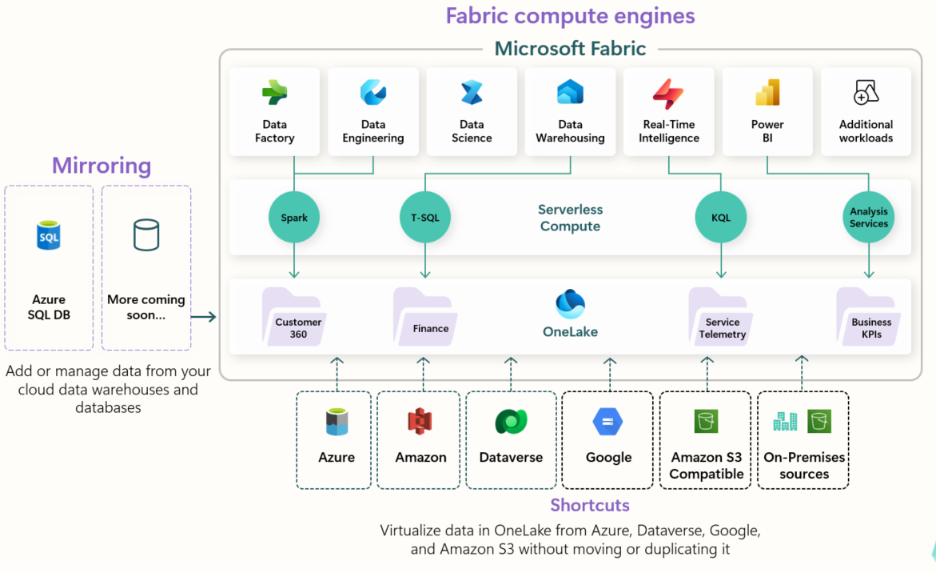
At the core of the Microsoft Fabric architecture overview is OneLake, a single, logical data lake that spans the entire organization. OneLake eliminates the need for multiple disconnected data stores by allowing all analytics workloads to operate on shared data.
Fabric provides multiple analytics experiences on top of OneLake, including data engineering, data science, data warehousing, and real-time analytics. Power BI is natively embedded into this architecture, enabling reports to be built directly on Fabric-managed data without redundant pipelines.
For enterprises, this architecture supports scalable reporting while simplifying governance. Centralized security policies, metadata management, and lineage tracking apply consistently across all analytics and reporting workloads.
Related Insights: Organizations exploring modern analytics architectures often start with a deeper understanding of Fabric’s design, as outlined in Techment’s guide on Microsoft Fabric architecture for modern analytics:
Core Components Used for BI
Microsoft Fabric reporting tools are built around several core components that directly support Power BI reporting.
Data Engineering enables ingestion and transformation of large-scale datasets using Spark-based pipelines. These pipelines feed curated data into OneLake, making it immediately available for reporting.
Data Warehousing provides a SQL-based analytical engine optimized for structured reporting workloads. Power BI can connect directly to Fabric warehouses, supporting high-performance queries and enterprise reporting patterns.
Real-Time Analytics supports streaming data scenarios, allowing Power BI dashboards to reflect live operational metrics. This capability is increasingly important for organizations pursuing real-time analytics with Fabric and Power BI for operational intelligence.
Together, these components form the foundation for Fabric data pipelines for reporting, ensuring that Power BI dashboards are built on timely, reliable, and governed data assets.
Related Insights: Read more on how Microsoft Fabric AI solutions fundamentally transform how enterprises unify data, automate intelligence, and deploy AI at scale in our blog.
Why Integrate Microsoft Fabric with Power BI? (Benefits)
The benefits of Microsoft Fabric with Power BI Integration extend beyond convenience. For enterprise leaders, the integration delivers tangible improvements in scalability, governance, and time-to-insight.
Better Data Modeling & Scalability
One of the most significant advantages of Microsoft Fabric with Power BI Integration is the ability to use shared semantic models. Instead of creating separate datasets for each report, enterprises can define centralized models that serve multiple reporting use cases.
These semantic models in Power BI are tightly coupled with Fabric-managed data, ensuring consistency across dashboards and departments. This approach reduces model sprawl and improves scalability as analytics adoption grows.
From a performance perspective, Fabric’s optimized storage and compute engines allow Power BI to query large datasets more efficiently. Enterprises can scale reporting workloads without constantly re-architecting their BI environments with Microsoft Fabric with Power BI Integration.
Faster Dashboards & Reporting
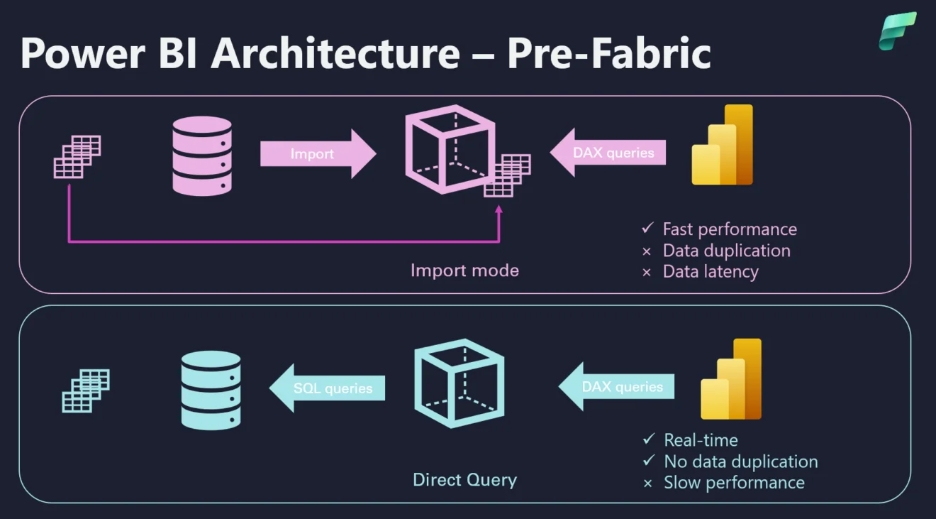
Microsoft Fabric with Power BI Integration enables faster report development and refresh cycles. Because data resides in OneLake and Fabric warehouses, Power BI can access it directly without complex data movement.
Power BI dataset refresh with Fabric benefits from incremental refresh patterns and optimized query execution. This results in fresher data with lower operational overhead — a critical factor for executive reporting and operational dashboards.
Faster reporting cycles also empower business users. Analysts spend less time managing data pipelines and more time delivering insights that drive decisions.
Enterprise-Grade BI Metrics & Security
Security in Microsoft Fabric with Power BI Integration is designed for enterprise-scale governance. Fabric inherits Azure Active Directory-based identity, role-based access control, and centralized policy management.
Data access policies defined in Fabric apply automatically to Power BI reports, ensuring consistent enforcement across analytics and reporting layers. This is particularly important for regulated industries where compliance and auditability are non-negotiable.
By unifying governance, Fabric enables business intelligence with Microsoft Fabric that balances self-service analytics with enterprise controls — a long-standing challenge in BI programs.
Related Insights: Learn more about Microsoft Architecture to understand how you can modernize your platform to become AI-ready.
Step-by-Step Guide: Microsoft Fabric with Power BI Integration
Successful Microsoft Fabric with Power BI Integration requires more than just technical connectivity. Enterprises must align platform configuration, security, and operating models to achieve sustainable value.
Pre-Requisites & Setup
Before organizations undertake Microsoft Fabric with Power BI Integration, several prerequisites must be in place. These include appropriate Microsoft Fabric and Power BI licensing, workspace configuration, and administrative permissions.
Fabric capacity must be provisioned to support expected analytics and reporting workloads. Power BI tenants should be configured to allow Fabric-based datasets and semantic models. Admin roles must be clearly defined to separate platform governance from report development responsibilities.
Microsoft Fabric with Power BI Integration also involves establishing workspace strategies. Many enterprises align Fabric workspaces with domains or business units to balance autonomy with centralized oversight.
Connect Power BI to Microsoft Fabric Data
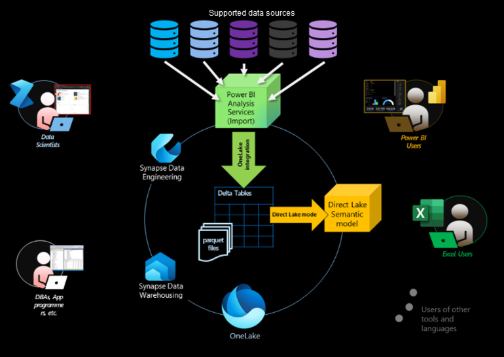
Once the platform is configured, connecting Power BI to Fabric data becomes straightforward. Power BI can connect directly to Fabric warehouses, Lakehouses, and real-time analytics endpoints.
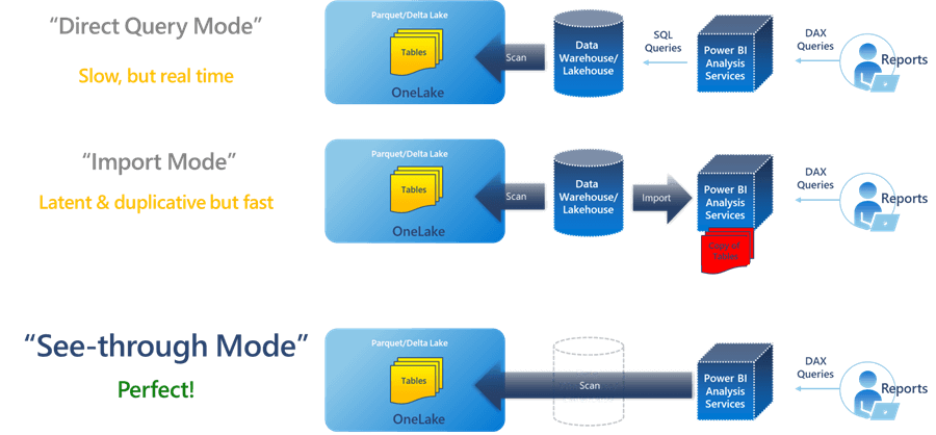
Best practices for Microsoft Fabric with Power BI Integration include using Direct Lake or optimized import modes where appropriate. These connection patterns reduce data duplication while maintaining performance.
Enterprises should also standardize naming conventions and metadata practices to improve discoverability and reuse of datasets. Following Microsoft Fabric with Power BI Integration best practices early prevents governance issues as adoption scales.
Publish Reports & Dashboards
After datasets and semantic models are established, Power BI reports can be published and shared across the organization. Fabric simplifies scheduling and orchestration of dataset refreshes, ensuring reports remain current.
Visualization design remains a critical success factor. Even with a strong backend architecture, poorly designed dashboards can undermine the value of Microsoft Fabric with Power BI Integration. Enterprises should invest in design standards and user training to maximize adoption.
Related Insights: Learn more in our partnership page and understand the strategic benefits we bring as a Microsoft solutions partner.
Best Practices & Optimization Tips for Fabric and Power BI Reporting
Successfully scaling Microsoft Fabric with Power BI Integration requires disciplined optimization across data modeling, performance, and governance. Enterprises that treat Fabric as just another data source for Power BI often miss its full strategic value.
Optimize Data Models for Reporting at Scale
Power BI reporting with Microsoft Fabric performs best when data models are intentionally designed for analytics consumption. Star schemas remain the preferred modeling approach, even when working with Lakehouse or warehouse data. Fact tables should be optimized for query patterns, while dimensions should be conformed and reusable across reports.
Fabric data pipelines for reporting should focus on producing analytics-ready datasets rather than raw operational extracts. This reduces the transformation burden within Power BI and improves overall performance. Enterprises should also align semantic models with business domains, ensuring metrics are consistently defined and governed.
Incremental refresh strategies are another critical optimization lever. By leveraging Fabric-managed storage and Power BI dataset refresh with Fabric, organizations can significantly reduce refresh times while keeping reports up to date. This is especially important for executive dashboards that rely on near-real-time insights.
Security & Governance Checklist for Enterprise BI
Security in Microsoft Fabric Power BI environments must be designed upfront rather than retrofitted. Enterprises should define clear data access tiers, separating raw, curated, and consumption-ready datasets. Role-based access control should be applied consistently across Fabric workspaces and Power BI reports.
Row-level and object-level security should be implemented at the semantic model layer wherever possible. This ensures that security rules are enforced consistently, regardless of how reports are accessed. Audit logging and lineage tracking should also be enabled to support compliance and regulatory requirements.
For organizations operating in regulated industries, aligning Fabric governance with broader data governance frameworks is essential.
Related Insights: Techment explores these governance considerations in depth in its guide on future-proofing enterprise data governance.
Common Challenges & Troubleshooting in Fabric–Power BI Integration
Despite its unified design, Microsoft Fabric Power BI integration can present challenges if not implemented thoughtfully. Understanding common pitfalls helps enterprises avoid delays and performance issues.
One frequent issue involves connectivity and performance mismatches. Using inappropriate connection modes or poorly optimized queries can lead to slow dashboards. Enterprises should evaluate Direct Lake, DirectQuery, and import options carefully based on data volume and latency requirements.
Dataset refresh failures are another common challenge. These often stem from upstream pipeline errors or misconfigured refresh policies. Establishing monitoring and alerting for Fabric pipelines helps teams identify and resolve issues before they impact reporting.
Scalability limitations may also emerge if capacity planning is overlooked. As Power BI adoption grows, Fabric capacity must be monitored and adjusted to maintain performance. Enterprises that treat capacity management as an ongoing operational discipline tend to achieve more consistent reporting outcomes.
Related Insights: Read what Microsoft Fabric is, how it works, why organizations are rapidly adopting it, and what leaders must know in our latest blog – What Is Microsoft Fabric? A Comprehensive Overview for Modern Data Leaders.
Real-World Enterprise Implementations of Fabric and Power BI
Enterprises across industries are already realizing measurable value from integrating Microsoft Fabric with Power BI for reporting.
In financial services, organizations use Fabric’s centralized architecture to consolidate risk, compliance, and performance data into unified executive dashboards. This approach reduces reporting latency and improves confidence in regulatory submissions.
Manufacturing enterprises leverage real-time analytics with Fabric and Power BI to monitor production metrics, supply chain performance, and quality indicators. By streaming operational data directly into Power BI dashboards, leaders gain immediate visibility into plant performance.
Retail and consumer goods companies use Microsoft Fabric for enterprise reporting to unify sales, marketing, and customer data. Power BI dashboards built on shared semantic models enable consistent insights across regions and channels, supporting faster decision-making.
These examples highlight a common theme: the most successful implementations treat Fabric and Power BI as a single analytics platform rather than separate tools.
Related Insights: How Leaders Are Using Microsoft Fabric AI Use Cases to Operationalize AI at Scale.
How Techment Helps Enterprises Succeed with Fabric and Power BI
Techment supports enterprises at every stage of their Microsoft Fabric Power BI integration journey—from strategy to execution and long-term optimization.
Our teams help organizations design modern analytics architectures that align with business priorities, ensuring Fabric is implemented as a strategic platform rather than a tactical tool. We support data modernization initiatives by integrating Fabric with existing data estates while minimizing disruption.
Techment also enables AI readiness by helping enterprises build governed, high-quality data foundations within Fabric. This ensures Power BI reporting is not only accurate today but also scalable for advanced analytics and AI use cases tomorrow.
From platform configuration and security design to semantic modeling and performance optimization, Techment provides end-to-end guidance.
Related Insights: Learn more about how Techment helps enterprises unlock value from Microsoft Fabric in our overview of enterprise analytics and AI solutions.
Conclusion: Transforming Enterprise Reporting with Fabric and Power BI
Microsoft Fabric Power BI integration represents a fundamental shift in how enterprises approach business intelligence. By unifying data engineering, analytics, and reporting on a single platform, organizations can move beyond fragmented BI architectures toward truly integrated analytics ecosystems.
Power BI reporting with Microsoft Fabric delivers faster insights, stronger governance, and greater scalability—capabilities that are increasingly critical in data-driven enterprises. When implemented thoughtfully, Fabric becomes a strategic enabler for enterprise reporting, analytics, and AI readiness.
For leaders evaluating the future of their BI platforms, integrating Microsoft Fabric with Power BI is not just a technical decision. It is a strategic investment in how data informs decisions across the organization. With the right architecture, governance, and execution partner, enterprises can turn this integration into a lasting competitive advantage.
Related Insights: How Leaders Are Using Microsoft Fabric AI Use Cases to Operationalize AI at Scale
Frequently Asked Questions
Is Microsoft Fabric mandatory for Power BI?
No. Power BI can operate independently. However, Microsoft Fabric Power BI integration provides significant benefits in scalability, governance, and end-to-end analytics.
Does Microsoft Fabric replace Power BI?
No. Fabric does not replace Power BI; it enhances it. Power BI remains the primary reporting and visualization layer within the Fabric ecosystem.
What are the cost implications of Fabric and Power BI together?
Costs depend on capacity usage and workload patterns. While Fabric can reduce infrastructure complexity, enterprises should evaluate capacity planning carefully.
How long does it take to integrate Power BI with Microsoft Fabric?
Initial integration can be completed in weeks, but full enterprise adoption typically evolves over several months as governance and operating models mature.